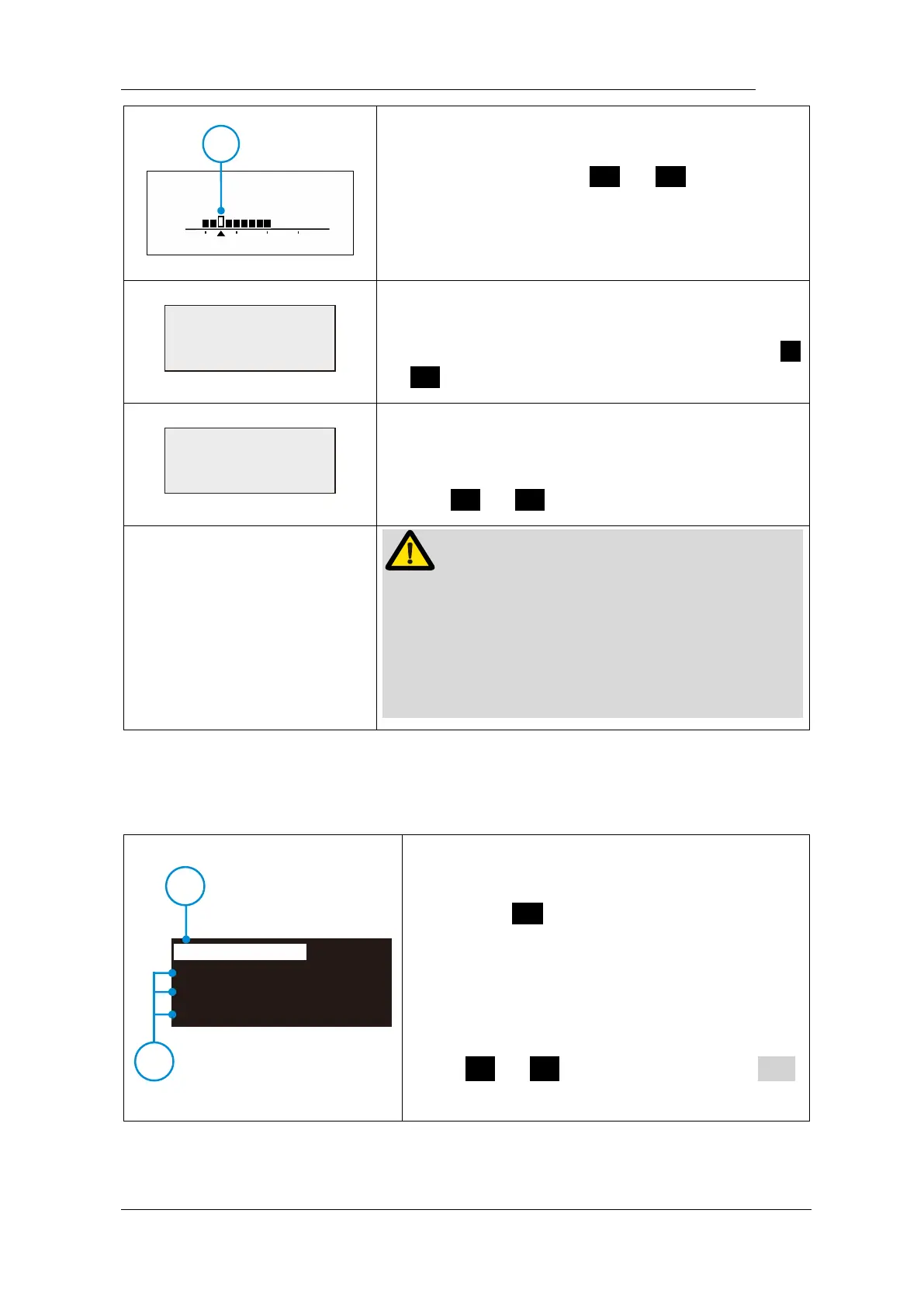
During combined length determination, normally
apical reverse must active before reaching major
apical foramen, Press < or > to set apical
reverse position by change the flash bar (○,
1
), the
motor will reverse while reaching the flash bar
every time.
Activating in REC and ATC operation mode.
forward angle (Clockwise rotation angle) can be
adjusted by operator from 30° to 370°, Press <
or > to change.
Activating in REC and ATC operation mode.
reverse angle (Counter Clockwise rotation angle)
can be adjusted by operator from 30° to 370°,
Press < or > to change.
The sum of FWD Angle and REV Angle must be
greater than 120°, the motor system has closed
the angle not needed. For example: if you set
FWD Angle 30°, the REV Angle must be setting
greater than 90°.
350 rpm
CW
Ncm3.0
1
2
M1
Protaper SX&S1
Protaper S2
Protaper F1
For convenience, we preset some common file
system.
Long press S to entry preset program
during standby state, the interface will show as
left.
M1 (○,
1
) meanings the current memory mode,
you can replace it by preset program (○,
2
)
press < or > to change, then press ●
to confirm.















 To Next Page