11
Chapter1Introduction
1-3. EIZO LCD Utility Disk
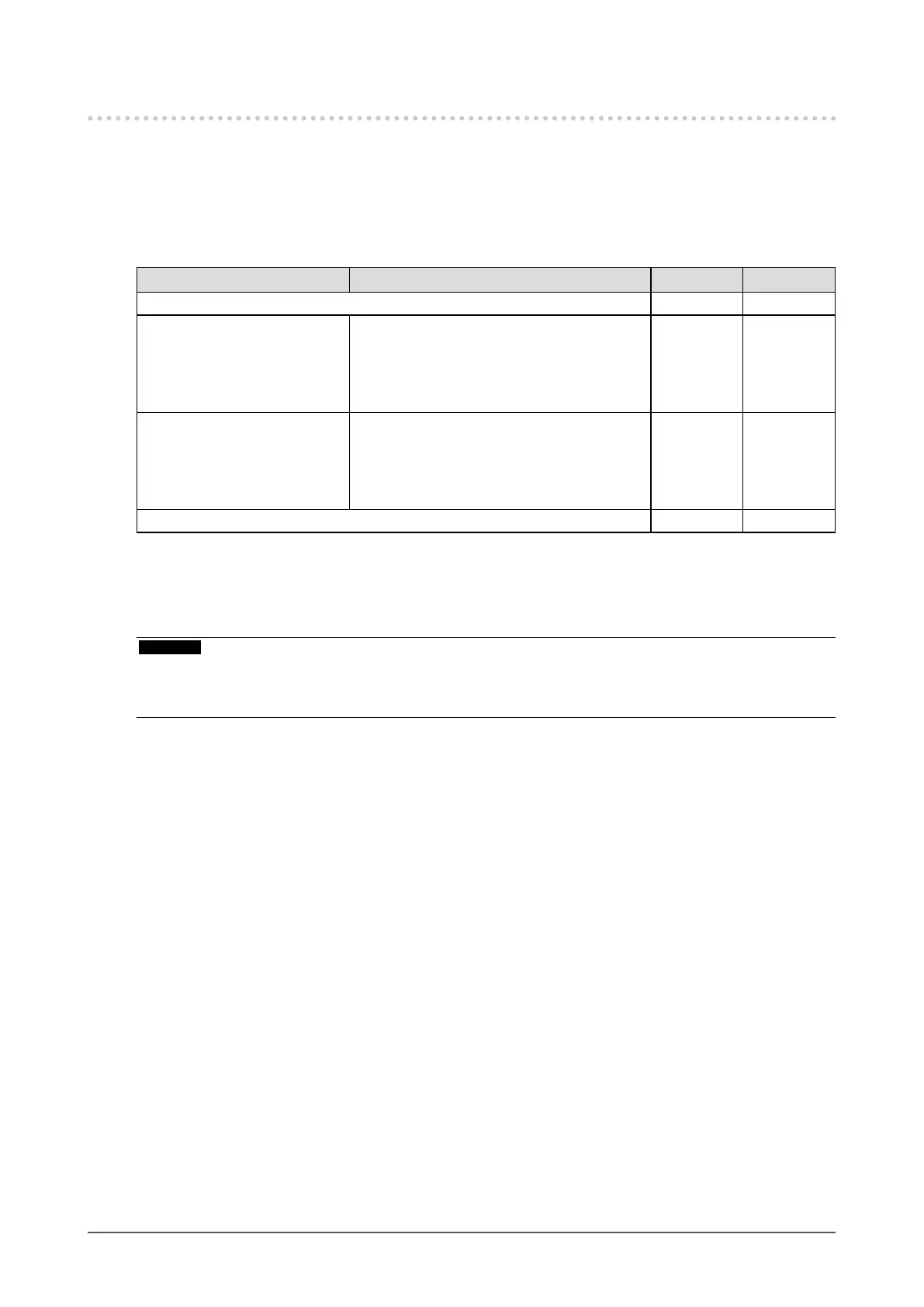
An “EIZO LCD Utility Disk” (CD-ROM) is supplied with this product. The following table shows the disk contents
and the overview of the software programs.
●
Disk contents and software overview
The disk includes application software programs for adjustment, and User’s Manual. Refer to “Readme.txt” or
the “read me” le on the disk for software startup procedures or le access procedures.
Contents Overview Windows Macintosh
A“Readme.txt”or“readme”le √ √
ColorNavigator
*1
Softwareforcalibratingmonitorcharacteristics
andgeneratingICCproles(forWindows)and
AppleColorSyncproles(forMacintosh).
(APCmustbeconnectedtothemonitorwith
thesuppliedUSBcable.)
√ √
ColorNavigatorElements
*2
Softwareforadjustingthecolorandbrightness
ofthemonitorwhilecomparingapicture
displayedonthemonitorwithaprintedpicture.
(APCmustbeconnectedtothemonitorwith
thesuppliedUSBcable.)
√ √
User’sManualofthismonitor(PDFle) √ √
*1 Only ColorNavigator Licensed models
*2 Only ColorNavigator Non-Licensed models
●
To use ColorNavigator/ColorNavigator Elements
Attention
• A license is necessary to use ColorNavigator. If “ColorNavigator License” in the monitor information window (page 47)
is “Not Registered”, the ColorNavigator license must be purchased and registered to the monitor.
• ColorNavigator Elements can be used without a license.
Refer to the corresponding User’s Manual on the CD-ROM disk in order to install and use the software.
When using this software, you will need to connect a PC to the monitor with the supplied USB cable. For
details of the USB cable connection, see “8-2. Making Use of USB (Universal Serial Bus)” (page 46).










 To Next Page