EasyManua.ls Logo

Eizo ColorEdge CX271 - Chapter 5 Connecting Multiple External Devices

Eizo ColorEdge CX271
70 pages
Print Icon
To Next Page IconTo Next Page
To Previous Page IconTo Previous Page
Loading...
35
Chapter5
Chapter 5 Connecting Multiple External
Devices
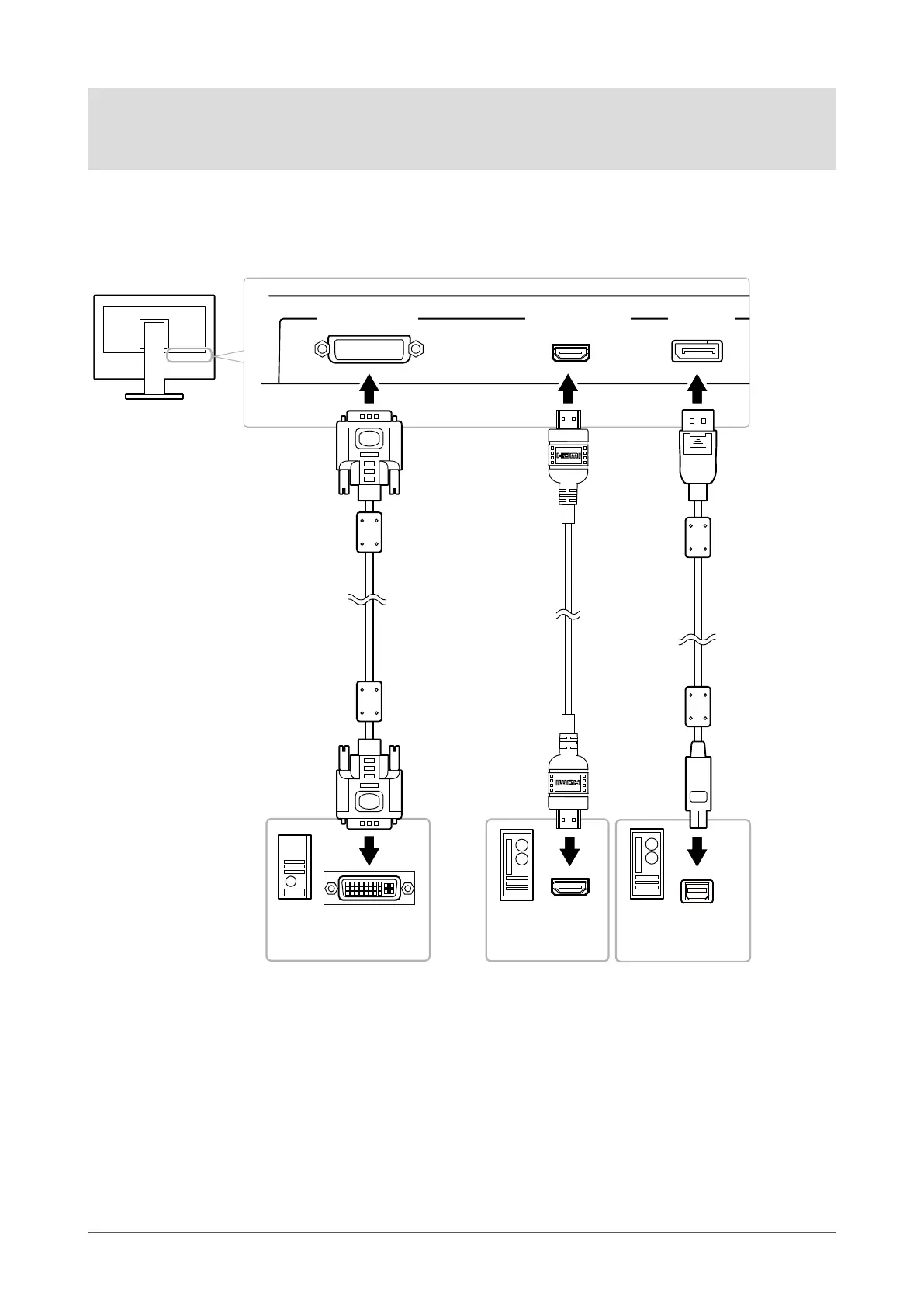
The product has multiple connections to external devices and allows you to switch to one of the connections for
display.
Connection examples
DisplayPort
connector
HDMIconnector
HDMIcable
(Commercially
availableproduct)*
1
Digital
(HDMI)
Toexternaldevice2
MiniDisplayPort/
Thunderbolt
connector
HDMIconnector
Toexternaldevice3
DVIconnector
Signalcable
(suppliedDD200DL)
Signalcable
(suppliedPM200)
Digital
(DVI)
Toexternaldevice1
Digital
(DisplayPort)
*1 Use a product able to handle High Speed .
DVI-Dconnector

Table of Contents

Other manuals for Eizo ColorEdge CX271

Related product manuals