9
Chapter1Introduction
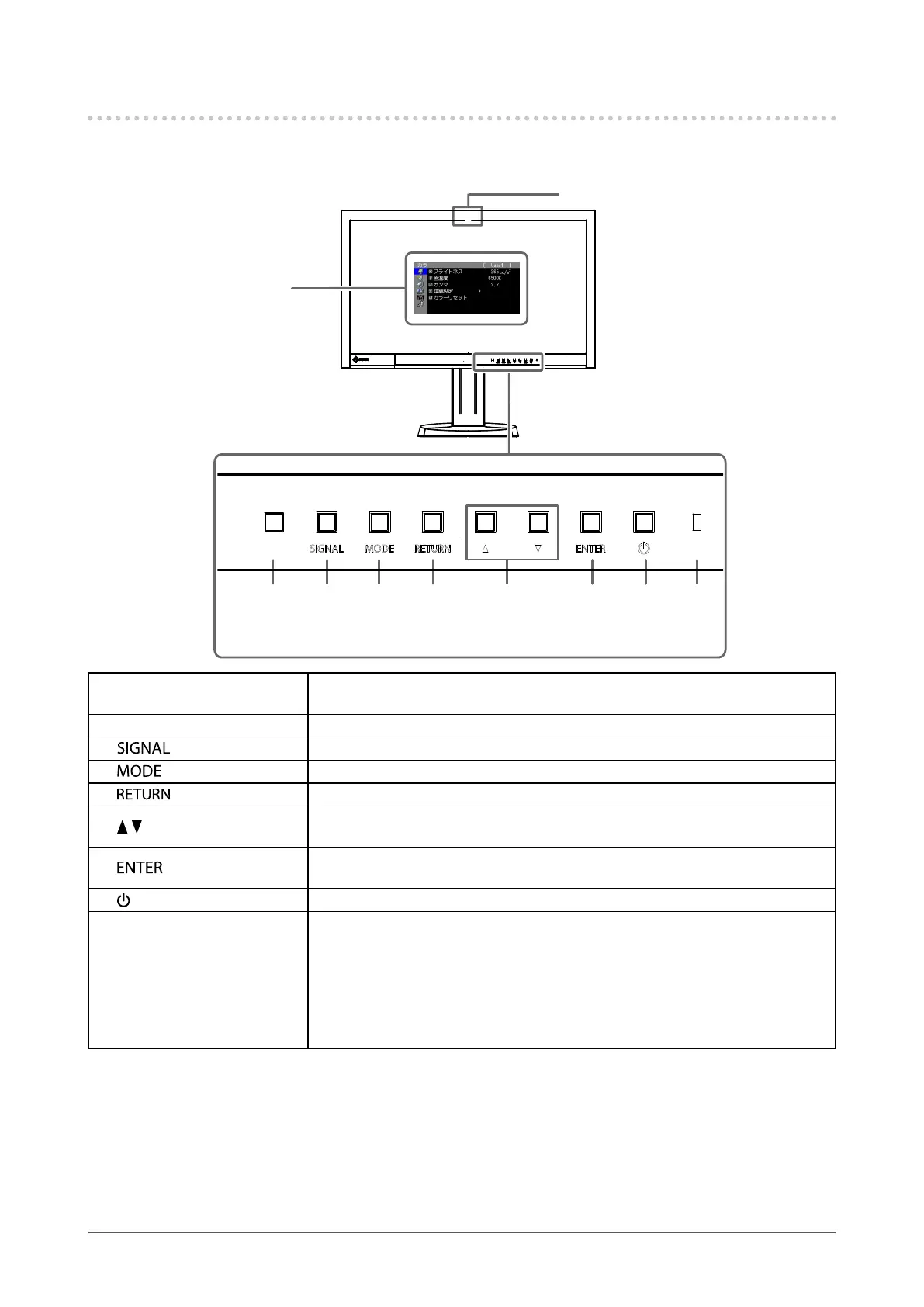
1-2. Controls and Functions
●
Front
Adjustment
menu
*1
1
7 8 92 4
5
3
6
1. Built-in correction sensor
Executesdisplaycorrectionforanindependentmonitor.SelfCorrectionfunction
(page33)
2. Ambient Light Sensor Measuresambientlight.
3.
button Switchesinputsignalsfordisplay(page36).
4.
button ChangesColorMode(page19).
5.
button Cancelsthesetting/adjustmentandexitstheAdjustmentmenu.
6.
button
• Providesthemenuselectionaswellastheadjustmentandsettingofafunction.
• DisplaystheBrightnessmenu(page20).
7.
button
DisplaystheAdjustmentmenu,determinesanitemonthemenuscreen,andsaves
valuesadjusted(page12).
8.
button Turnsthepoweronoroff.
9. Power Indicator
Indicatesthemonitor’soperationstatus.
Blue: Operating
Flashingblue(2timesforeach): Indicatesthatdisplaycorrectionisrequiredifthe
SelfCorrectionschedule(page34)isset.
Orange: Powersavingmode
OFF: Mainpower/Poweroff
*1 For details, see “1-4. Basic Operations and Functions” (page 12).










 To Next Page