15
Chapter2AdjustingScreens
Chapter 2 Adjusting Screens
2-1. Setting Resolution
●
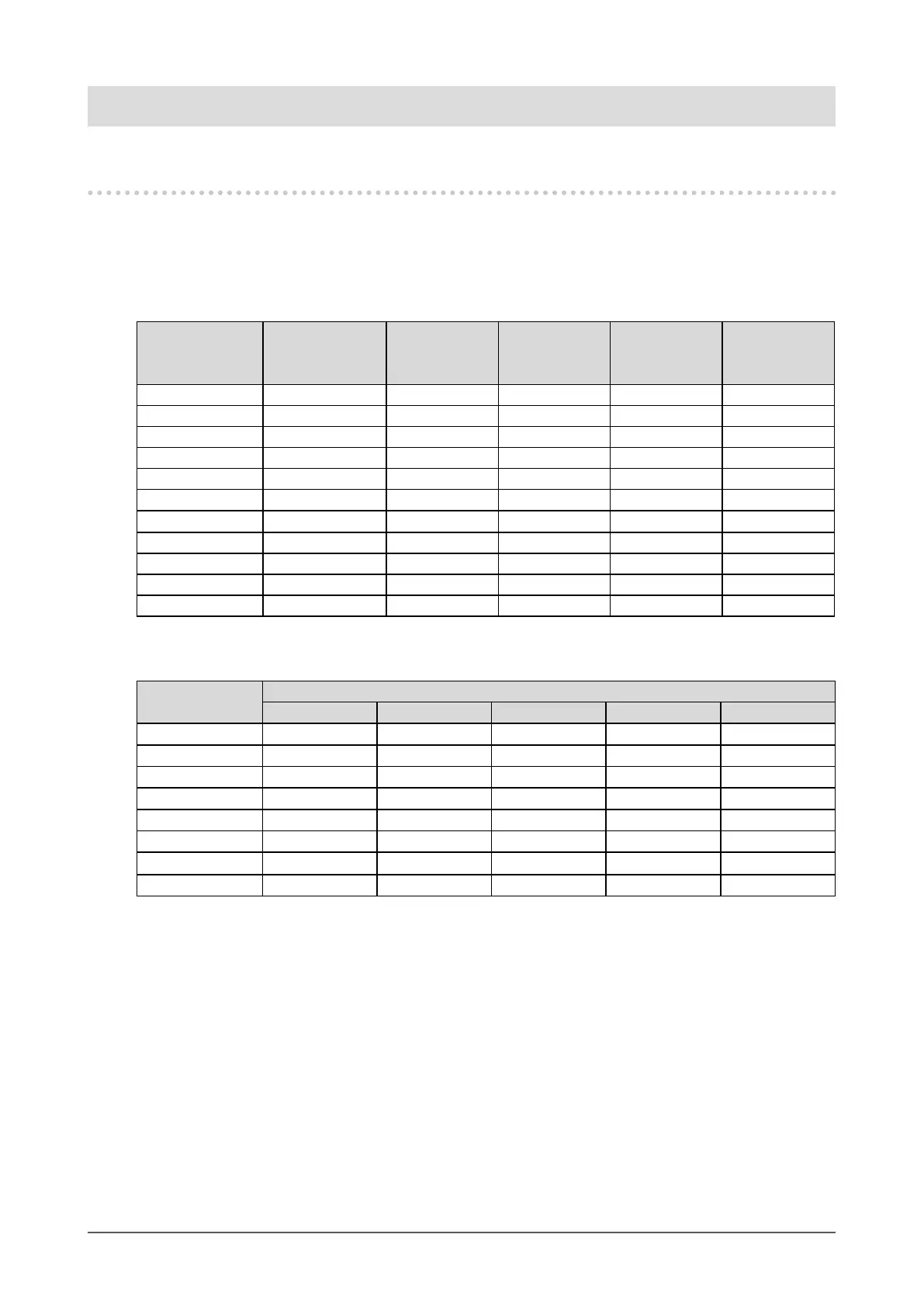
Compatible Resolutions/Formats
The monitor supports the following resolutions and signal format.
Digital Input (DVI-D, DisplayPort, HDMI: PC signal)
Resolution
Vertical scan
frequency
DVI-D
(Single Link)
DVI-D
(Dual Link)
DisplayPort HDMI
640x480 60Hz √ √ √ √
720x400 70Hz √ √ √ √
800x600 60Hz √ √ √ √
1024x768 60Hz √ √ √ √
1280x960 60Hz √ √ √ √
1280x1024 60Hz √
√ √ √
1600x1200 60Hz √ √ √ √
1920x1080 60Hz √ √ √ √
1920x1200 60Hz √ √ √ √
2560x1440 30Hz √
※
2
- - √
2560x1440
※
3 60Hz - √ √ -
Digital Input (HDMI: video signal
*1
)
Format
Vertical scan frequency
24Hz 25Hz 30Hz 50Hz 60Hz
640x480 - - - - √
480i - - - - √
480p - - - - √
576i - - - √ -
576p - - - √ -
720p - - - √ √
1080i - - - √ √
1080p √ √ √ √ √
*1 When displaying PC signals by HDMI signal input, change the monitor’s setting in advance (see “To switch signal
formats” (page 16)).
*2 When displaying in this resolution or vertical scan frequency, change the monitor’s setting in advance (see “To
switch signal formats” (page 16)).
*3 Recommended resolution










 To Next Page