24
Chapter2AdjustingScreens
To set clipping
This function allows you to display the monitor with the colors based on the standard values of the dened
color gamut (such as sRGB). The method of displaying the dened color gamut outside the normal gamut of the
monitor can be set.
Procedure
1. Choose “Color” from the Adjustment menu, and press
.
2. Choose “Advanced Settings” from “Color”, and press
.
3. Choose “Clipping”, and press
.
4. Select “On” or “Off” with
or .
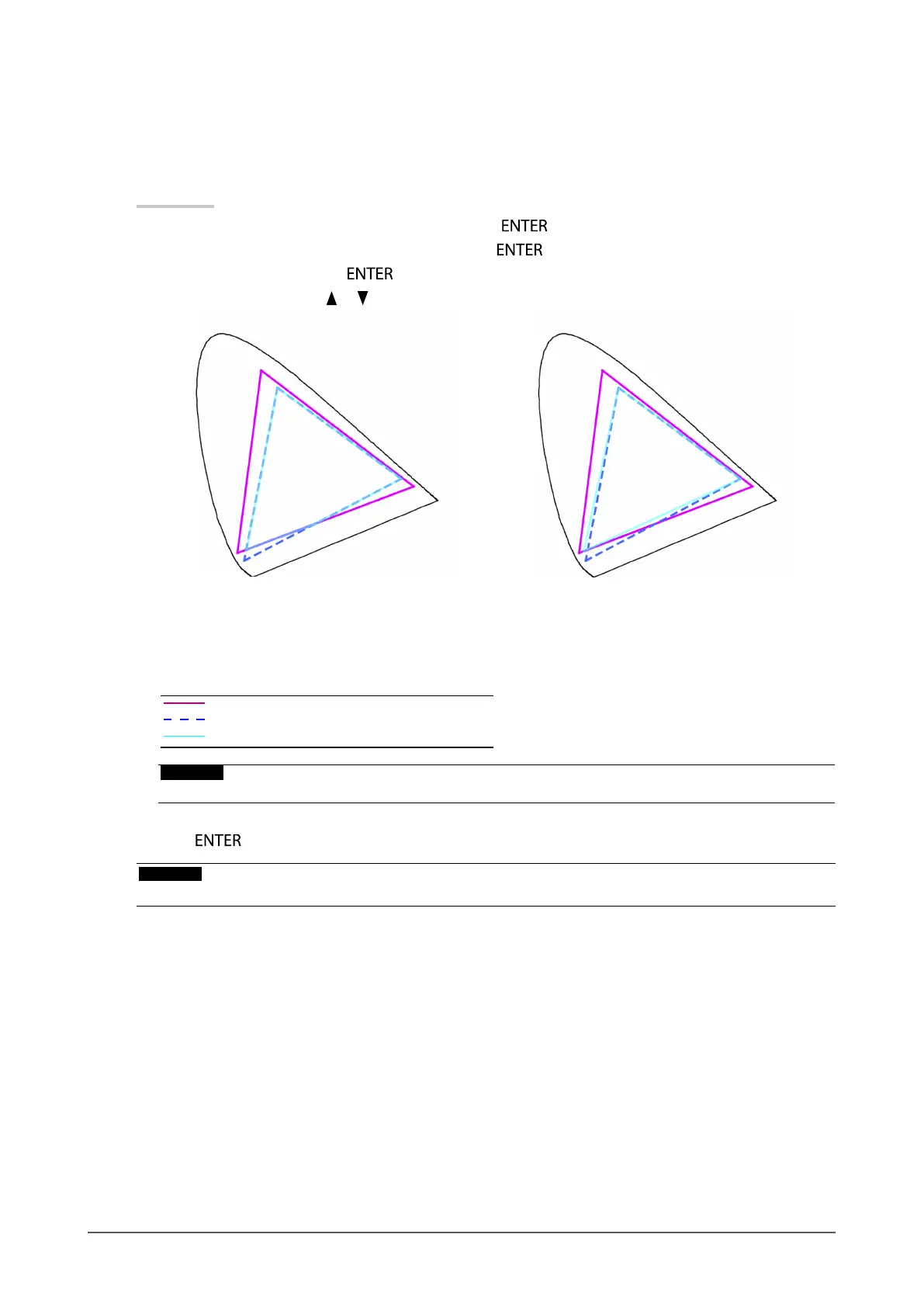
On: Off:
Displayscolorsbasedonthestandardvalues.The
colorsoutsidethegamutofthemonitorareclipped.
Displayscolorswithpriorityonthecolorgradation
ratherthanthecoloraccuracy.Theprimarycolors
outsidethegamutofthemonitor(blueinthediagram)
areadjustedtothecolorsmostsimilartothosethat
canbedisplayedbythemonitor.
Colorgamutofmonitor
Colorgamutdefinedbystandard
Colorgamutdisplayedonscreen
Attention
• Thisisaconceptualdiagram,anddoesnotdisplaytheactualcolorgamutofthemonitor.
5. Press to exit.
Attention
• This function will be disabled if “Native” is selected at “To set color gamut” (page 22).










 To Next Page