EasyManua.ls Logo

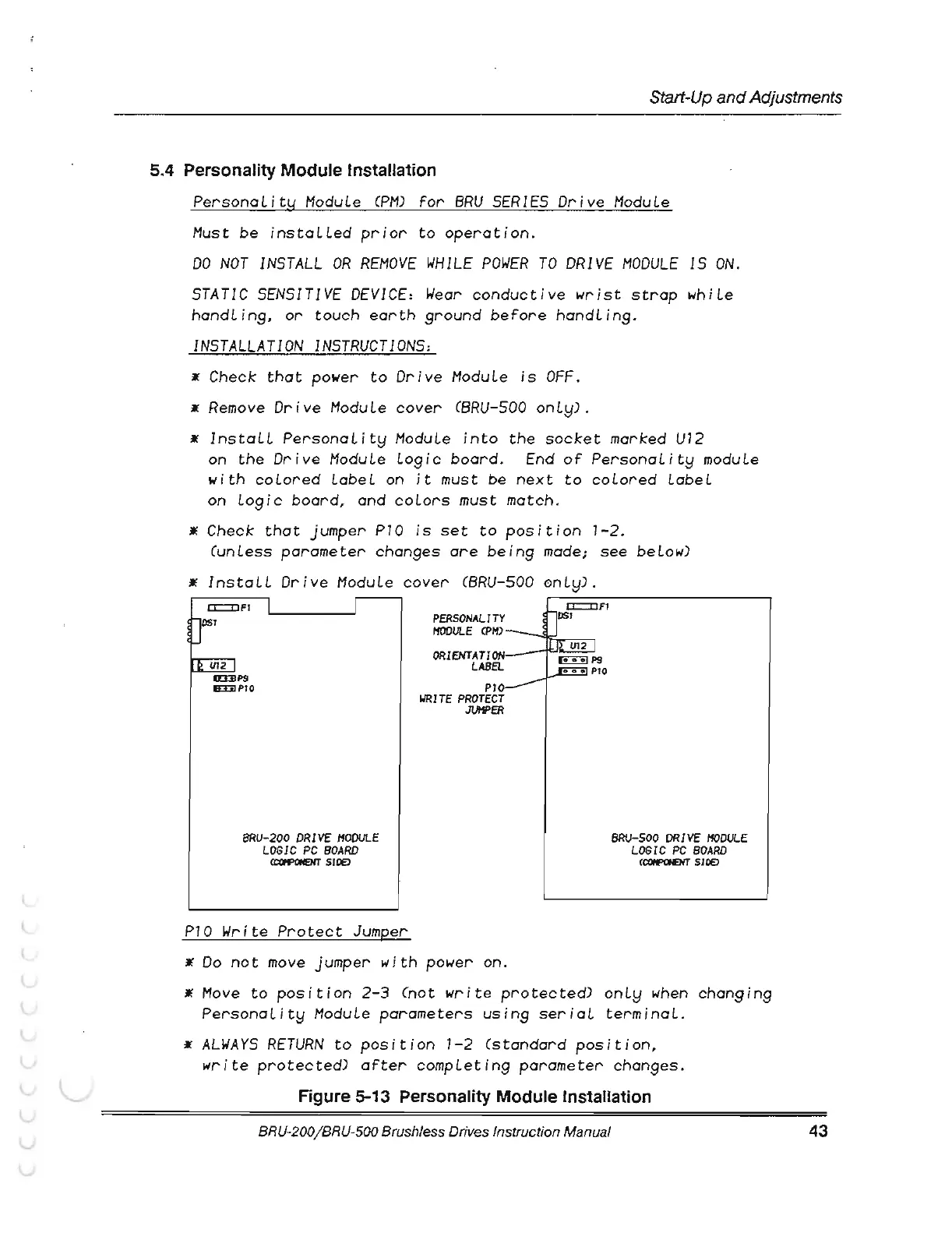
Electro-Craft BRU-200 - Figure 5-13 Personality Module Lnstallation; Personality Module Installation

Default Icon
145 pages
Print Icon
To Next Page IconTo Next Page
To Previous Page IconTo Previous Page
Loading...
(
(
Start-Up
and
Adjustments
5.4 Personality Module Installation
PersonaLity
ModuLe
CPM)
for
BRU
SERIES
Drive
ModuLe
. Must
be
instaLLed
prior
to
operation.
DO
NOT
INSTALL
OR
REMOVE
WHILE
POWER
TO
DRIVE
MODULE
IS
ON.
STATIC
SENSITIVE
DEVICE:
Wear
conductive
wrist
strap
whiLe
handLin9,
or
touch
earth
9round
before
handLin9.
INSTALLATION
INSTRUCTIONS:
Check
that
power
to
Drive
ModuLe
is
OFF.
Remove
Drive
ModuLe
cover
CBRU-500
onLy) .
InstaLL
PersonaLity
ModuLe
into
the
socket
marked
U12
on
the
Drive
Module Lo9ic
board.
End
of
PersonaLity
moduLe
with
coLored
LabeL
on
it
must be
next
to
coLored
LabeL
on Lo9ic board, and
coLors
must match.
Check
that
jumper
P10
is
set
to
position
7-2
.
(unless
parameter chan9es
are
bein9
made;
see
beLow)
InstaLL
Drive
ModuLe
cover
CBRU-500
0nly)
.
Ill.
cn2
J
a:EIIP9
&:DIPIO
BRU-200
DRIVE
MODULE
LOGIC
PC
BOARD
CCCifi'OHE)IT
SlDEJ
P10
Write
Protect
Jumper
PERSONALITY
l'fODULE
CPH)
ORIENTATION
LABEL
P10
WRITE
PROTECT
JUHPER
Do
not
move
jumper
with
power on.
BRU-500
DRIVE
MODULE
LOGIC
PC
BOARD
CCOifPOHENT
SlOE)
Hove
to
position
2-3
(not
write
protected)
onLy
when
chan9in9
PersonaLity
ModuLe
parameters
usin9
seriaL
terminaL.
ALWAYS
RETURN
to
position
1-2
(standard
position
,
write
protected)
after
compLetin9
parameter
chan9es.
Figure 5-13 Personality Module Installation
BAU-200/ BRU-500 Brushless Drives Instruction Manual
43

Table of Contents

Related product manuals