(
r
Troubleshoo
ti
ng
and
Maintenance
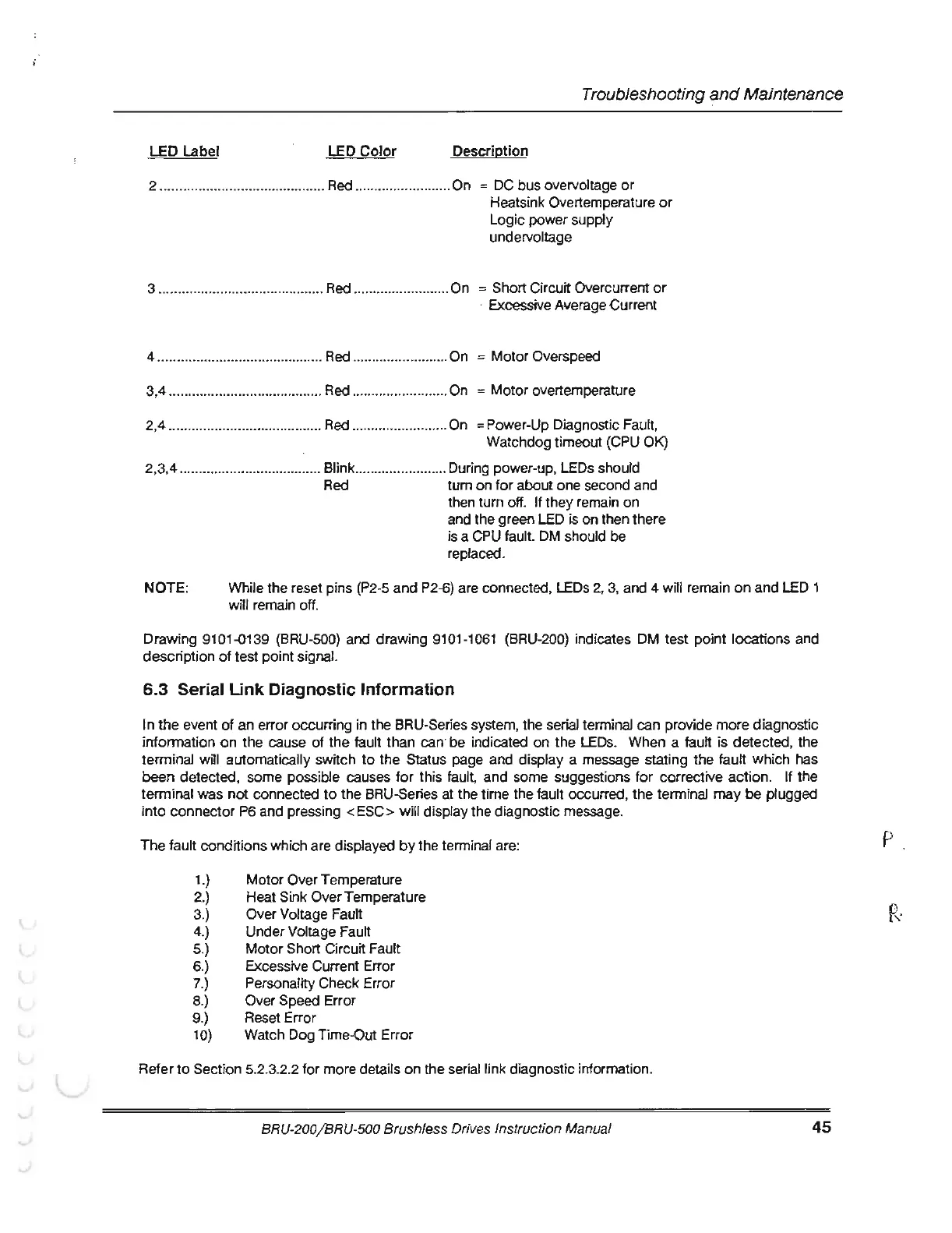
LED
Label
LED
Color
Description
2 ........................................... Red .......................
..
On =
DC
bus overvoltage
or
Heatsink Overtemperature
or
Logic
power supply
undervoltage
3 ........................................... Red .......................
..
On = Short Circuit Overcurrent
or
· Excessive Average Current
4 ........................................... Red ......................... On
=
Motor
Overs peed
3,4 .....................
..
................. Red
..
....................... On =
Motor
overtemperature
2,4 ............................
..
.......... Red ......................... On =Power-Up Diagnostic Fault,
Watchdog timeout (CPU OK)
2,
3,4
..................................... Blink ........................ During power-up, LEOs should
Red
tum
on
for
about
one second and
then turn off.
If
they remain
on
and the green LED is
on
then there
is a CPU fault. DM should
be
replaced.
NOTE
:
Wh
i
le
the
reset pins (P2-5
and
P2-6) are connected, LEOs 2, 3, and 4 will remain
on
and
LED 1
will remain
off
.
Drawing 9101-0139 (BRU-500) and drawing 9101-1061 (BRU-200) indicates OM test point locations and
description
of
test point signal.
6.3 Serial
Link
Diagnostic Information
In
the
event
of
an
error occurring
in
the BRU-Series system,
the
serial terminal
can
provide
more
diagnostic
information
on
the
cause
of
the
fault
than
can
be
indicated on
the
LEOs. When a fault is detected, the
terminal will automatically switch
to
the
Status page
and
display a message stating
the
fault
which
has
been
detected, some possible causes
for
this fault, and some suggesti
ons
for
corrective
action
. If
the
terminal
was
not
connected
to
the BRU-Series
at
the
time the fault occurred, the
term
inal
may
be
plugged
into
connector
P6 and pressing < ESC> will display the diagnostic message.
The
fault conditions which are displayed
by
the terminal are:
1.)
2.)
3.)
4.)
5.)
6.)
7.)
8.)
9.)
10)
Motor
Over Temperature
Heat Sink Over Temperature
Over Voltage Fault
Under Voltage Fault
Motor
Short Circuit Fault
Excessive Current Error
Personality Check Error
Over Speed Error
Reset Error
Watc h
Dog
Time-Out Error
Refer
to
Secti
on
5.2.3.2.2 for more details
on
the
se
r
ia
l link
di
a
gno
stic information.
BRU
-200/
BR
U-
500 Brushless
Dri
ves Instructi
on
Manual
45
p



 To Next Page