Replace the inverter.
NO
NO
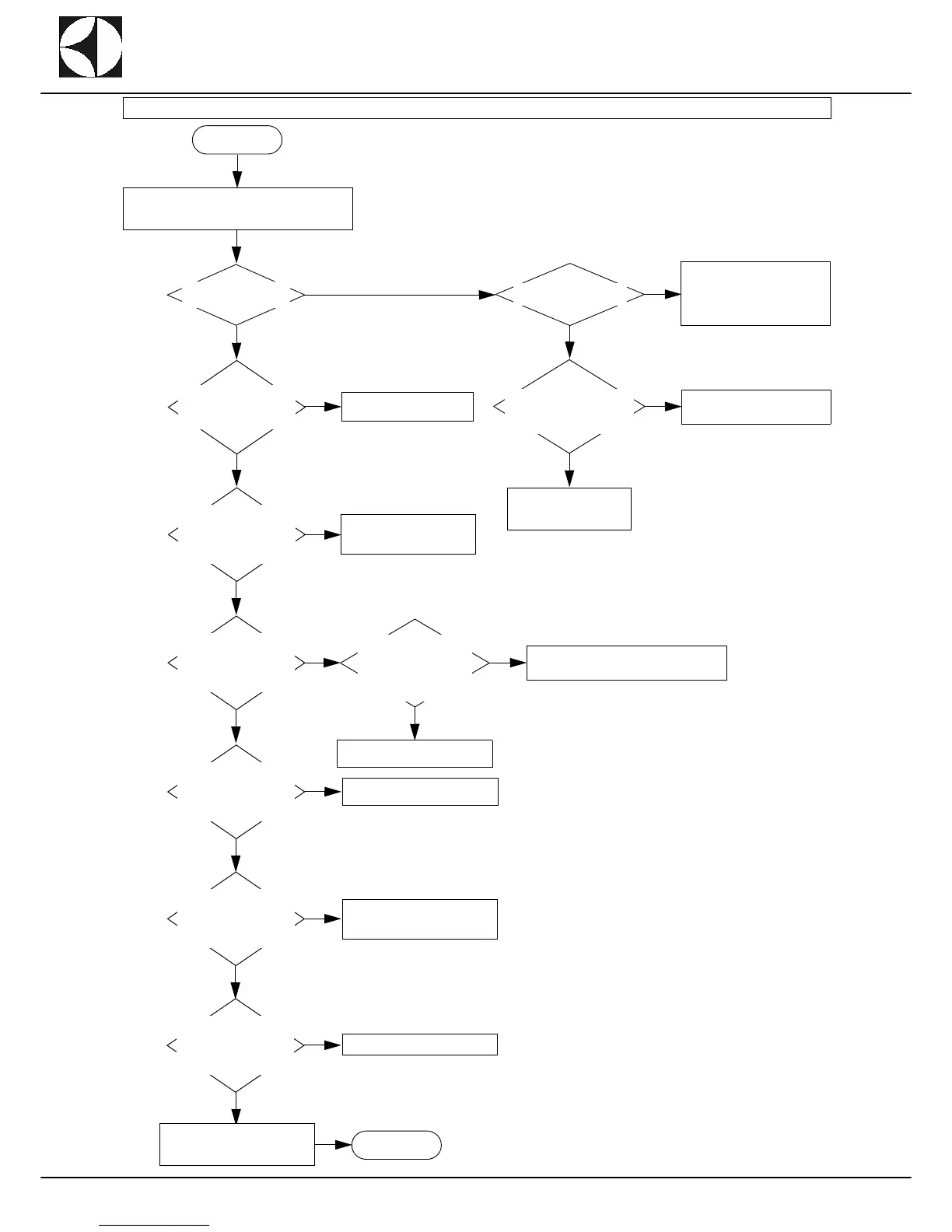
Alarm 27: the drive gearmotor inverter has
generated an alarm.
START
Check if the parameters
are correct.
Correctly enter them according
to that indicated in par. DIN-
VERTER FUNCTIONALITY
Pag.71
Check if inverter display
is on.
YES
NO
YES
Check the correct power
supply 230V (-15%;
+10%) between terminals
1 and 2 of the inverter.
YES
Check continuity between
points RC or RA of the invert-
er with the machine switched
on.
Check the wiring or replace the
inverter.
NO
YES
YES
Display the alarms table
27 see par. E page 85.
Check the correct power
supply 230V (-15%;
+10%) on board AP1 on
connector J21 (contacts 7
and 8).
Check the wiring and con-
nector.
NO
YES
Check the correct power
supply 230V (-15%;
+10%) on board AP1 on
connector J23 (contacts 3
and 4).
NO
Check the correct power
supply 230V (-15% ;
+10%) on the discon-
necting switch box if be-
tween connectors F1, F2,
F3 and F4.
Check the wiring and connectors.
YES
NO
Mains power trouble.
YES
Check the correct power
supply 230V (-15%;
+10%) on board AP1 on
connector J21 (contacts 5
and 8).
NO
Replace board AP1.
YES
Check the correct power
supply 230V (-15%;
+10%) on board AP1 on
connector J21 (contacts 6
and 8).
NO
Replace transformer GS1 or
check the wiring or connectors.
YES
Check the correct power
supply 230V (-15% ;
+10%) on board AP1 on
connector J21 (contacts 7
and 8).
NO
Replace board AP1.
Check the wiring between the in-
verter and board AP1 and re-
place the inverter if necessary.
END
SHORT COMPACT


 To Next Page