Operation and Maintenance
UFM Series 6
Q.Sonic-plus
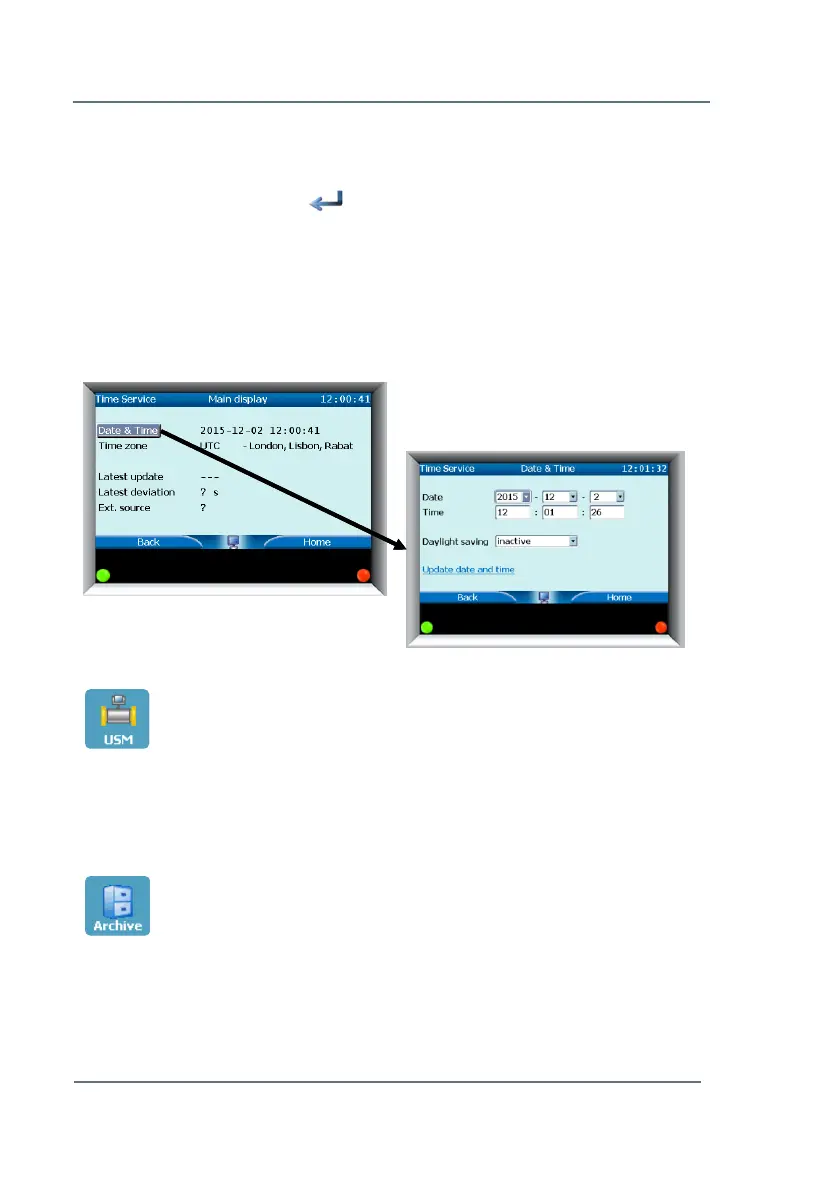
Time Service – To program the date and time of the meter:
► Highlight Date & Time (from Basic Display -> Time Service)
► Press the select arrow .
► Highlight and select Update date and time when you have entered the
correct information.
Date and time will be updated.
Please note: you have the possibility to activate daylight savings time. See
Figure 7-8.
USM
This button will also bring you back to the Basic Display.
Please see Chapter 7.3 Basic Display (p.36) for more information.
Archive
With the software package SonicExplorer it is possible to set up an archive
in the Series 6 Ultrasonic Flowmeters. For detailed information about the
nature of the archive and its possibilities, please refer to the SonicExplorer
Figure 7-8: Update Date & Time



 To Next Page