UFM Series 6
Q.Sonic-plus
Operation and Maintenance
user manual, available at http://www.docuthek.com/. By choosing the right
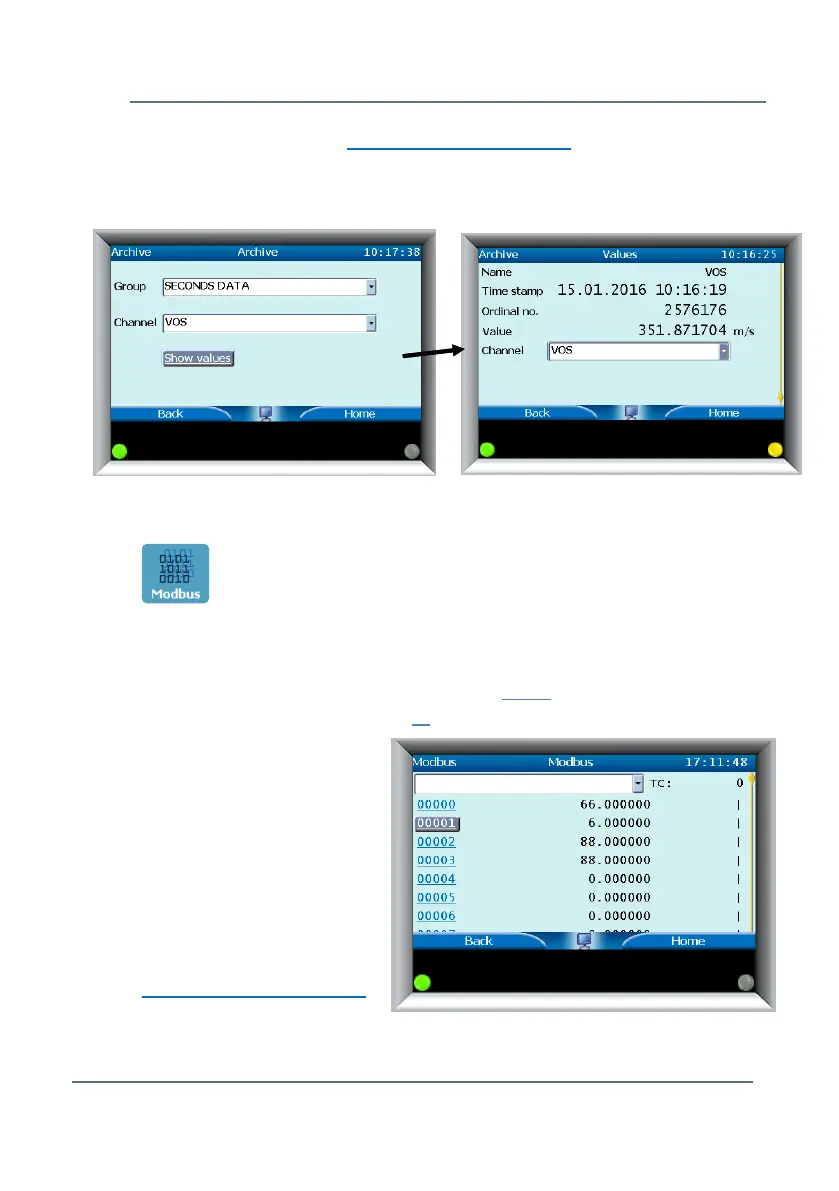
Group and Channel and selecting Show values it is possible to see all
important data of the selected archive (see Figure 7-9).
Modbus
This menu will bring you to the Modbus protocol screen. Modbus Registers
are listed on the left hand side, with corresponding values on the right. (For
example in Figure 7-10 the Modbus Register 00000 relates to the Flow Meter
Identification Code. The output of 66 equates to the UFM model Q.Sonic
Plus
.
For the descriptions of each
value output and other
information regarding
Modbus Protocol, please
see the document UFM
Series 6 Modbus Protocol -
listed in Appendix I –
References, or available
online at
http://www.docuthek.com/.
Figure 7-9: Archives Screen
Figure 7-10: Modbus Screen



 To Next Page