Liebert iCOM
®
Control
Liebert
®
CRV
™
100
View Network
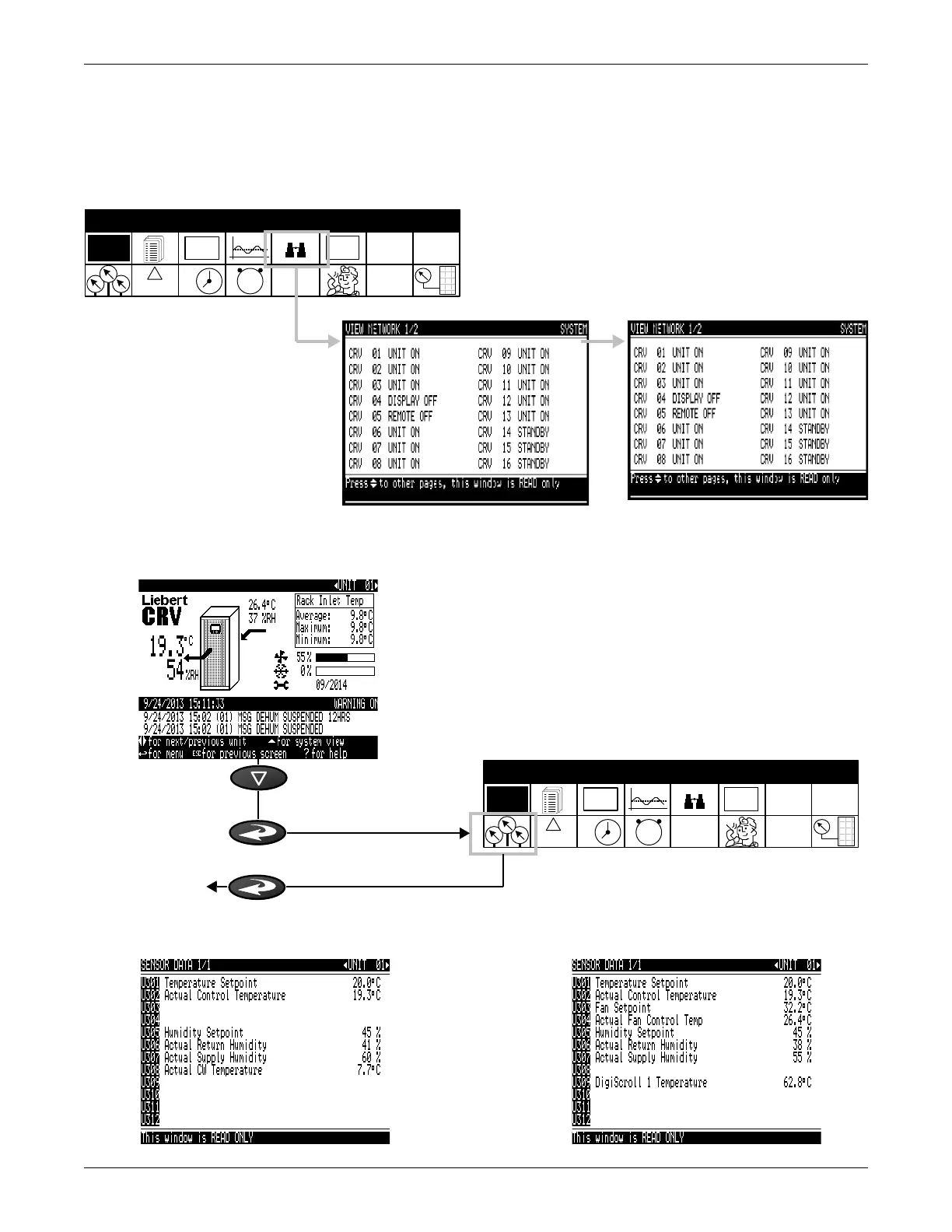
View Network—The view network screen provides an overview of the Liebert iCOM
®
network and a
status of each unit. This screen will provide the unit’s name. If no name is given, only the unit
number will be displayed.
Figure 74 User menus-Network screen
Sensor Data
Figure 75 User menus-Sensor data parameters screen
EVENT
LOG
°C / °F
% RH
SET
SET
12
39
6
SET
ALARMS
!
ACTIVE
ALARMS
USER MENUS
1234h
Sensor Data: Chilled Water Models Sensor Data: DX Models
EVENT
LOG
°C / °F
% RH
SET
SET
12
39
6
SET
ALARMS
!
ACTIVE
ALARMS
USER MENUS
1234h










 To Next Page