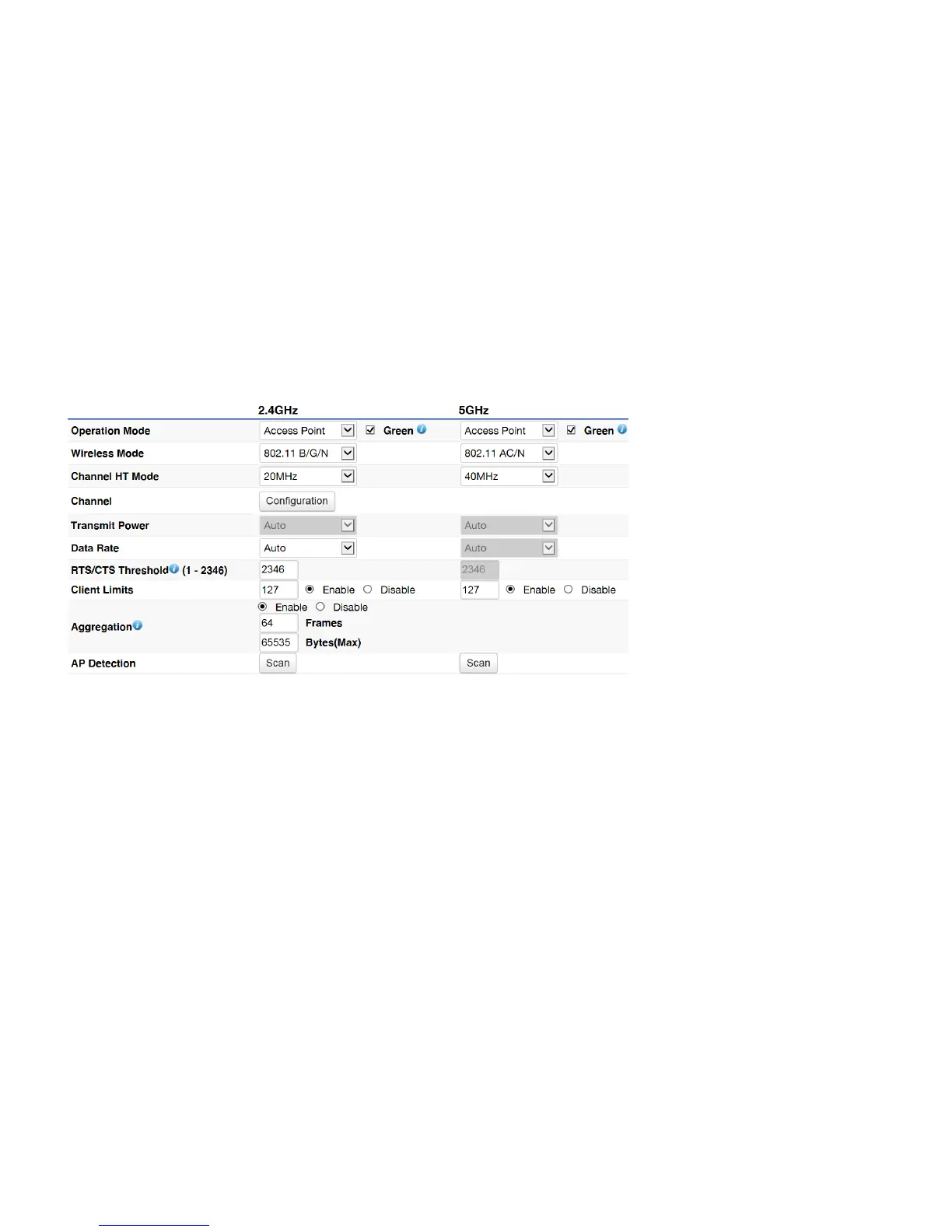
This page displays the current status of the Wireless settings of this AP.
2.4 GHz/5 GHz Wireless Network
Operation Mode
: Scrow down this list to select operation modes (Access Point, WDS Access Point and WDS Bridge) for
implementing on this radio. The default operation mode is Access Point.
Wireless Mode
: Scrow down this list to select wireless broadcasting standard on 2.4GHz and 5GHz frequency bands.
Channel HT Mode
: Scrow down this list to select bandwidth for operating under a frequency band. The default channel bandwidth
is 20 MHz on 2.4GHz frequency radio and 40 MHz on 5GHz frequency radio. Considering the different applications, users can decide
to implement a channel bandwidth to fulfill real applications. The larger of the channel, the greater of transmission quality and
speed.
Transmit Power (Tx Power)
: Default Tx power is Auto to obey regulatory power of each country.
Channel
: Click Configuration button to open a new window to configure channels for performing wireless service.



 To Next Page