roubleshooting with LED Error Indications 54
Table 3-8. Paper jam error indication
Step
No.
Detail phenomenon Check point Remedy
1
Paper is not ejected
completely and
jammed around the
Paper eject frame.
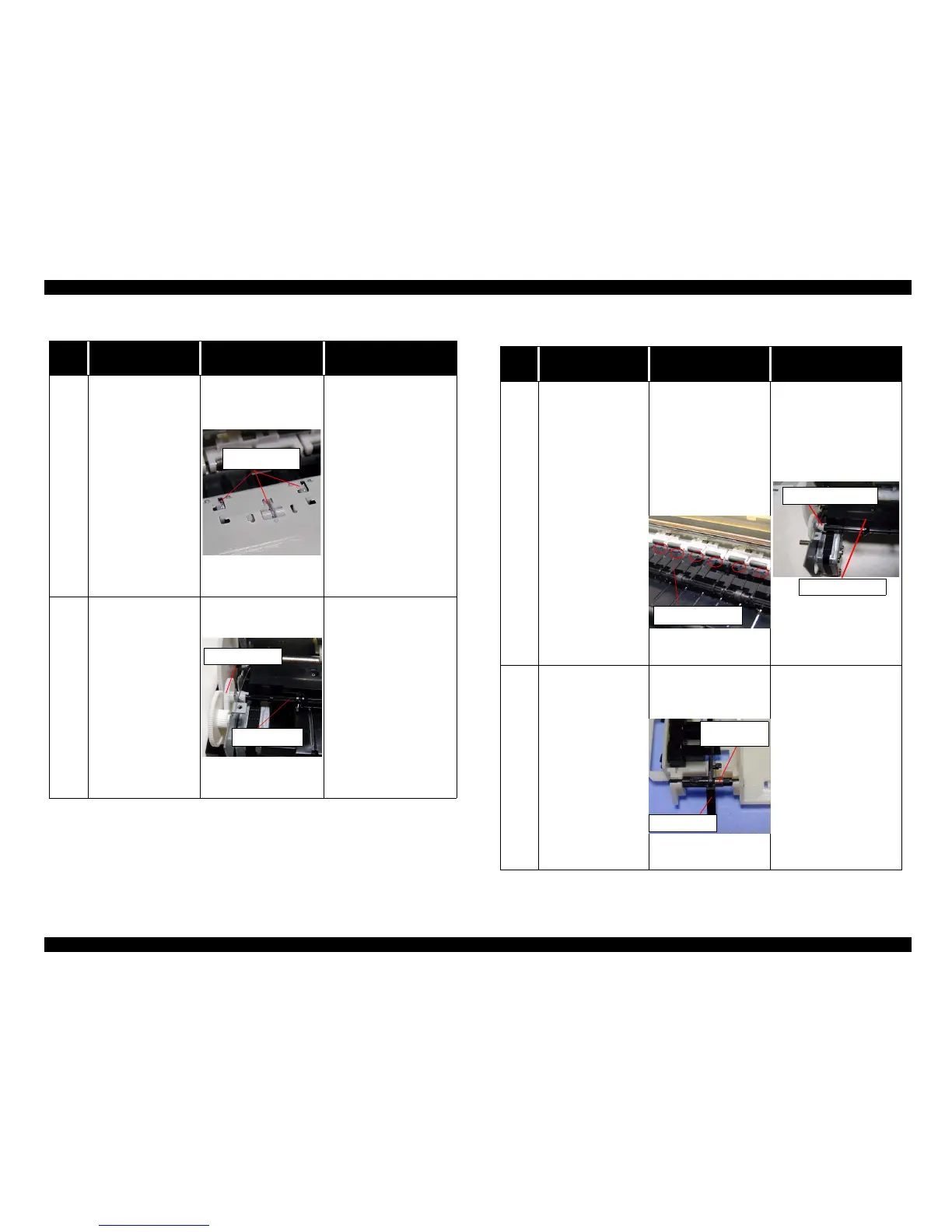
• Check if the star wheel
assembly is assembled
in the Paper eject
frame.
If it is no problem,
proceed the next step.
• Remove the jammed
paper and assemble the
Star wheel assembly in
the Paper eject frame
completely.
If the hook portion of the
Star wheel assembly is
broken, replace the Star
wheel assembly with
new one.
2 Ditto
• Check if the Paper
eject roller is rotating
correctly.
If it is no problem,
proceed the next step.
• Set the tip of the Spur
gear 25.6 to the
Combination gear 11.6,
36.8 and assemble it
correctly.
Star wheel assy
Spur gear 25.6
Paper eject roller
Table 3-9. Paper jam error indication
Step
No.
Detail phenomenon Check point Remedy
3
The paper is jammed
around the Front paper
guide.
1. Check if the Front
paper guide is floating
from the assemble
position.
2. Check if there is any
damage around the
rear edge of the each
ribontheFrontpaper
guide.
If it is no problem,
proceed the next step.
1. Assemble the Front
paper guide front to the
suitable portion and
confirm the PF
grounding spring is
securing the Front paper
guide.
2. Replace the Front paper
guide with new one.
4
Paper is loaded
correctly from ASF.
But, after complete the
print job, paper jam
indicatedon the screen
without any paper jam.
If you send the new
print job in this
condition, the General
error is indicated on
the screen.
• Check if the Torsion
spring 0.22 comes off
on the both PE sensor
lever.
• If the Torsion spring
0.22 is not set on the
correct position, set it
correctly. If any paper
dust is placed around the
PE sensor lever, remove
it.
• If it is no problem,
proceed the next step.
Front paper guide
PF grounding spring
Front Paper guide
Tensionspring
0.22
PE sensor lever



 To Next Page