User’s Guide Introduction
A.2
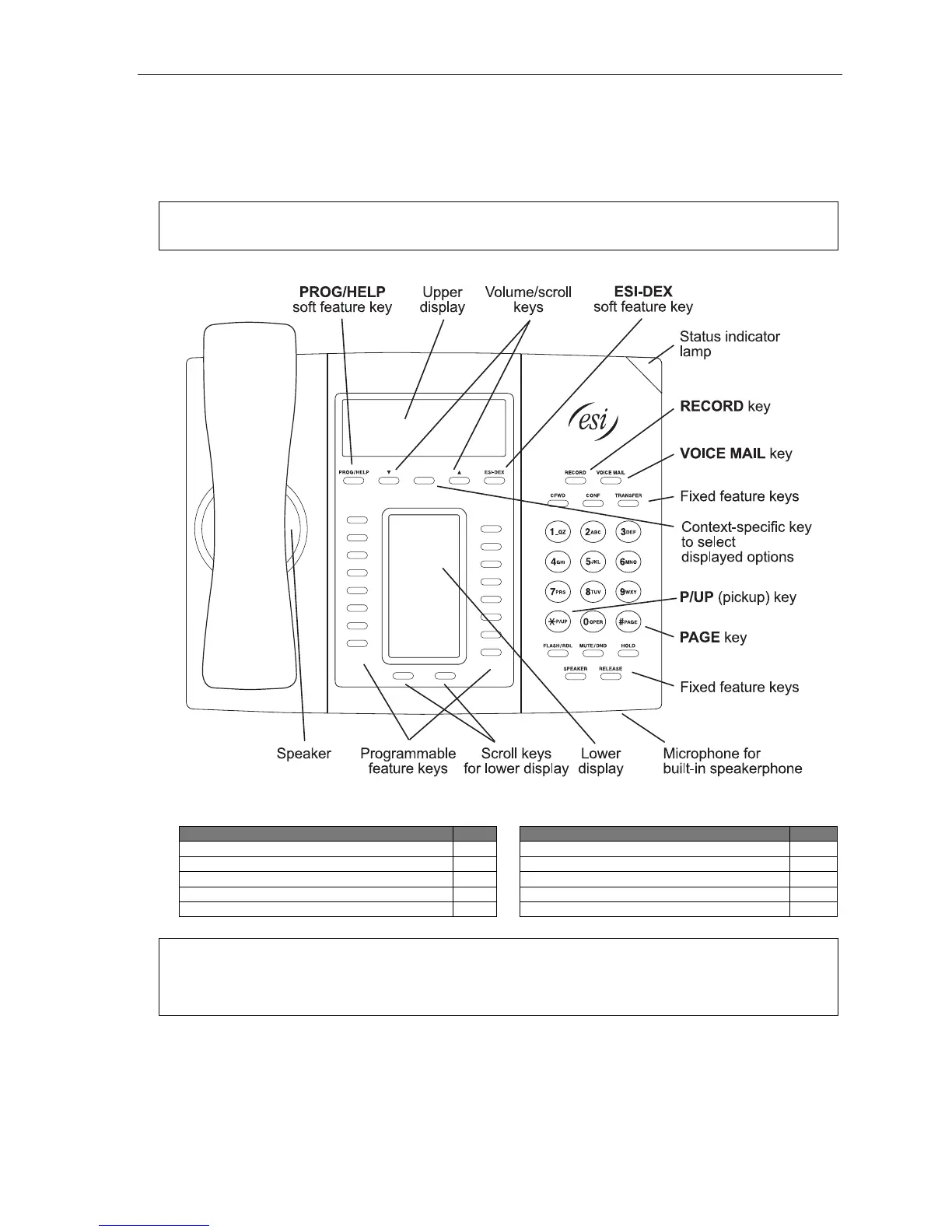
ESI 60 phone
The ESI 60 phone has a variety of programmable and built-in features. The model that works with your system is
the ESI 60D (a digital phone). It supports up to two optional Expansion Consoles (see page A.5). The ESI 60
models offers the same basic features which are described throughout this User’s Guide. The phone’s built-in voice
mail features and voice prompts make it easy to program and use.
Note: Depending on your angle of view, you will notice differences in the contrast levels of the upper and lower
displays. This is normal.
Items referenced elsewhere
Item Page
Item Page
PROG/HELP soft feature key C.2
Verbal User Guide and tutorial B.1
P/UP (pickup) key E.16
Status indicator lamp D.10
Fixed feature keys E.2
ESI-DEX soft feature key F.2
VOICE MAIL key D.1
RECORD key D.8
Programmable feature keys C.2
PAGE key E.16
Hint: On any of these ESI phone varieties (including the Expansion Consoles), you can perform direct
programming by holding down a programmable feature key for at least two seconds (similar to how you
might program a car radio button). This isn’t applicable to the fixed-feature keys which, as their name
implies, are already programmed.



 To Next Page