Chapter 6 Cable Connection
> 6.7 Power Cord Connection
ETERNUS DX60/DX80/DX90 Disk storage system User Guide
133
Copyright 2010 FUJITSU LIMITED
P3AM-3042-07ENZ0
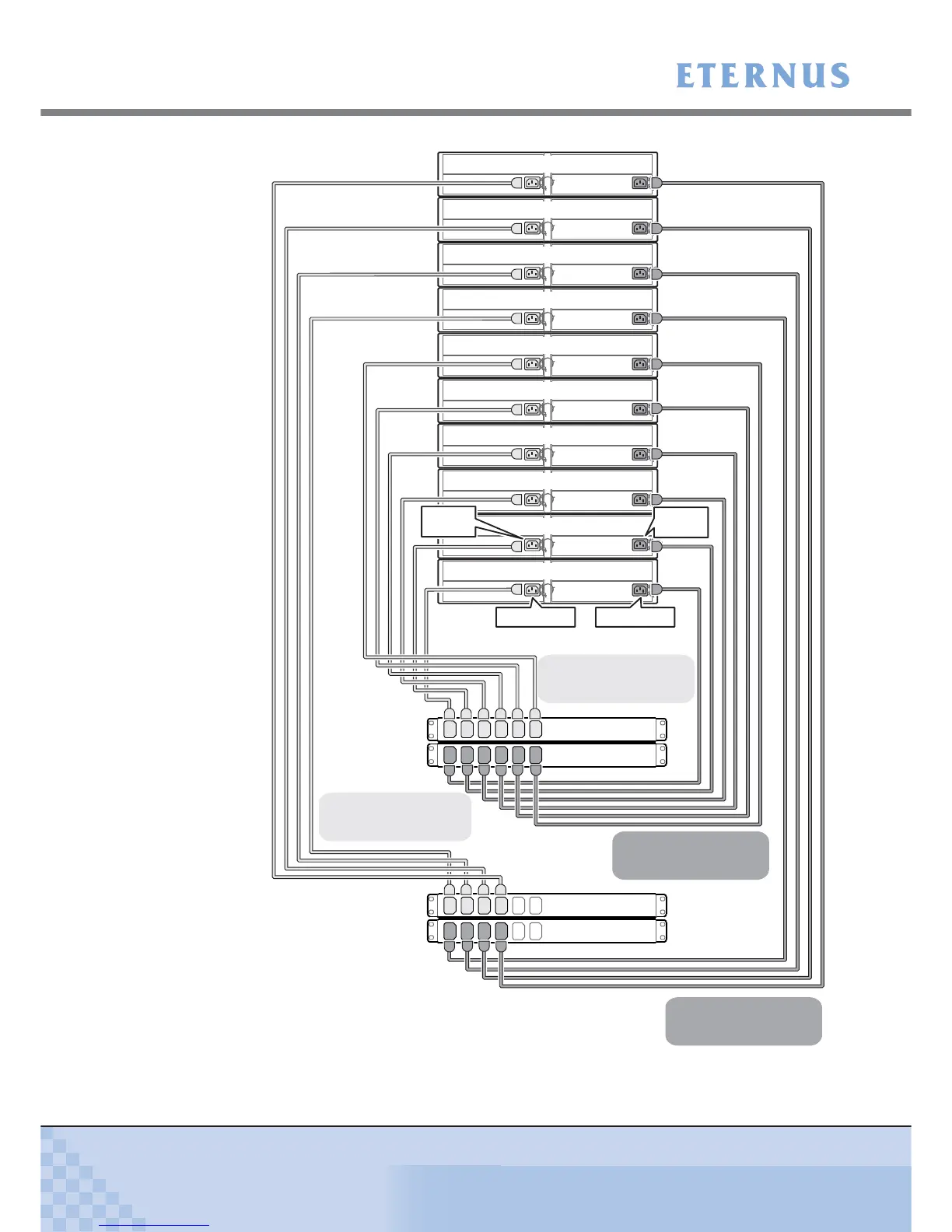
Figure 6.6 Connection of AC output cables (2U AC outlet box)
AC outlet box A
AC outlet box B
AC outlet box C
AC outlet box D
OUT1
OUT2
OUT3
OUT4
OUT5
OUT6
OUT1
OUT2
OUT3
OUT4
OUT5
OUT6
OUT1
OUT2
OUT3
OUT4
OUT5
OUT6
OUT1
OUT2
OUT3
OUT4
OUT5
OUT6
Drive Enclosure 9
Drive Enclosure 8
Drive Enclosure 7
Drive Enclosure 6
Drive Enclosure 5
Drive Enclosure 4
Drive Enclosure 3
Drive Enclosure 2
Drive Enclosure 1
Controller Enclosure
PSU#1 Inlet
PSU#1 Inlet
PSU#0 Inlet
PSU#0 Inlet
Connect between the OUTn of the
AC outlet box A and the PSU#0 inlets
of the ETERNUS DX60/DX80/DX90.
Connect between the OUTn of the
AC outlet box B and the PSU#1 inlets
of the ETERNUS DX60/DX80/DX90.
Connect between the OUTn of the
AC outlet box D and the PSU#1 inlets
of the ETERNUS DX60/DX80/DX90.
Connect between the OUTn of the
AC outlet box C and the PSU#0 inlets
of the ETERNUS DX60/DX80/DX90.



 To Next Page