Chapter 5 Installation
> 5.2 Rack Installation
ETERNUS DX60/DX80/DX90 Disk storage system User Guide
96
Copyright 2010 FUJITSU LIMITED
P3AM-3042-07ENZ0
Procedure
1 Refer to "ETERNUS DX60/DX80/DX90 Disk storage system Package Contents"
to confirm there are no missing parts for the rack mount kit.
2 Adjust the rack rail (bracket L (for left side) and bracket R (for right side)) sizes to
fit the rack.
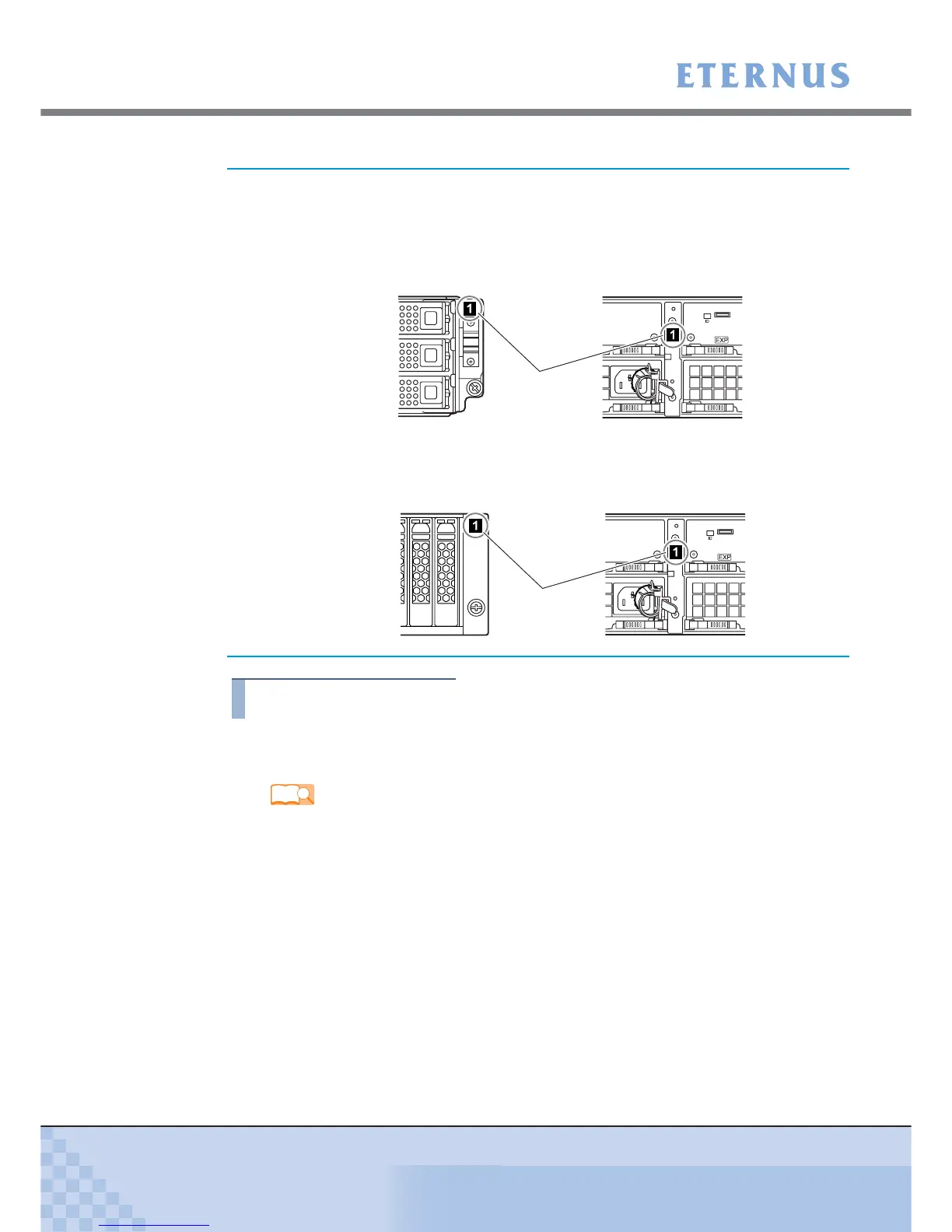
When installing multiple drive enclosures, install them on the controller
enclosure in order of the "DE_No. label" attached on the drive enclosure.
The "DE_No. label" is attached in the following location.
• 3.5" type drive enclosure
• 2.5" type drive enclosure
Refer
"ETERNUS DX60/DX80/DX90 Disk storage system Package Contents"
At the right side of the
front of the drive enclosure
Between the EXP#0 and EXP#1 expanders
at the rear of the drive enclosure
DE_No. label
At the right side of the
front of the drive enclosure
Between the EXP#0 and EXP#1 expanders
at the rear of the drive enclosure
DE_No. label



 To Next Page