1143W24E4.00 · EV3 200 Web 03/2021
| 35 |
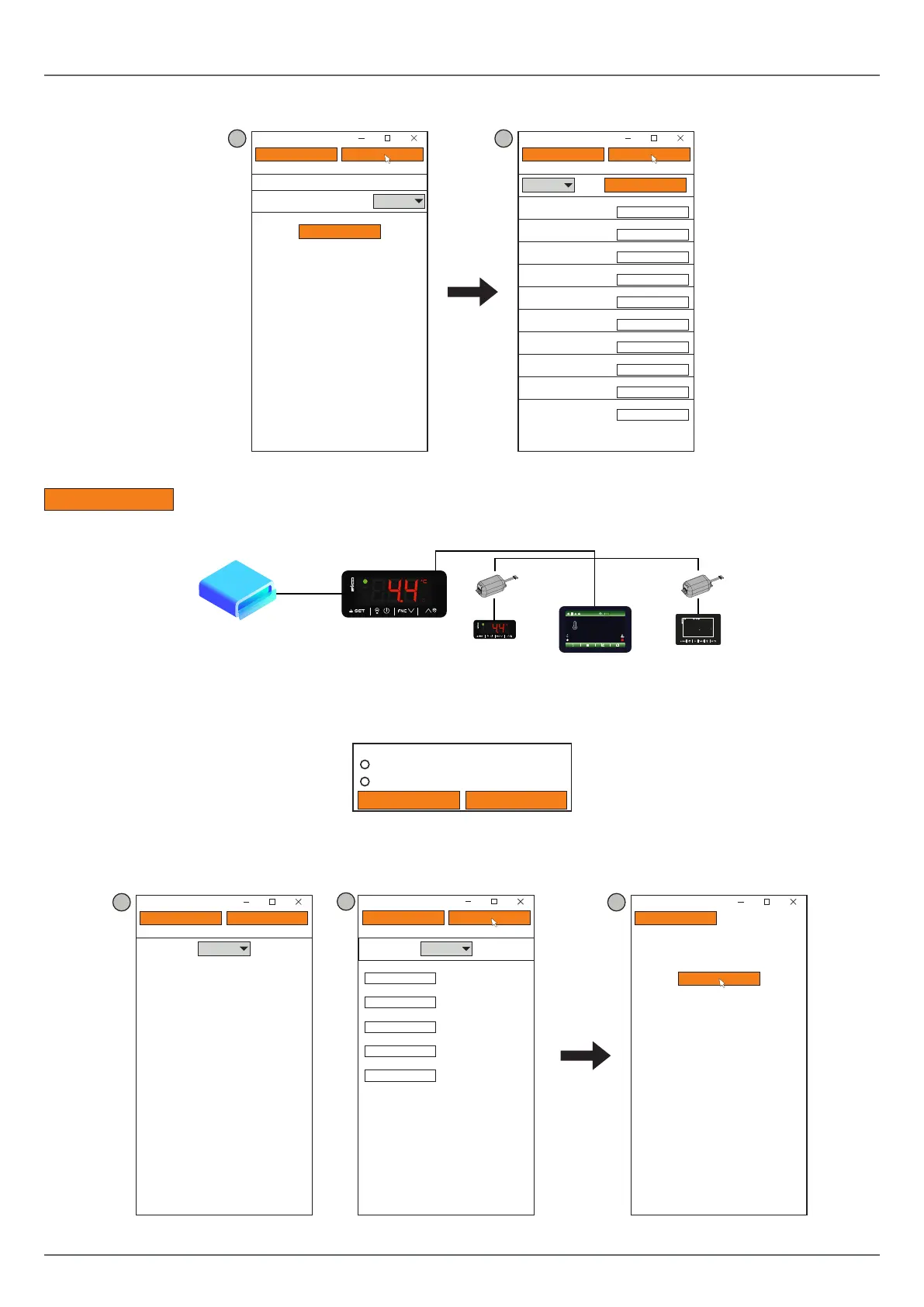
5. Setthedate,timeandlocaltimeusedandpressNext;
6. Set the name of the controllers connected via RS-485 to EV3 200 Web and press Next;
4 5
Next
Prev
2. Date and Time
EPOCA
Day, NN MM YYYY hh:mm:ss
Daylight saving time
Addr. 1
Off
Set local time
Next
Prev
3. Controllers
EPOCA
Autoaddress
Com1
On Line
On Line
Off Line
Off Line
Off Line
Off Line
Off Line
Off Line
Off Line
Off Line
Name Name
Name
Addr. 2
Addr. 3
Addr. 4
Addr. 5
Addr. 6
Addr.7
Addr. 8
Addr. 9
Addr. 10
Name
Name
Name
Name
Name
Name
Name
Name
Name
Fig. 38. Selecting the device and conguring the Plant and Device
Autoaddress
:ifthedevicesareswitchedononeatatime,thiskeyautomaticallyconfigurestheBLE parameter of the
device being switched on.
EV3 200 Web
Modem
Ethernet
RS-485 subnet
TTL/RS-485
BLE=1
COM1
BLE=2
BLE=3
RS-485
TTL/RS-485
03/07/18 09:22
PRODUCT TEMPERATURE: -35.3°C LOG OUT
WORKING SETPOINT: -38.0°C LOGIN: ADMIN
CABINET
TEMPERATURE
STATUS OK
-35.8
°C
-17.5
60
%
Over
Temp
Program 01
Stop
°c
Fig. 39. Diagram of subnetwork and BLE conguration
Toeraseadeviceanditsfailedconfiguration,pressAddr. X.Apop-upappearswhereyoucanchoosetoerasetherecordings
or the configuration of the device.
Erase
Close
Erase memory
Device configuration
Device data recording
Fig. 40. Pop-up to erase memory
7. Set the type of IP address and press Next;
8. Press Conguretocompletecongurationofthedevice.
6 7
Next
Prev
4. IP Address
EPOCA
IP address:
Dynamic
Next
Prev
EPOCA
Configure
Next
Prev
4. IP Address
EPOCA
Static
IP address
Netmask
Gateway
Dns 1
Dns 2
0.0.0.0
0.0.0.0
0.0.0.0
0.0.0.0
0.0.0.0
6
Fig. 41. Selecting the type of IP address and end of conguration



 To Next Page