EVCO S.p.A.
EVBOX1 | Installation guide ver. 2.0 | Code 144BOX1E204
page 42 of 100
13 SETTINGS
13.1 Setting the date, time and day
of the week (only in the models
with clock)
The date can be set in the day-month-year format; the time in
the hours-minutes format (24 h).
To access the procedure:
1.
Make sure that the keyboard is not locked and that
no procedure is in progress.
2.
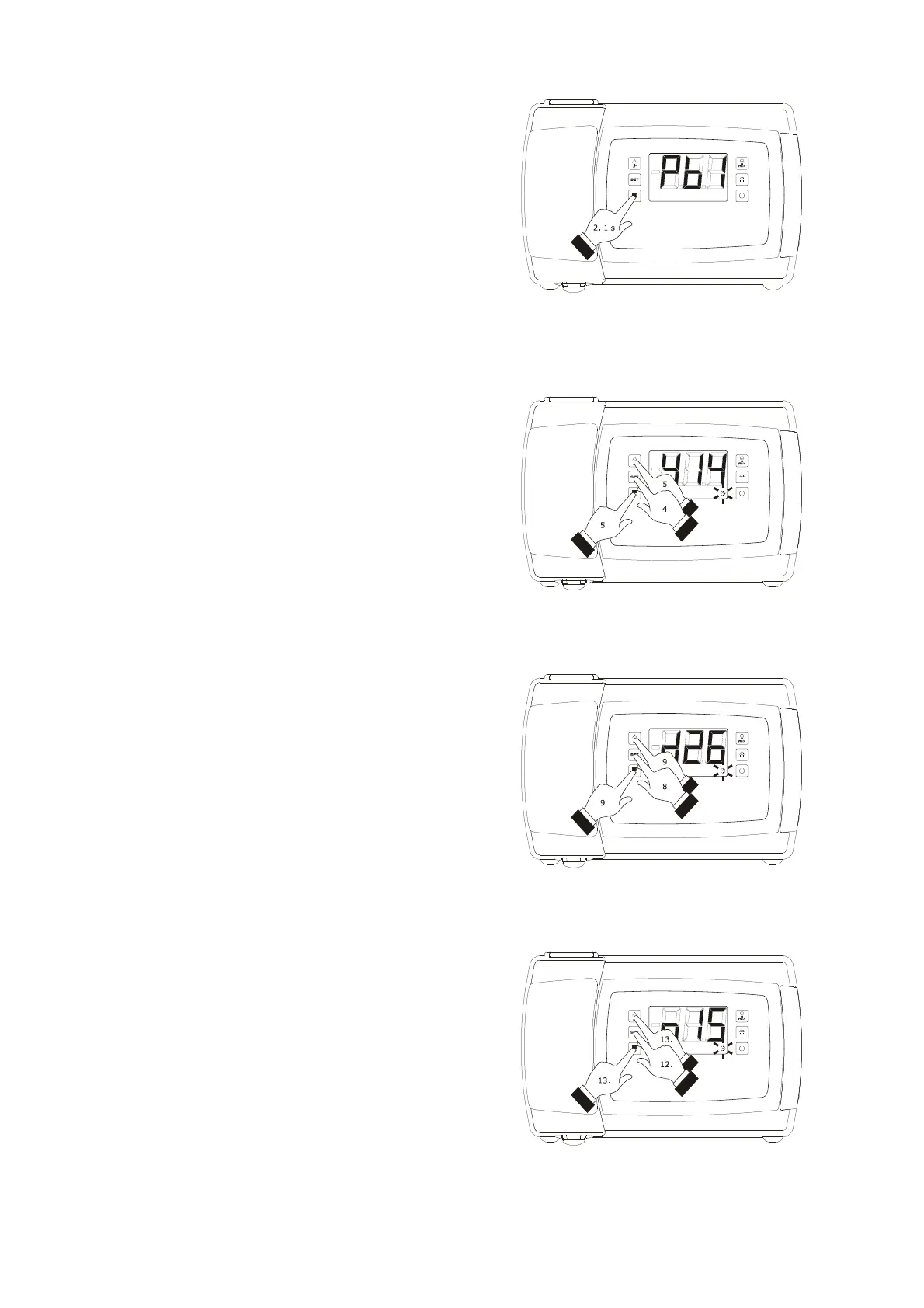
Hold the key “DOWN” for 1 s: the display will show
the first label available.
3.
Press and release the "UP" or "DOWN" key to
select “rtc”.
To set the year:
4.
Press and release the “SET” key: the display will
show “y” followed by the last two numbers of the
year and the “clock” LED light shall flash.
5.
Press and release the “UP” or “DOWN” key within
15 sec.
To set the month:
6.
Press and release the “SET” key when setting the
year: the display will show “n” followed by the
number of the month.
7.
Press and release the “UP” or “DOWN” key within
15 sec.
To set the day:
8.
Press and release the “SET” key when setting the
month: the display will show “d” followed by the
number of the day.
9.
Press and release the “UP” or “DOWN” key within
15 sec.
To set the hour:
10.
Press and release the “SET” key when setting the
day: the display will show “h” followed by the
number of the hour.
11.
Press and release the “UP” or “DOWN” key within
15 sec.
To set the minute:
12.
Press and release the “SET” key when setting the
hour: the display will show “n” followed by the
number of the minute.
13.
Press and release the “UP” or “DOWN” key within
15 sec.
To set the day of the week:
14.
Press and release the “SET” key when setting the
minute: the display will show the first label
available.
Access the procedure for setting the date, time and day of the week
Setting the year
Setting the day
Setting the minute



 To Next Page