EVCO S.p.A.
EVBOX1 | Installation guide ver. 2.0 | Code 144BOX1E204
page 44 of 100
To select a parameter:
7.
Press and release the “UP” key or the “DOWN”
key.
To set a parameter:
8.
Press and release the “SET” key.
9.
Press and release the “UP” or “DOWN” key within
15 sec.
10.
Press and release the “SET” key and do not
operate for 15 s.
To exit the procedure:
11.
Press and release the “UP” and “DOWN” key for 4
s or do not operate for 60 s (any changes will be
saved).
After setting the parameters, suspend power supply flow to
the device.
13.4 Restoring the Manufacturer’s
settings
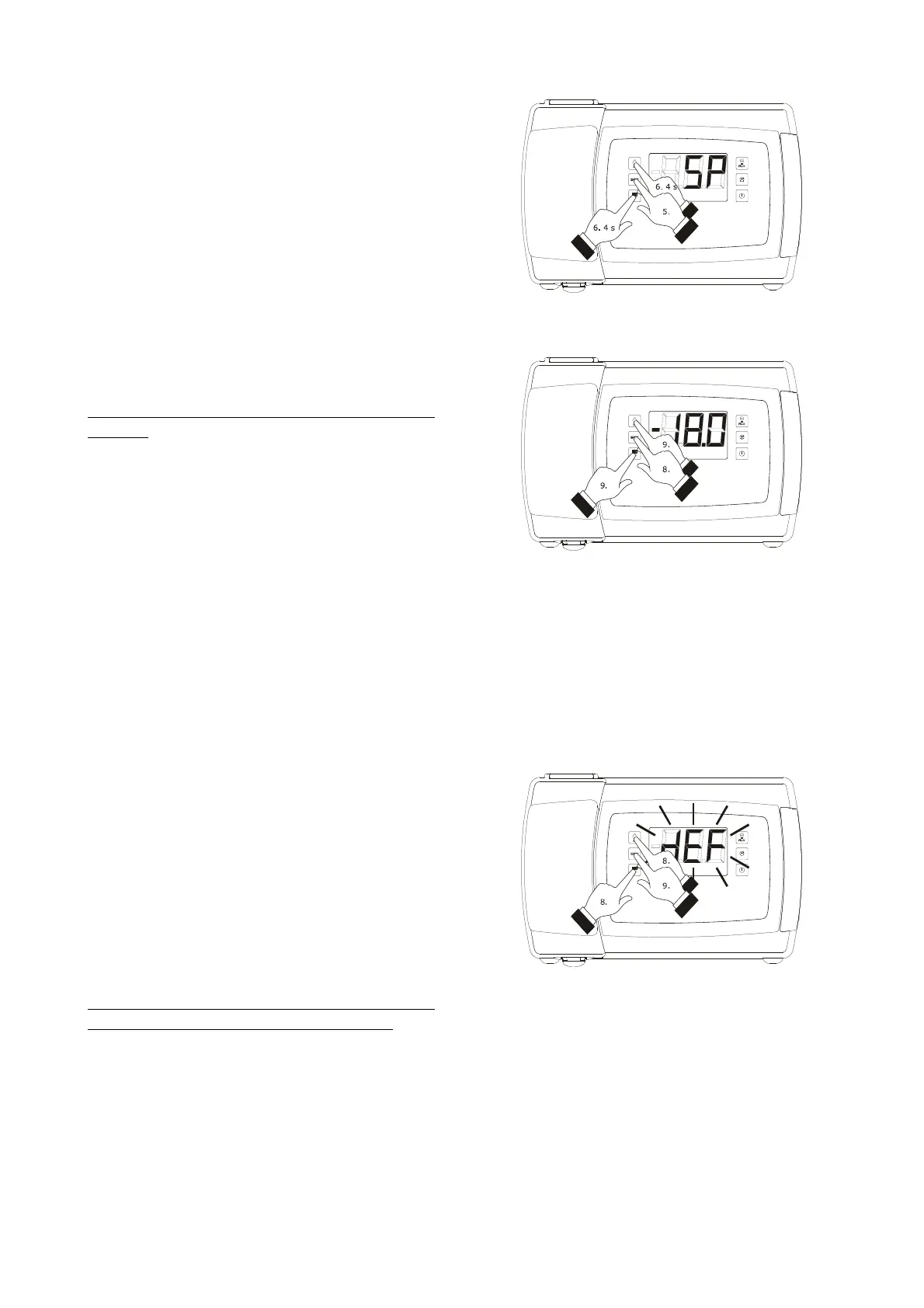
To restore the manufacturer's settings, proceed as follows:
1.
Make sure no procedures are in progress.
2.
Hold the “UP” and “DOWN” key for 4 s: the display
will show “PA”.
3.
Press and release the “SET” key.
4.
Press and release the “UP” or “DOWN” key within
15 s to set “149”.
5.
Press and release the “SET” key and do not
operate for 15 s.
6.
Hold the “UP” and “DOWN” key for 4 s: the display
will show “dEF”.
7.
Press and release the “SET” key.
8.
Press and release the “UP” or “DOWN” key within
15 s to set “1”.
9.
Press and release the “SET” or do not operate for
15 sec: the display will show a flashing “dEF” for 4
sec, after which the device will exit the procedure
10.
Cut the device power supply off.
To exit the procedure in advance:
11.
Hold the “UP” and “DOWN” key for 4 s during the
procedure (i.e. before setting “1”: Restore will not
be performed).
Make sure that the manufacturer’s settings are appropriate
(see paragraph 13.5 “List of configuration parameters”.
Access the procedure to set the configuration parameters
Setting a parameter
Restoring the Manufacturer’s Settings



 To Next Page