EasyManua.ls Logo

Eventide ARGUS 5000 - Page 197

Eventide ARGUS 5000
237 pages
Print Icon
To Next Page IconTo Next Page
To Previous Page IconTo Previous Page
Loading...
CLEAR
USER
WPTS/FP
-N
CLEAR
WPTS
NOTE
-
IF
"Y"
IS
SELECTED WHEN
PAGE"
OR
"RTN"
IS
PRESSED,
ALL
USER
VAYPOINTS
AND
STORED
FLIGHT
PLANS
WILL
BE
ERASED.
PAGE
LINE
CHG
RTN
CLEAR
VPTS
END
FACTORY
DEFAULTS
-N
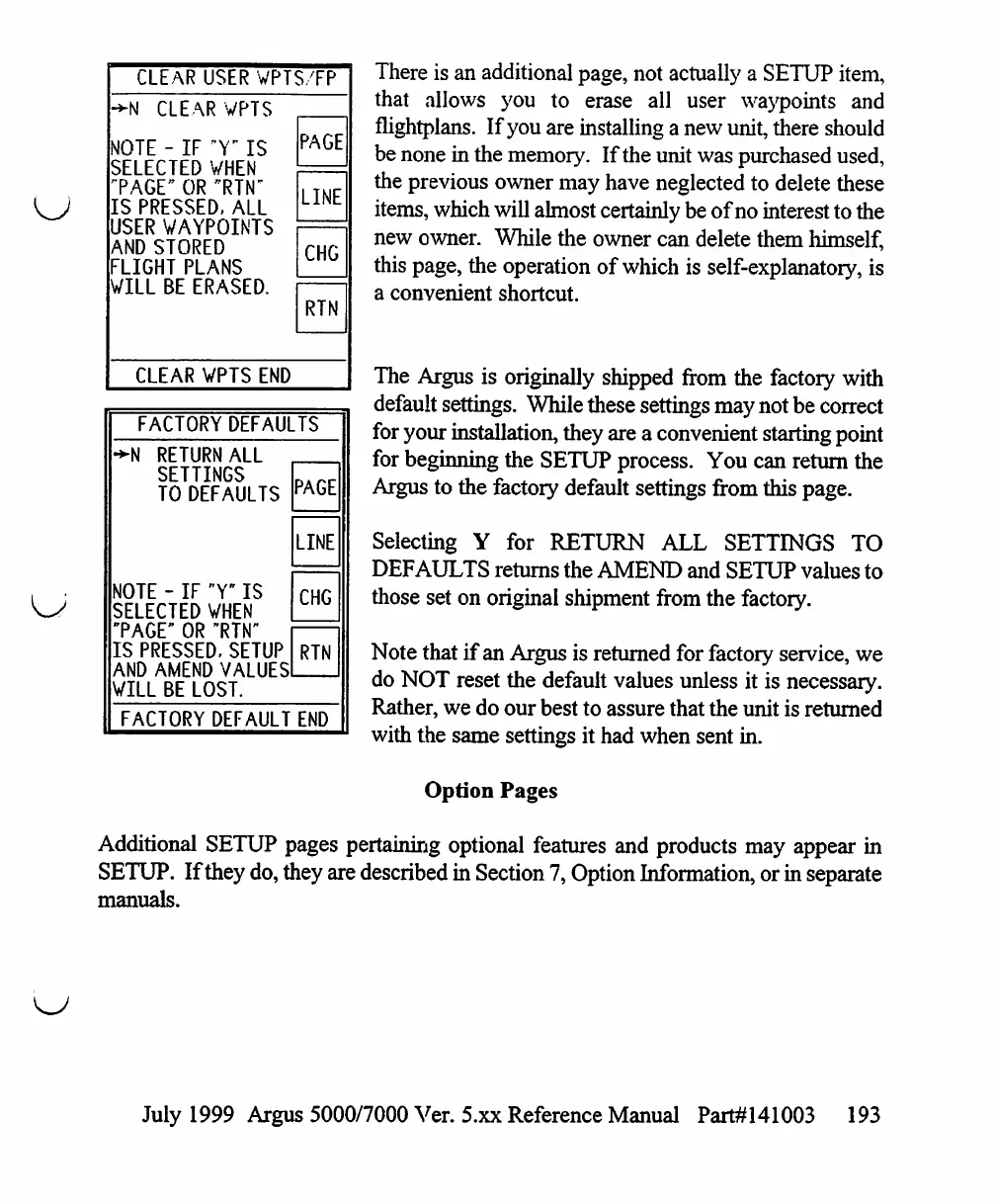
There
is
an
additional
page,
not
actually
a
SETUP
item,
that
allows
you
to
erase
all
user
waypoints
and
flightplans.
If
you
are
installing
a
new
unit,
there
should
be
none
in
the
memory.
If
the
unit
was
purchased
used,
the
previous
owner
may
have
neglected
to
delete
these
items,
which
will
almost
certainly
be
of
no
interest
to
the
new
owner.
While
the
owner
can
delete
them
himself,
this
page,
the
operation
of
which
is
self-explanatory,
is
a
convenient
shortcut.
The
Argus
is
originally
shipped
from
the
factory
with
default
settings.
While
these
settings
may
not
be
correct
for
your
installation,
they
are
a
convenient
starting
point
for
beginning
the
SETUP
process.
You
can
return
the
Argus
to
the
factory
default
settings
from
this
page.
Selecting
Y
for
RETURN
ALL
SETTINGS
TO
DEFAULTS
returns
the
AMEND
and
SETUP
values
to
those
set
on
original
shipment
from
the
factory.
Note
that
if
an
Argus
is
returned
for
factory
service,
we
do
NOT
reset
the
default
values
unless
it
is
necessary.
Rather,
we
do
our
best
to
assure
that
the
unit
is
returned
with
the
same
settings
it
had
when
sent
in.
Option
Pages
Additional
SETUP
pages
pertaining
optional
features
and
products
may
appear
in
SETUP.
If
they
do,
they
are
described
in
Section
7,
Option
Information,
or
in
separate
manuals.
RETURN
ALL
SETTINGS
TO
DEFAULTS
NOTE
-
IF
"Y"
IS
SELECTED
WHEN
PAGE"
OR
"RTN"
IS
PRESSED.
SETUP
AND
AMEND
VALUES
WILL
BE
LOST.
PAGE
LINE
CHG
RTN
FACTORY
DEFAULT
END
July
1999
Argus
5000/7000
Ver.
5.xx
Reference
Manual
Part#141003
193

Table of Contents

Other manuals for Eventide ARGUS 5000

Related product manuals