61
Electrical System
the instructions printed on each switch and/or the
battery switch operation manual for additional infor-
mation on the remote activated switches.
The engine main and auxiliary charging systems
control the charging of the engine and house batter-
ies whenever the engines are operating. The engine
batteries can be temporarily connected in parallel by
the emergency parallel switch to provide additional
starting current for the engines. The batteries are
also charged by the battery charger when plugged
into shore power.
The engine charging systems manage the charging
current for the 12 volt system whenever the engines
are running. The systems automatically sense the
condition of each battery and direct available current
to the batteries that require charging.
When the engines are started, the engine alternators
start to recharge the batteries. The charging circuits
sense the charge and it is split between the batteries,
with the lowest batteries receiving the most charge.
When the engines are turned o, charging stops and
the sensing circuits disconnect the batteries from the
charging circuits, thereby automatically isolating the
batteries from one another.
When in port or at anchor, the engine battery
switches should be o. Only the battery switch
that activates the House circuits should be on. This
will keep the engine starting batteries in reserve for
starting the engines.
Notice:
Current is supplied to the automatic switches
for the bilge pumps and high water alarm when
the batteries are connected and the battery
switches are o.
Notice:
The manual overrides on the battery switches
completely bypass the remotely activated
switches when the switches are manually ac-
tivated. The circuits cannot be turned o us-
ing the remote battery switches if the battery
switches have been activated by the manual
switches.
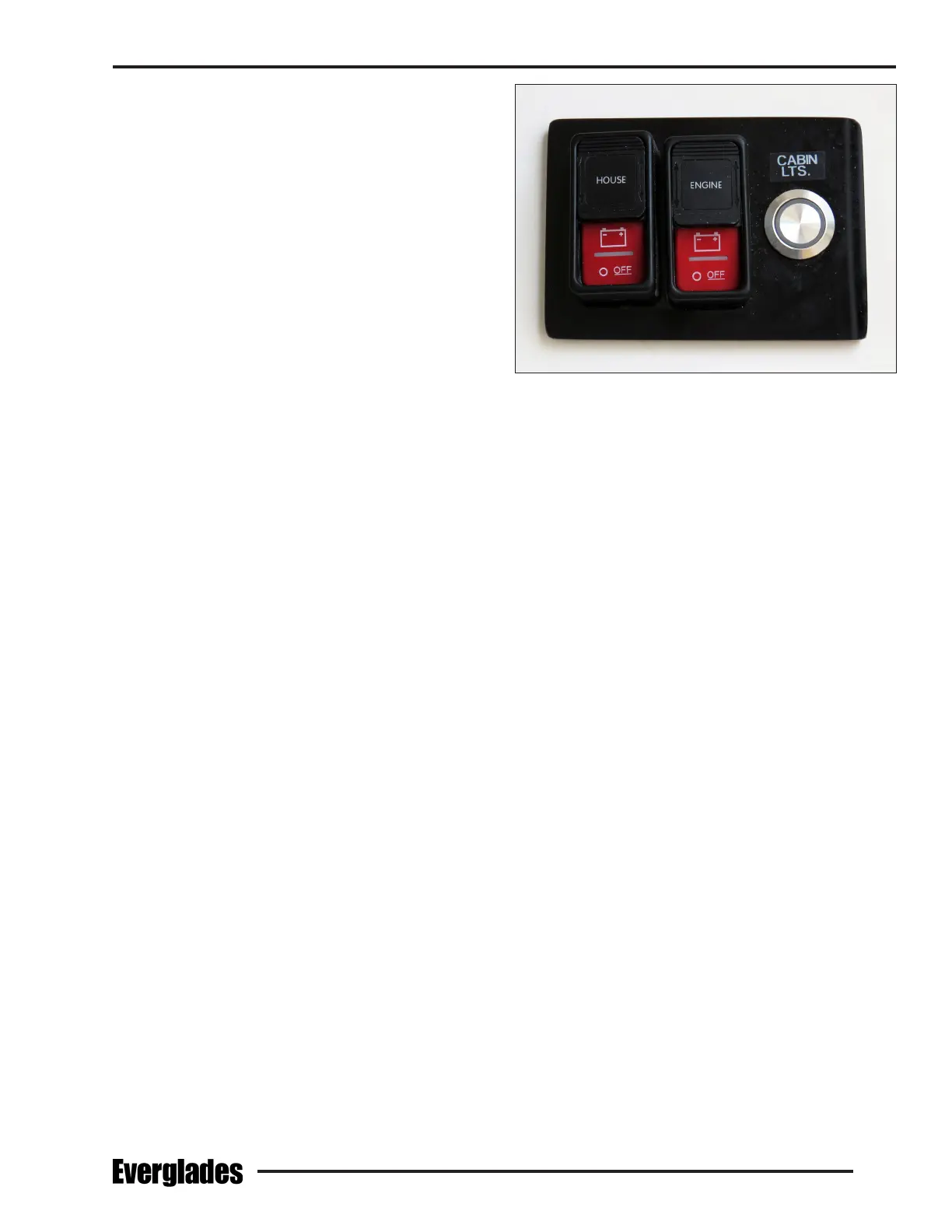
Battery Switches on Panel in the Head Compartment
6.4 Remote Battery Switch Panel
Each battery switch is controlled by a switch in
the battery switch panel located on the aft head
compartment bulkhead. A red light in each switch
will illuminate to indicate that the battery the
switch it controls is now on. When the battery
switch is turned o, the red light may not turn o
immediately or will slowly fade out if there are no
loads present on the system. This is normal as
the capacitors in the system drain.
Engine
Remotely activates the port and starboard en-
gine battery switches. Slide the label down and
press the top of the switch to activate the battery
switches. Slide the label up and press the bottom
of the switch to turn the battery switches o.
House
Remotely activates the House battery switch. Slide
the label down and press the top of the switch to
activate the battery switch. Slide the label up
and press the bottom of the switch to turn the
battery switch o.
Notice:
The remote battery switch panel is always
supplied power whenever the house battery
or battery bank is connected.


 To Next Page