64
Electrical System
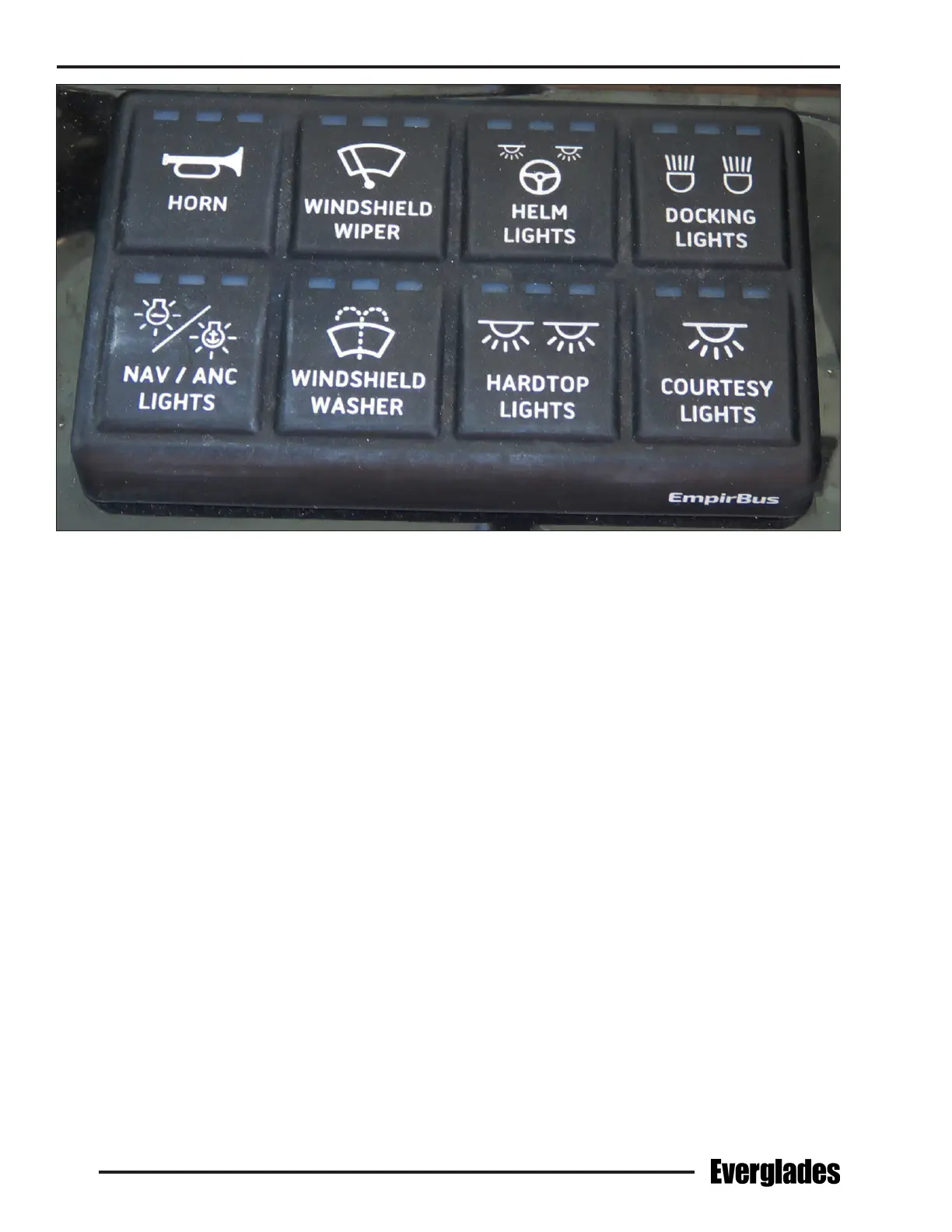
Helm Switch Panel
The following is a description of the accessories
controlled by the helm accessory switch panel:
Horn
A momentary switch that activates the boat horn
located on the hardtop.
Windshield Wiper
Activates the windshield wiper.
Windshield Washer
A momentary switch that activates the solenoid that
sprays water on the windshield washer from the
fresh water system.
Notice:
The fresh water system must be activated for
the windshield washers to work.
Helm Lights
Activates the red overhead map lights above the
helm.
Notice:
Red lights have less eect on night vision and
should be selected if you need to illuminate the
helm area while navigating at night.
Docking Lights
Activates the lights in the hull on each side of the
bow that illuminate the area in front of the boat
for better visibility when docking at night.
Nav/Anc Lights
Activates the navigation and anchor lights. Press
the switch once for navigation lights. Press the
switch again to activate the anchor light. Press
the switch again to turn the lights o.
Hardtop Lights
Activates the lights in the hard top above the helm
and mezzanine seats.
Courtesy Lights
Activates the lights below the gunnels that illumi-
nate the cockpit sole.
Helm Switch Panel on Starboard Side of Steering Wheel


 To Next Page