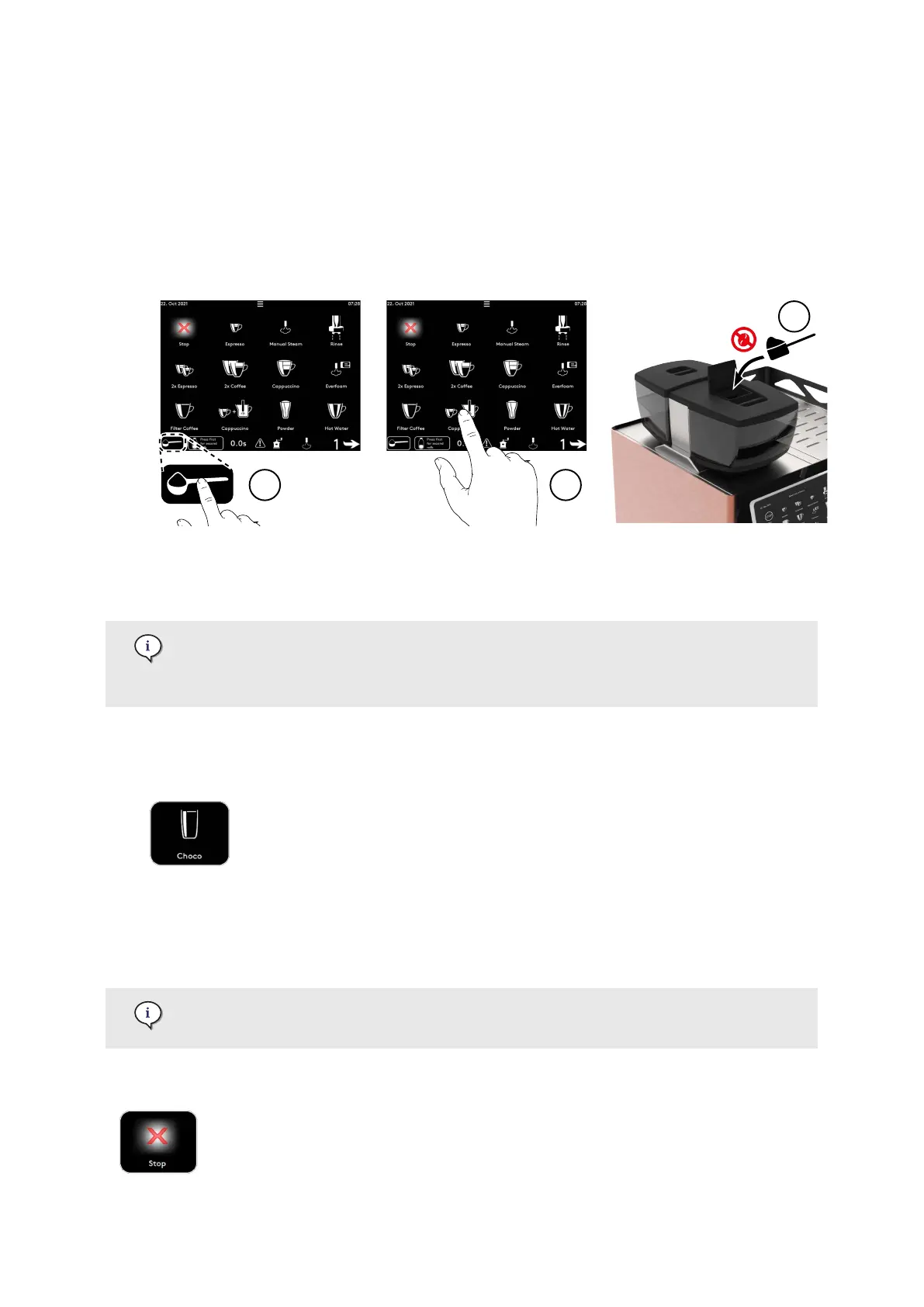
1. Adjust the coee spout height (page 63).
2. Place a cup under the coee outlet.
3. Press the button with measuring scoop (1).
4. Press the desired product (2).
5. Open the powder chute lid and add one portion of ground coee max. 20 g (3). Use espresso ne
grind coee for optimal in-cup quality.
6. Close the powder chute lid and press Continue to dispense the product.
7. Wait for the product to dispense.
5.8.7. Dispense a powder product (e.g. choco) (machine option)
All product buttons function as start/stop buttons.
Press the button to start dispensing the product and, if necessary, to stop dispensing
manually: press the same product button again.
1. Adjust the coee spout height (page 63).
2. Place a cup under the coee outlet.
3. Press one of the powder product (e.g. Choco).
4. Wait for the product to dispense.
5.9. Product stop
Depending on settings, the STOP button may not be displayed in the products area.
Refer to User rights in the Display menu (page 163) for more information.
To stop dispensing of all products, press the stop button.
Operation
© Eversys S.A. Page 66 of 172 02.01.2023











 To Next Page