100
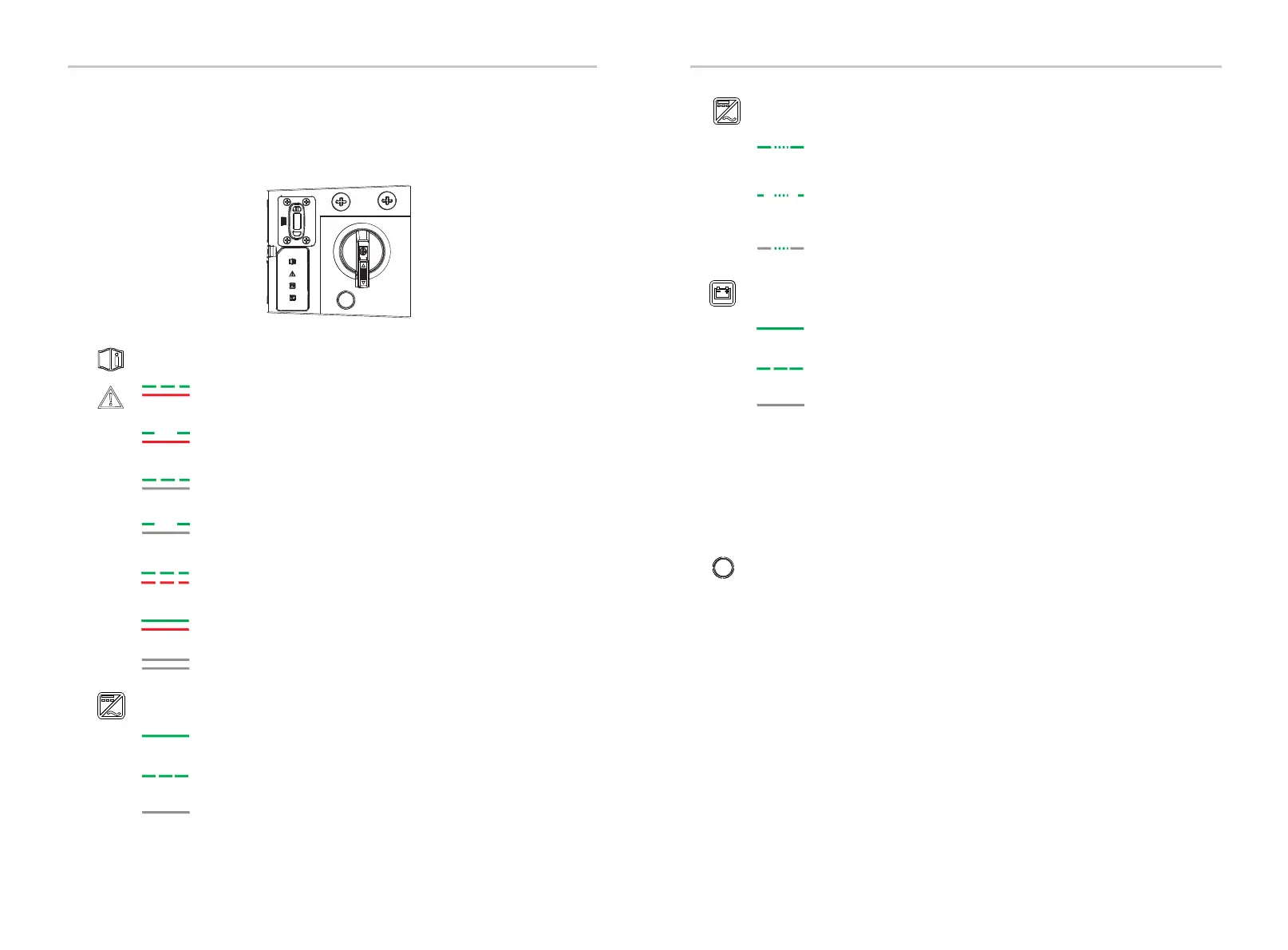
LED1 flashes green (0.5s on, 0.5s off) and LED2 is red when arc
fault occurs.
LED1 flashes green (2s on, 2s off) and LED2 is red when ground
fault occurs.
LED1 flashes green (0.5s on, 0.5s off) and LED2 is off when PV
voltage fault occurs.
LED1 flashes green (2s on, 2s off) and LED2 is off when Grid
error occurs.
LED1 is green and LED2 is red when other fault occurs.
LED1 flashes green (0.5s on, 0.5s off) and LED2 flashes red
(0.5s on, 0.5s off) when firmware upgrading is ongoing.
LED1 is off and LED2 is off when no fault occurs.
Fault LED 1 and Fault LED 2
11 Indicator Light and Button
Indicator light and button of inverter
Operation LED (Free / Secondary)
Green when the inverter is in normal status or in backup status.
Flashing green (1s on, 1s off) when the inverter is in waiting or
checking status.
Off when the inverter has a fault.
Indicator Light and ButtonSystem ON
101
Operation LED (Primary)
Green for 2s and then quick flashing green for 1s (0.2s on,
0.2s off) when the inverter is in normal or backup status.
Flashing green for 2s (1s on, 1s off) and then quick flashing
green for 1s (0.2s on, 0.2s off) when the inverter is in waiting
or checking status.
Off for 2s and quick flashing green for 1s (0.2s on, 0.2s off)
when the inverter has a fault.
BAT LED
Green when the battery communication is normal and working.
Flashing green (1s on, 1s off) when the battery communication
is normal and the battery is in idle status.
Off when the battery does not communicate with inverter.
Press the button for 0.5 second: Clear EPS OverLoad Fault / EPS Bat
Power Low / BI_TransformerImbalanceHighFault / BI_VoltImbalanceFault
/ BatBreakOpen Fault.
Press the button for 1 second: Turn on the inverter if it has been turned
off.
Press the button for 1 second: Turn off the inverter if it has been turned
on. The control circuitry remains powered up.
Press the button for 5 seconds: Run arc self-test if there is no arc fault.
Press the button for 5 seconds: Clear arc fault if arc fault occurs.
All LEDs
All LEDs flash (0.5s on, 0.5s off) when firmware upgrading has been
completed but the U drive is still connected .
All LEDs will be back to the normal state if the U drive is unplugged after
the upgrading finished.
Inverter power button


 To Next Page