+1.317.845.5710
+44.1438.310163
USA (Corporate Headquarters)
Europe/Middle East/Asia
33
Configuring SOCKS Settings
SOCKet Secure (SOCKS) is an Internet protocol that routes network packets between a client and server through a proxy
server. This feature is useful if the encoder is located on a local network behind a firewall, yet alarms need to be sent to a
destination outside the local network (such as the Internet). SOCKS4 and SOCKS5 are supported, and SOCKS5 additionally
provides authentication so only authorized users may access a server.
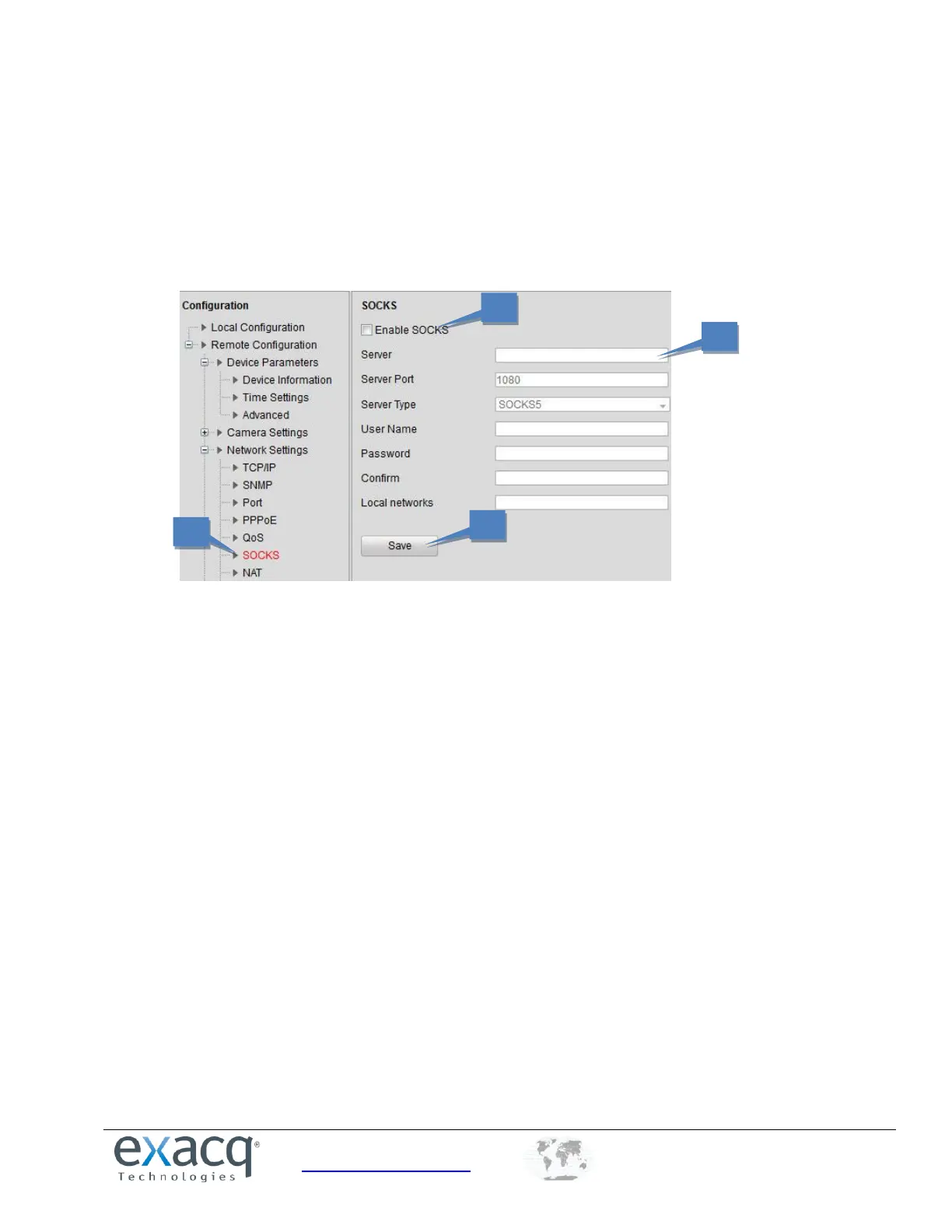
1. From the Remote Configuration menu, select Network Settings and then SOCKS to open the SOCKS Settings
interface:
2. Select the Enable SOCKS checkbox.
3. Configure the following settings:
Server: Enter the address of the SOCKS server.
Server Port: Enter the port of the SOCKS server (default: 1080).
Server Type: Select the server type ( SOCKS4 or SOCKS5). If you select SOCKS5, you can enable the user
authentication on the server and then enter the login username and password.
Local networks: Define the local network segment that does not need to use SOCKS proxy server. You
can enter multiple network addresses and use a semicolon (;) to separate them (“10.0.0.0/255.0.0.0;
172.16.0.0/255.240.0.0”).
4. Click Save to save the settings.



 To Next Page