+1.317.845.5710
+44.1438.310163
USA (Corporate Headquarters)
Europe/Middle East/Asia
18
Main Page
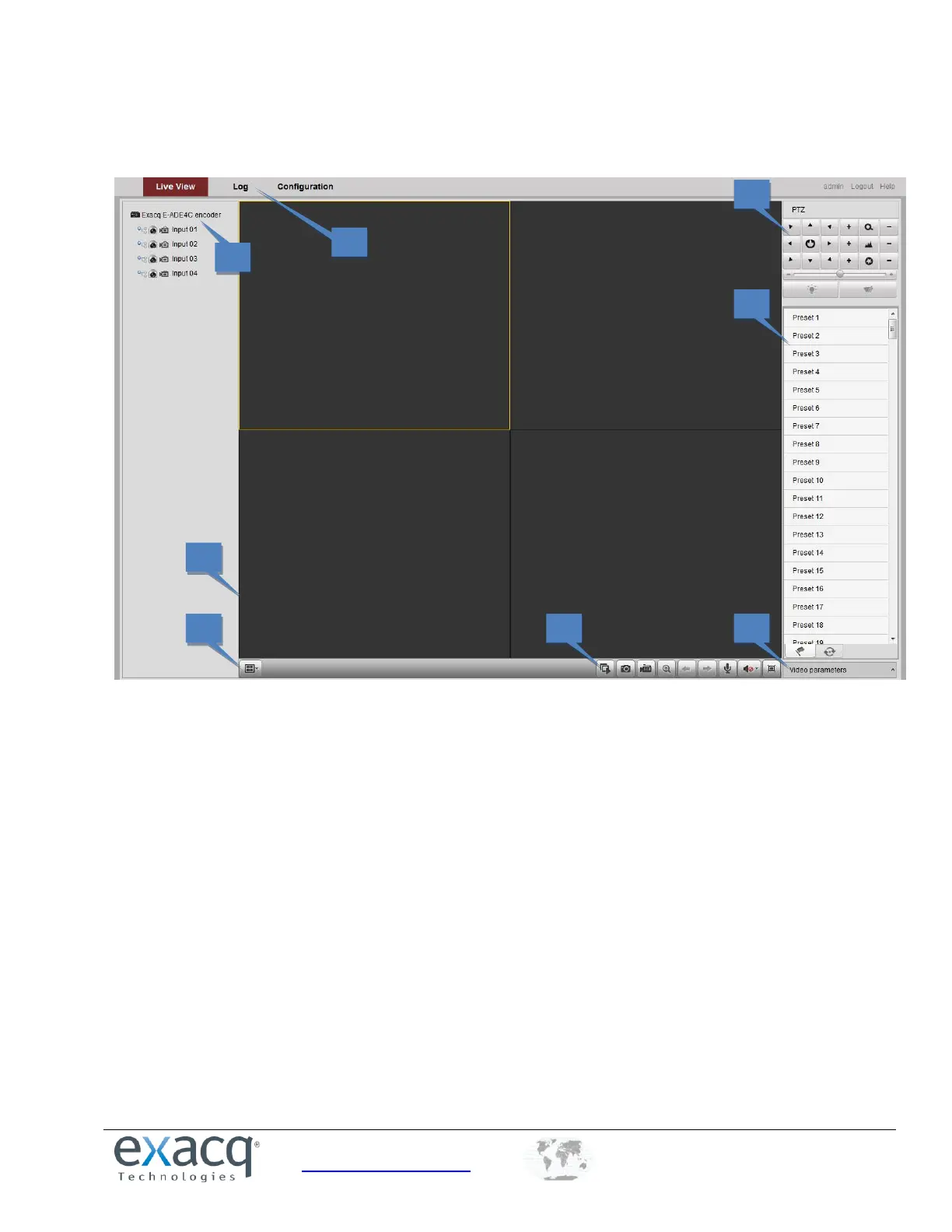
After successful login, the main page opens automatically.
The following features are available on this page:
1. Menu Bar: Enter the Live View, Log, and Configuration pages.
2. Device List: Display the connected encoder and its channels.
3. Live Video Window: Display the live video of the current camera.
4. Window-division: Choose a Live View display mode.
5. Toolbar: Control functions in live view mode, such as live view, audio on/off, two-way audio, and more.
6. PTZ Control: Control pan/tilt/zoom and the lighter and wiper controls.
7. Preset Setting/Calling: Set and call the preset for the camera (supports PTZ functions).
8. Video Parameters menu: Configure the brightness, contrast, hue, and saturation of live video. (Click the Video
Parameters button to display the options.)



 To Next Page