exacqVision User Manual
1/24/2011
To enable the Custom User
Permissions section, deselect View Admin in the Custom User
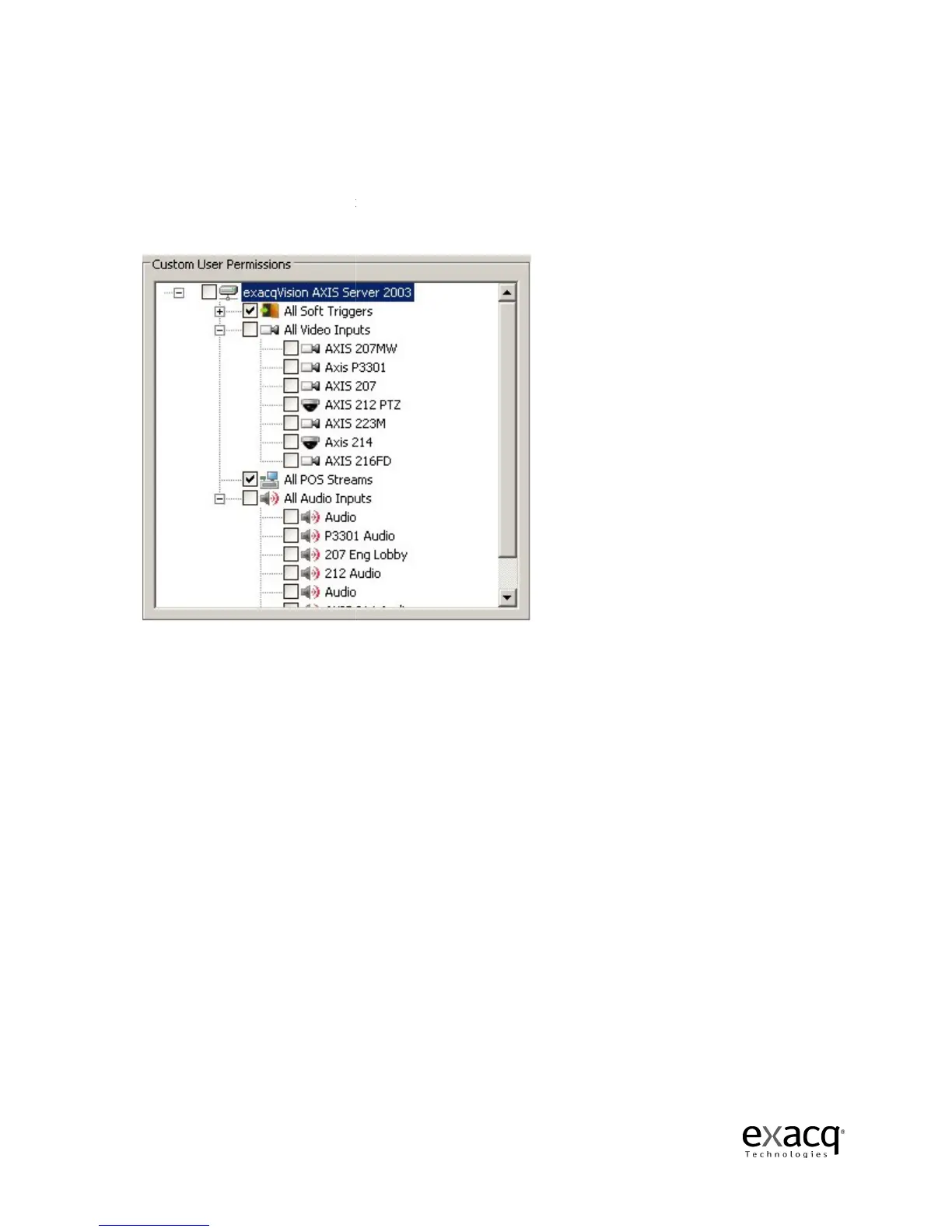
Privileges section. Clicking on the camera name in the Custom User Permissions tree
video from that camera. By default, a user is assigned permission to view all cameras. At the top of
th
e tree you can uncheck the server to deselect all of the cameras. Click on any of the individual
camera check boxes to select or deselect cameras. When the user logs in to the system, the user
will not have access to the sources that are restricted for tha
Page 190
Permissions section, deselect View Admin in the Custom User
Privileges section. Clicking on the camera name in the Custom User Permissions tree
video from that camera. By default, a user is assigned permission to view all cameras. At the top of
e tree you can uncheck the server to deselect all of the cameras. Click on any of the individual
camera check boxes to select or deselect cameras. When the user logs in to the system, the user
will not have access to the sources that are restricted for tha
t account.
Permissions section, deselect View Admin in the Custom User
Privileges section. Clicking on the camera name in the Custom User Permissions tree
displays
video from that camera. By default, a user is assigned permission to view all cameras. At the top of
e tree you can uncheck the server to deselect all of the cameras. Click on any of the individual
camera check boxes to select or deselect cameras. When the user logs in to the system, the user


 To Next Page