Home
EXFO
Test Equipment
FIP-400B
Page 119
EXFO FIP-400B - Page 119
142 pages
Manual
Save Page as PDF
To Next Page
To Next Page
To Previous Page
To Previous Page
Loading...
Troubleshooting
Fiber Inspection Probe
111
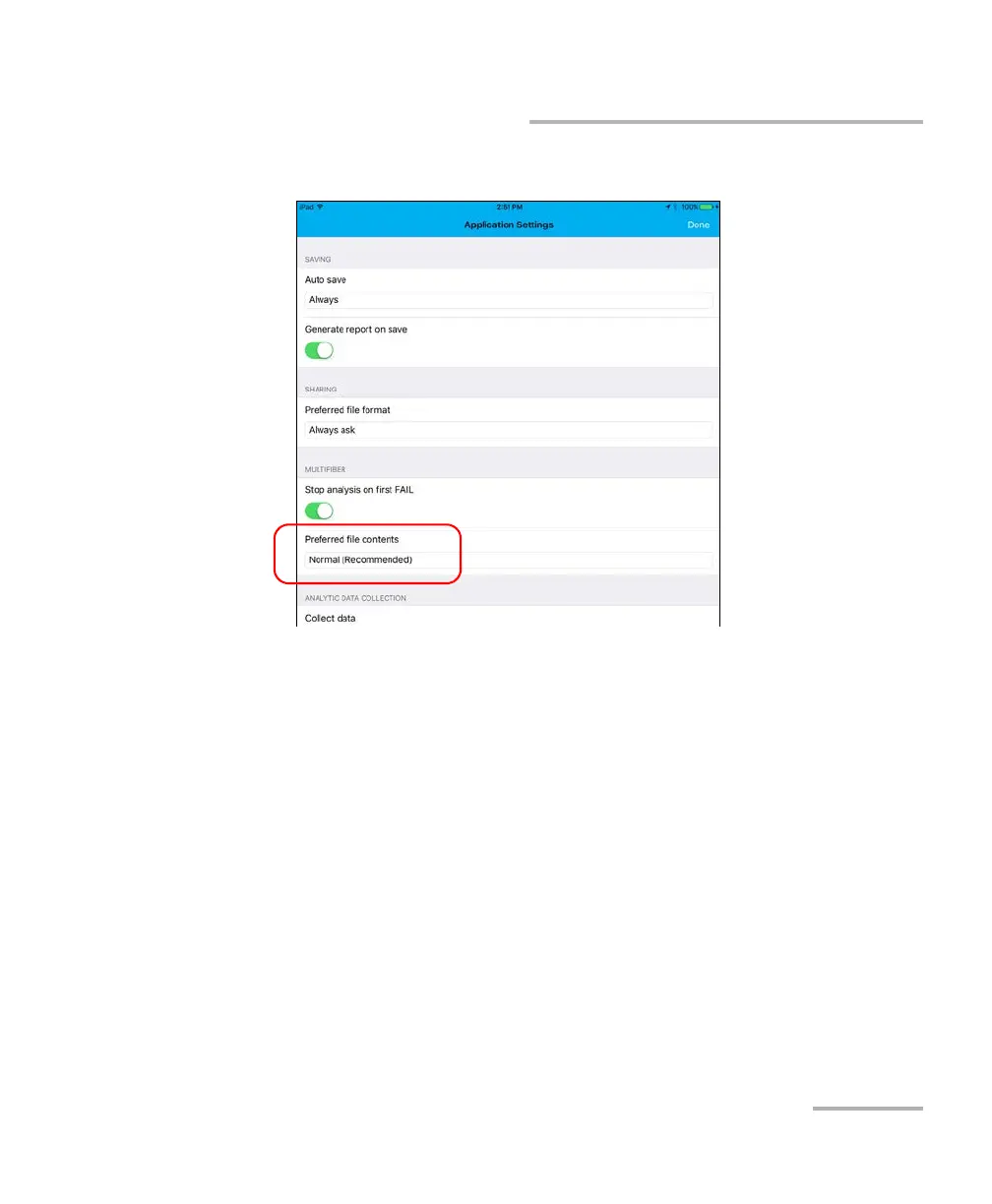
Changing the File Contents
3.
Under
Multifiber
, tap
Preferred file contents
.
4.
Select
Nor
mal (Recommended)
or
Enhanced
.
5.
Ta
p
Done
to confir
m your choice.
6.
Ta
p
Done
to retur
n to the main window
.
118
120
Table of Contents
Main Page
Table of Contents
3
Certification Information
5
Introducing the FIP-400B Fiber Inspection Probe and Connectormax2 Mobile
9
Probe
10
Available Models
13
Probe Tips
14
LED Indicators
14
Connectormax2 Mobile Software
17
Technical Specifications
18
Conventions
19
Safety Information
21
Other Safety Symbols on Your Unit
23
Electrical Safety Information
24
Setting up Your Fiber Inspection Probe and Connectormax2 Mobile
27
Preparing to Use the Mobile Application
27
Connecting or Disconnecting the Wireless Probe
28
Changing the Fiber Inspection Probe Tip
31
Changing the FIP Nozzle (MF-Ready Probes Only)
32
Adjusting Brightness
38
Setting up Identification
40
Setting up the Incrementation
42
Setting up Autonaming
45
Setting up Auto Capture
48
Managing and Selecting Test Configurations
50
Modifying the File Format
61
Stopping the Analysis Process on First Fail
63
Restoring to Default Settings
65
Inspecting Fiber Ends
67
Inspecting Fiber Ends (Single Fiber and Transceiver - Fiber Receptacles)
67
Inspecting Multiple Fiber Ends (MF-Ready Probes Only)
73
Saving Files
83
Managing Files
86
Analyzing Captures
91
Creating and Viewing Reports
97
Transferring Results with Third-Party Applications
101
Transferring Results Directly with Your Smart Device
107
Updating the Firmware
108
Maintenance
109
General Maintenance
109
Cleaning Lenses
110
Recycling and Disposal
110
Recharging the Battery (FIP-425B and FIP-435 Models Only)
111
Replacing the Battery (FIP-425B and FIP-435 Models Only)
112
Troubleshooting
115
Solving Common Problems
115
Changing the File Contents
118
Contacting the Technical Support Group
120
Viewing Information about Connectormax2 Mobile
121
Viewing Online Help
122
Transportation
123
Warranty
125
General Information
125
Liability
126
Exclusions
126
Certification
126
Service and Repairs
127
EXFO Service Centers Worldwide
128
A Fiber Inspection Probe Tip Compatibility Chart
129
Index
133
Related product manuals
EXFO Fiber Guardian FG-750
372 pages
EXFO FOT-12
63 pages
EXFO FOT-10A
63 pages
EXFO FTB-860
675 pages
EXFO FTB-200
222 pages
EXFO FTB-880
675 pages
EXFO FOT-930
111 pages
EXFO FVA-3100
128 pages
EXFO FTBx-88260
1071 pages
EXFO FTB-800 Series
675 pages
EXFO FTBx-88000 Series
1071 pages
EXFO FTB-860 NetBlazer Series
409 pages




 To Next Page