Home
EXFO
Measuring Instruments
FTB-1v2
Page 103
EXFO FTB-1v2 - Page 103
497 pages
Manual
Save Page as PDF
To Next Page
To Next Page
To Previous Page
To Previous Page
Loading...
Se
t
ti
n
g
Up
Y
our
FTB-
1
v2
a
nd
FT
B-
1v
2
Pr
o
FTB-1v2 and FTB
-1
v2 Pro
91
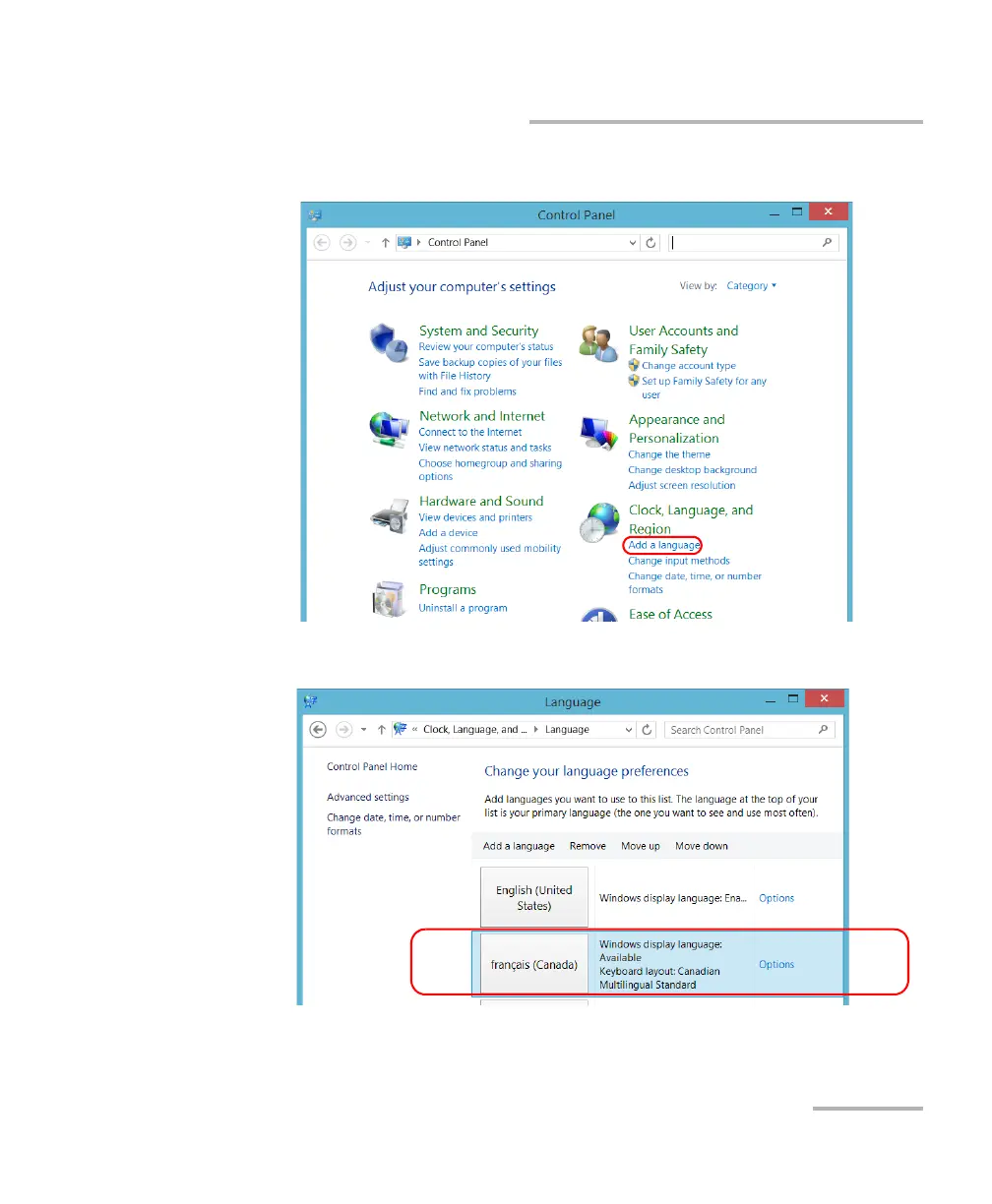
Selecting the L
anguage of Operation
3.
Under
Clock, L
anguage, and Region
, tap
Add a language
.
4.
Select the desired langu
age from the list.
5.
Ta
p
Options
.
102
104
Table of Contents
Main Page
Table of Contents
3
Regulatory Information
7
Introducing the FTB-1V2 and FTB-1V2 Pro
13
Working with FTB and Ftbx Modules
20
LED Indicators Description
22
Function Buttons Description
24
Power Sources
25
Automatic Fan Speed Management
25
Software Options for Your Unit
26
Product Registration
27
Technical Specifications
27
Conventions
28
Safety Information
29
Other Safety Symbols on Your Unit
31
Laser Safety Information
32
Electrical Safety Information
33
Getting Started with Your Unit
39
Inserting and Removing Ftbx Test Modules
39
Attaching and Removing FTB Test Modules
45
Positioning Your Unit
51
Turning on Your Unit
52
Turning off Your Unit
53
Configuring Your Unit at First Startup
59
Accessing and Exiting Mini Toolbox X
61
Starting Module Applications
62
Understanding Module Statuses
63
Using the On-Screen (Virtual) Keyboard
65
Working with Windows 8.1 Pro or Windows Embedded 8 Standard
66
Right-Clicking with the Touchscreen
68
Installing or Upgrading EXFO Applications
69
Activating Software Options
71
Installing Third-Party Software on Your Unit
74
Protecting Your Unit with an Antivirus Software
74
Securing Your Unit Using the Kensington Lock
75
Using a Keyboard, Mouse or Other USB Devices
76
Inserting and Removing Microsd Cards
78
Working with Bluetooth Devices
81
Setting up Your FTB-1V2 and FTB-1V2 Pro
83
Adjusting Brightness
83
Adjusting Speaker and Microphone Volume
84
Customizing the Right-Click Feature
90
Enabling or Disabling the Automatic Logon
94
Selecting the Startup Applications
98
Configuring Network Printers
100
Selecting the Language of Operation
102
Setting Date and Time Formats
111
Adjusting the Date, Time and Time Zone
113
Configuring the Power Management Options
116
Setting Mini Toolbox X Behavior
126
Configuring the Internet Options
128
Getting Ready to Retrieve Geolocation Information
131
Configuring Parameters Via Windows Mobility Center
136
Setting Other Parameters
137
Working with Your Unit
139
Printing Documents
139
Viewing PDF Files
140
Taking Screen Captures
141
Browsing the Web
142
Accessing the Internet with a Mobile Broadband USB Modem Key
143
Retrieving the GPS Location of Your Unit
145
Managing Favorites
148
Using the Calculator
156
Using the Text Editor
156
Accessing Other Tools
157
Using the Optional Built-In Power Meter and VFL
159
Inspecting Fibers with a Probe
161
Managing Data
163
Viewing Disk Space and Managing Files
164
Transferring Data Via the Bluetooth Technology
165
Connecting to a Wireless Network
172
Using the USB to RS-232 Adapter
175
Freeing up Disk Space with the Disk Cleanup Utility
181
Enabling or Disabling the Wireless Communication
185
Connecting to a VPN from Your Unit
190
Accessing Your Unit Remotely
197
Working with Remote Desktop
198
Working with VNC
208
Adding Exceptions to the Firewall
216
10 Testing Network Connections
221
Performing a Ping Test
221
Performing a Trace Route Test
224
Exporting the Results
226
11 Preparing for Automation
227
Linking Units with the Ethernet Port
229
Linking Units Using a Serial Port
229
Getting Optimum Performance from Your Unit
230
Changing Communication Settings
232
Configuring DCOM Access to Your Unit
237
Configuring Your Instruments
260
Using Your Unit and Modules in an Automated Test Environment
267
Standard Status Data Structure
268
Bits
269
Mnemonics
269
SCPI Command Structure
272
Consulting Data Types
275
Writing Remote Control Code
276
Error Message Format
277
Monitoring Remote Commands
278
13 Maintenance
283
Cleaning Detector Ports
284
Cleaning VFL-Type Connectors
285
Cleaning the Touchscreen
286
Battery Safety Recommendations
286
Recharging the Batteries
287
Modifying the Low-Battery Thresholds
289
Replacing the Battery (All Models Except High-Power Dual Carrier)
294
Replacing the Batteries (High-Power Dual Carrier)
299
Installing or Removing the Power Meter and VFL
305
Managing Windows Updates
312
Recycling and Disposal
316
14 Troubleshooting
317
Solving Common Problems
317
Power on (PON)
317
Restoring Your Unit to Normal Operation
325
Accessing the Online Documentation
359
Contacting the Technical Support Group
361
Viewing System Information
362
Retrieving Network Interfaces Information
364
Transportation
368
15 Warranty
369
General Information
369
Liability
370
Exclusions
371
Certification
371
Service and Repairs
372
EXFO Service Centers Worldwide
373
A Data Types
375
Applicable Data Types for Input-IEEE 488.2
376
Applicable Data Types for Output -IEEE 488.2
385
Applicable Data Types for Input-SCPI
395
Special Numeric Values Received on Output
396
BIEEE 488.2 and Specific Command Reference
397
IEEE 488.2 Commands-Quick Reference
397
IEEE 488.2 Required Commands
398
User Request (URQ)
400
Specific Commands-Quick Reference
418
Specific Commands
419
CSCPI-Based Errors
441
Execution Error (EXE)
445
Query Error (QYE)
454
Operation Complete (OPC)
455
DCOM Properties and Events
457
Activex (COM/DCOM)-Quick Reference
458
Properties
459
Events
466
E Communicating through TCP/IP over Telnet
467
Executing SCPI Commands over Telnet
467
Accessing Modules
473
Internal Commands of the TCP/IP over Telnet Protocol
475
Index
487
Other manuals for EXFO FTB-1v2
Quick Reference Guide
2 pages
Related product manuals
EXFO FTB-1v2 Pro
497 pages
EXFO FTB-2
509 pages
EXFO FTB-500
449 pages
EXFO FTB-5800
103 pages
EXFO FTB-2 Pro
509 pages
EXFO FTB-4 Pro
509 pages
EXFO FPM-600
59 pages
EXFO FPM-300
40 pages
EXFO FIP-500
131 pages
EXFO FOT-600
79 pages
EXFO EPM-50 Series
23 pages
EXFO Optical Xplorer OX1
215 pages



 To Next Page