Quantum Series Videowall Processing Systems • Introduction 7
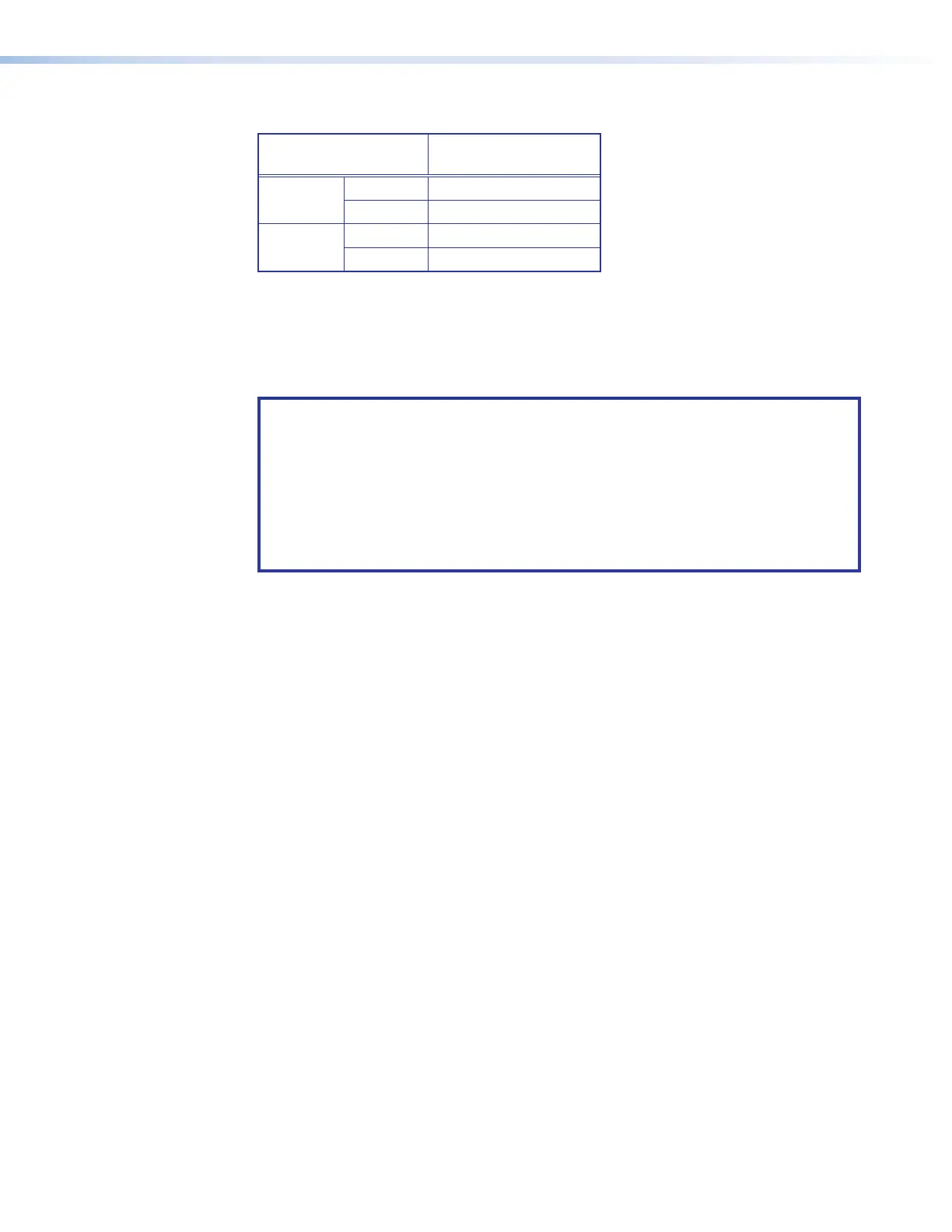
High-definition sources
Resolution
Maximum Number of
Real Time Sources
HD 720p
Full native 7
Quarter 28
HD 1080p
Full native 3
Quarter 12
Display Architecture
When Quantum is controlled by the Quantum Control Software, source signals are placed
on the display in windows, which are fully resizable and can be positioned anywhere on
the displays.
NOTES:
• The Quantum Control Software remembers the display layout that was in effect
before the system was powered down.
• By default, each new Quantum system is configured with a single, full-size
window that is displayed with a Quantum logo design. This logo is stored on the
internal flash drive or hard disk.
• For further details on controlling source window content, size, and positioning,
see the Quantum Control Software User Guide.
Source layers
The output image has two layers:
• PCI source layer — Used to display source signals delivered via the PCI bus, such
as stored images and window border attributes
• RAPT source layer — Used to display source signals delivered via the RAPT bus,
that is, digitized sources from the input cards and QGE 100 sources
When no source windows are present, the PCI source layer is black and the RAPT source
layer fully transparent, making the entire display appear black.
The layer on which source windows are placed is determined by the Quantum processor
and control software, and needs no user intervention.



 To Next Page