Quantum Series Videowall Processing Systems • Installation and Maintenance 20
Rear Panel Features
The Quantum rear panels provide slots for cards containing video input and output
connectors, RJ-45 network connectors, connectors for a keyboard, mouse, and monitor,
and USB connectors. It also contains the power connector and two vents.
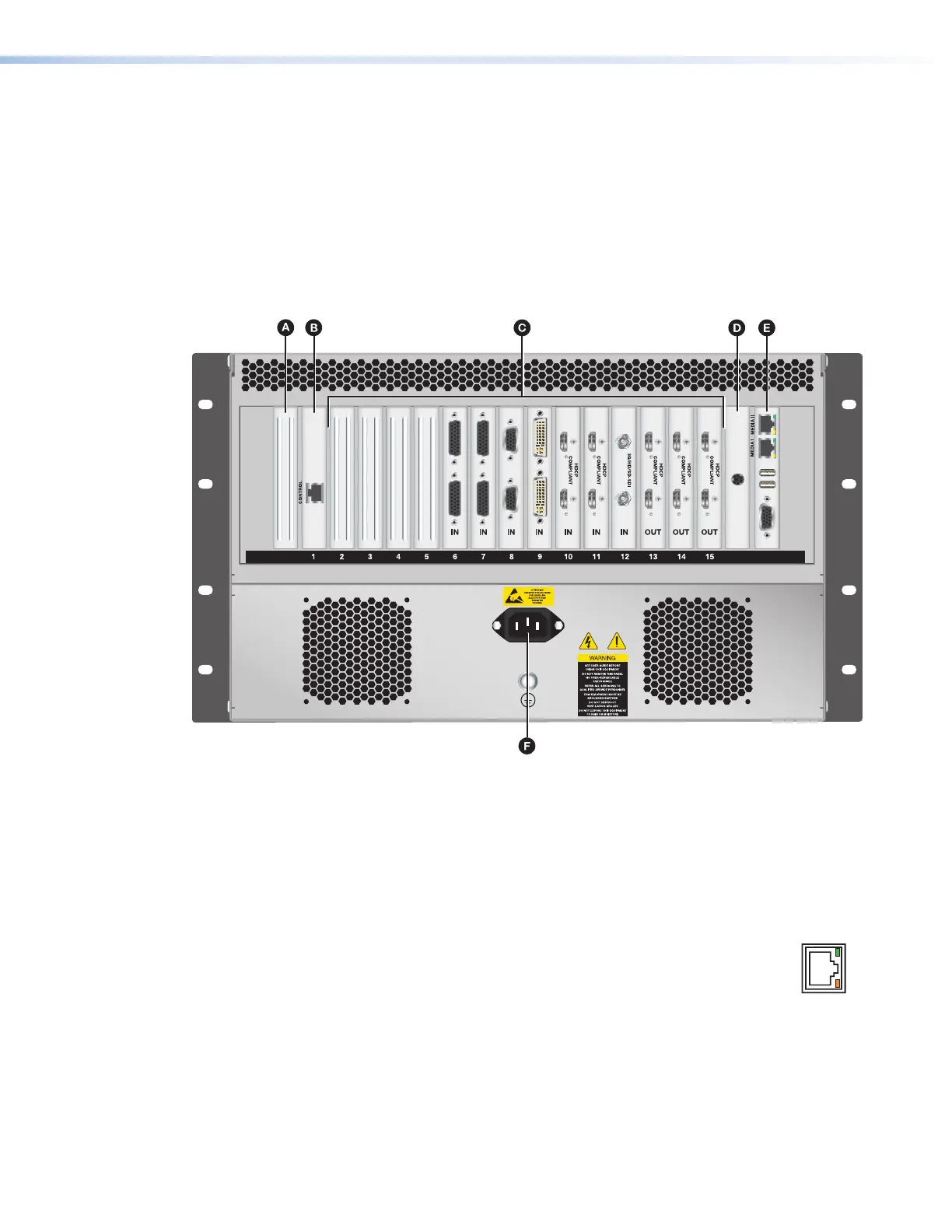
Quantum Elite 615 Rear Panel
The Quantum Elite 615 rear panel has 15 slots in which cards can be installed to order,
plus three slots in which cards are permanently installed. It also contains the main power
connector and the vents.
Figure 14. Quantum Elite 615 Rear Panel
A
Slot 0
D
PS/2 keyboard card
B
Control card
E
Media I and Media II network, USB, and
monitor ports
C
Input and output cards
F
Power connector
A
Slot 0 — By default, this slot is empty. If all other input and output slots are full, an
additional input card can be installed in this slot.
B
Control card — This slot holds the card containing the Control port.
To enable control via the Quantum Control Software, use this RJ-45
Ethernet connector (shown at right) to connect the Quantum to a network,
a single computer, or a QC 101 controller. See Control Card on the next
page, Ethernet Connections on page 51, and QC 101 Controller, beginning on
page 69, for more information.
• ACT LED — The amber Activity LED blinks to indicate network activity.
• LINK LED — The green Link LED lights steadily to indicate a good network
connection.
ETHERNET



 To Next Page