Quantum Series Videowall Processing Systems • Operation 67
Accessing the Quantum Control Software
The Windows-based Quantum Control Software enables you to configure and control the
Quantum from your computer by creating a videowall project. Use this control program to
display multiple image sources on single or multiple target displays. Two different control
programs are provided: one for the Quantum Elite models and one for the Quantum
Connect.
NOTE: The Quantum Elite Control Software does not operate with a Quantum
Connect processor or vice versa.
Some features of the Quantum Control Software include:
• The user interface is organized into a series of tasks so that you can easily navigate
through them and set up the videowall.
• A virtual canvas provides an on-screen layout for the videowall where windows can be
added, sized, and positioned.
• Custom videowall configurations can be saved as scenes (presets) for future recall.
• You can create a custom user interface so that the system operator can easily recall
the scenes.
See the Quantum Control Software User Guide for details on using this software.
Computer System Requirements
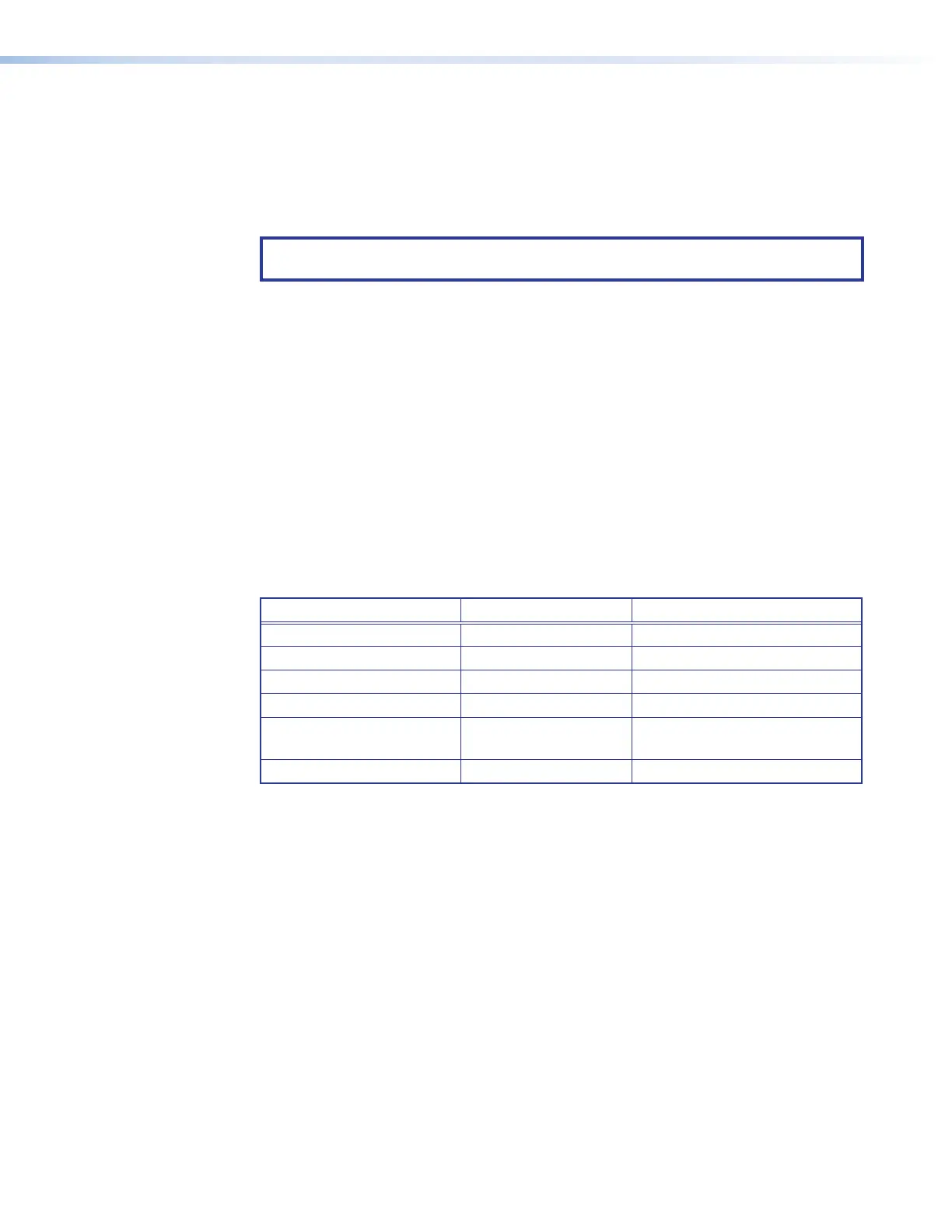
For the Quantum Control Software to function correctly and reliably, it must be installed on
a computer that meets or exceeds the following criteria:
Minimum Recommended
Operating System Windows XP Windows 7 or Windows 8
Processor Speed 200 MHz 450 MHz or higher
Memory (RAM) 64 MB 128 MB or higher
Hard Disk Free Space 30 MB More than 30 MB
Graphics
1024x768, 65 K colors
(16-bit)
1920x1080, 16.7 M colors
(32-bit)
Network Card (Ethernet) 10Base-T 100Base-T
Installing the Software
The control software for your model is provided on a CD with your processor (it is not
available for downloading from the website). To use the software to set up the Quantum
displays, install the program on your computer as follows:
1. Insert the Quantum CD into the disk drive of your PC and wait for your external drive
screen to open.
2. Open the folder for your Quantum product (Quantum Elite or Quantum Connect).
3. Open the Quantum Model Name Software folder.
4. Double-click on the file named Quantum Elite_SetupVn.nn.exe or
Quantum Connect_SetupVn.nn.exe. In the file name, n.nn is the software version
number.
The Quantum Installation wizard opens.
5. Follow the instructions on the wizard screens to complete the software installation.



 To Next Page