Quantum Series Videowall Processing Systems • QC 101 Controller 70
Installation and Connections
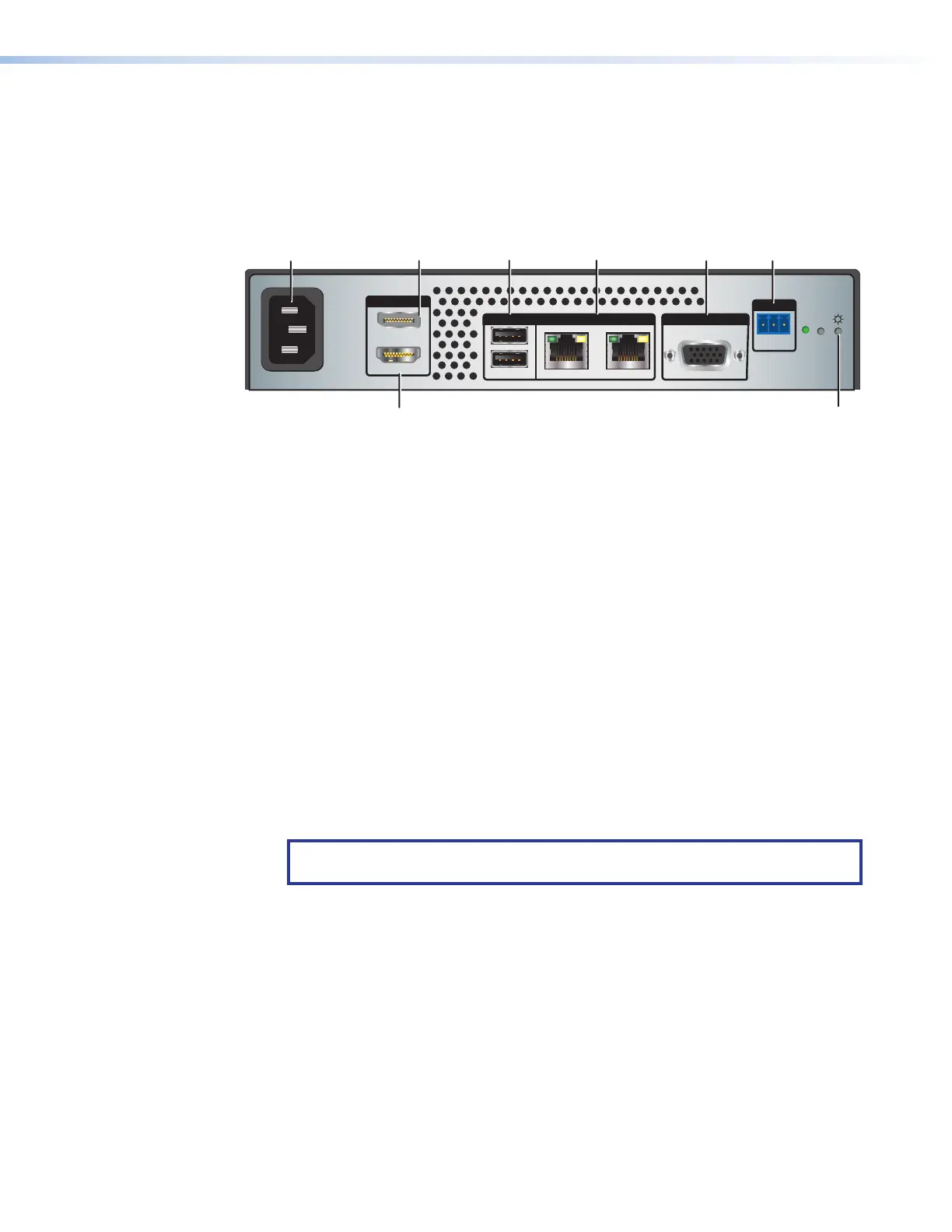
QC 101 Rear Panel Connections
The rear panels of the QC 101 E and the QC 101 C are identical except for a label
indicating the model (QC 101 E or QC 101 C).
100-240V ~ 0.5A MAX
50-60 Hz
OUTPUTS
OUTPUTS
REMOTE
USB CONTROL
DISPLAYPORT
1
3
LAN 1LAN 2
VGA
RS-232
Tx Rx G
RESET
2
1
2
HDMI
F
FE
E
D
DC
C
B
B
A
A
A
AC power connector
E
VGA output connector
B
DisplayPort output connector
F
Remote RS-232 connector
C
USB connectors
G
Power button
D
LAN connectors
H
HDMI output connector
Figure 59. QC 101 Rear Panel
A
AC power connector — Connect the supplied IEC power cord between this male
IEC connector and an AC power source.
B
DisplayPort output connector — (Optional) Connect an external display that
supports DisplayPort to this connector for use when configuring a Quantum
processor using the Quantum Configuration Software.
C
USB connectors — Connect a mouse and keyboard (or a keyboard and mouse
combination), and a flash drive (if needed), to these two connectors to create and
save Quantum Elite or Connect configuration project files (see the Quantum Control
Software User Guide, available at www.extron.com for details on using the Quantum
Configuration Software).
D
LAN connectors — These two RJ-45 connectors support 10/100/1000 Base-T.
Connect either of these ports to a LAN or directly to the Control connector on a
Quantum chassis to enable communication with the processor.
NOTE: The QC 100 must be connected to the same subnet as the Quantum
processors.
E
RGBHV output connector — (Optional) Connect an RGB display to this 15-pin VGA
connector for use when configuring the system using the Quantum Configuration
Software.
F
Remote RS-232 connector — Connect a control system (such as an Extron IPCP
or IPL Pro Control Processor) to this 3-pole captive screw connector for remote
control of the videowall via RS-232 (see the Quantum Control Software User Guide
for the commands).
G
Power button — Using a small screwdriver or stylus, press this recessed button
momentarily to safely shut down the controller. Pressing and holding the button for
5 seconds forces a hard shutdown of the QC 101.



 To Next Page