Quantum Series Videowall Processing Systems • Introduction 14
Application Diagrams
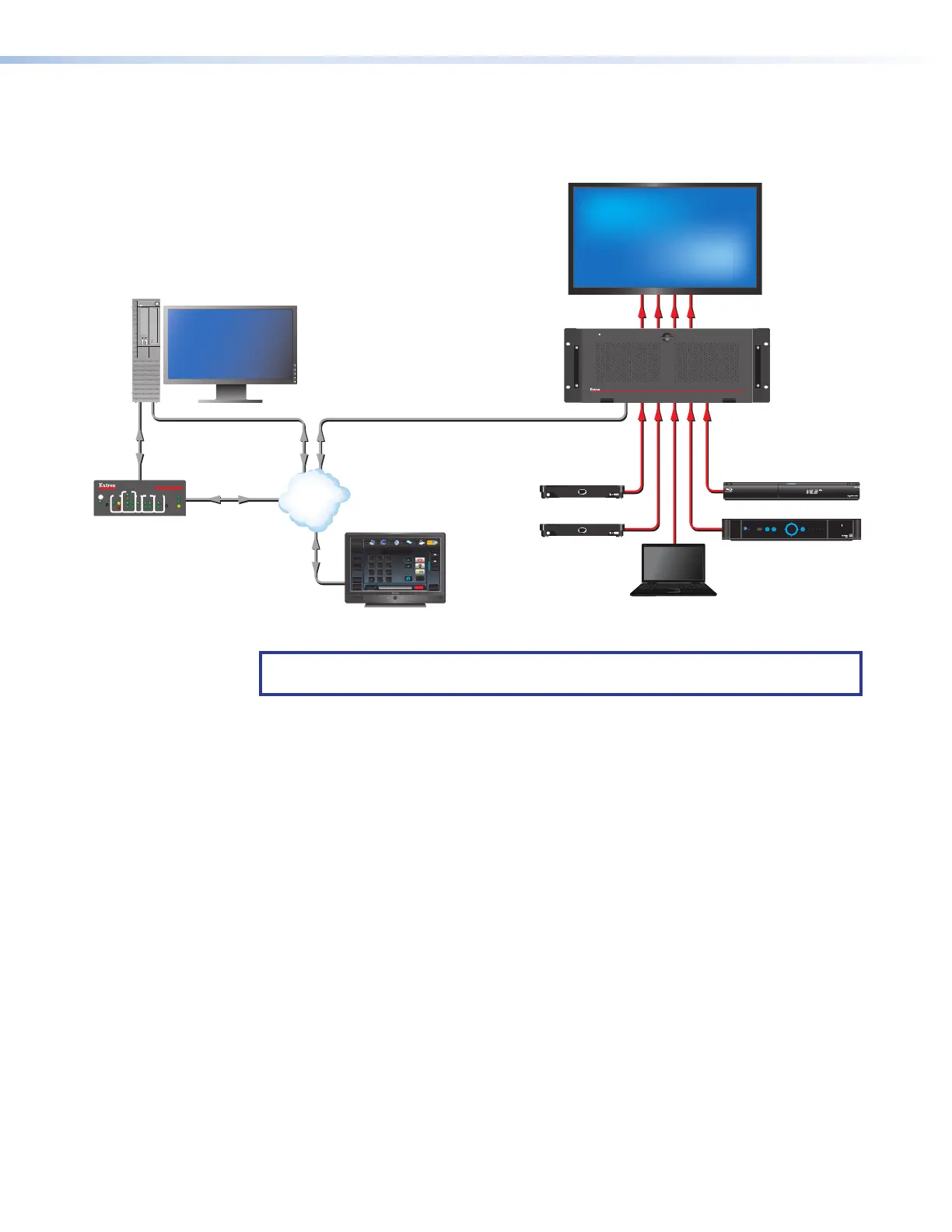
The following application diagrams show examples of how the Quantum Connect and
Quantum Elite can be connected.
Control
VLAN
HDMI
Ethernet
Ethernet Ethernet
RS-232
Ethernet/PoE
Media Player
4K Display
Media Player
Blu-ray Player
Satellite Receiver
HDMI
HDMI HDMI
Control PC
PUSH PUSH
POWERGUIDE MENU RES480 480p 720p 1080i1080p
DIRECTV HD
SELECT
DIRECTV
Extron
Quantum Connect 84
HDCP-Compliant Videowall
Processor
Extron
TLP Pro 1020T
10" Tabletop
TouchLink Pro
Touchpanel
ron
PCP Pro 250
Link Pro
l Processor
Extron
Quantum Connect
Control Software
QUANTUM CONNECT 408
VIDEO WALL PROCESSOR
DATA
Help
System
Off
Display
Room
Control
Off
Mute
Screen
Lighting
December 15, 2013 - 7:58 AM
Audio
Control
Volume
Mute
Tuner
1 2 3
VCRLaptop PC DVD
Doc
Cam
Tuner
On
Channel
Last
Presets
More
Presets
321
654
987
Enter
0
1000
LINK
ACT
R
IR
IPCP PRO 250
eBUS
OVER
LIMIT
S
COM
I/O
1
2
2
4
1
321
RTS
CTS
Tx
Rx
RELAYS
IR/S
1
1
WiFi
1234
Figure 10. Connection Diagram for a Quantum Connect
NOTE: The Quantum Connect model does not support the use of the Media I and
Media II network ports that are available on the Elite models.



 To Next Page