Quantum Series Videowall Processing Systems • Installation and Maintenance 56
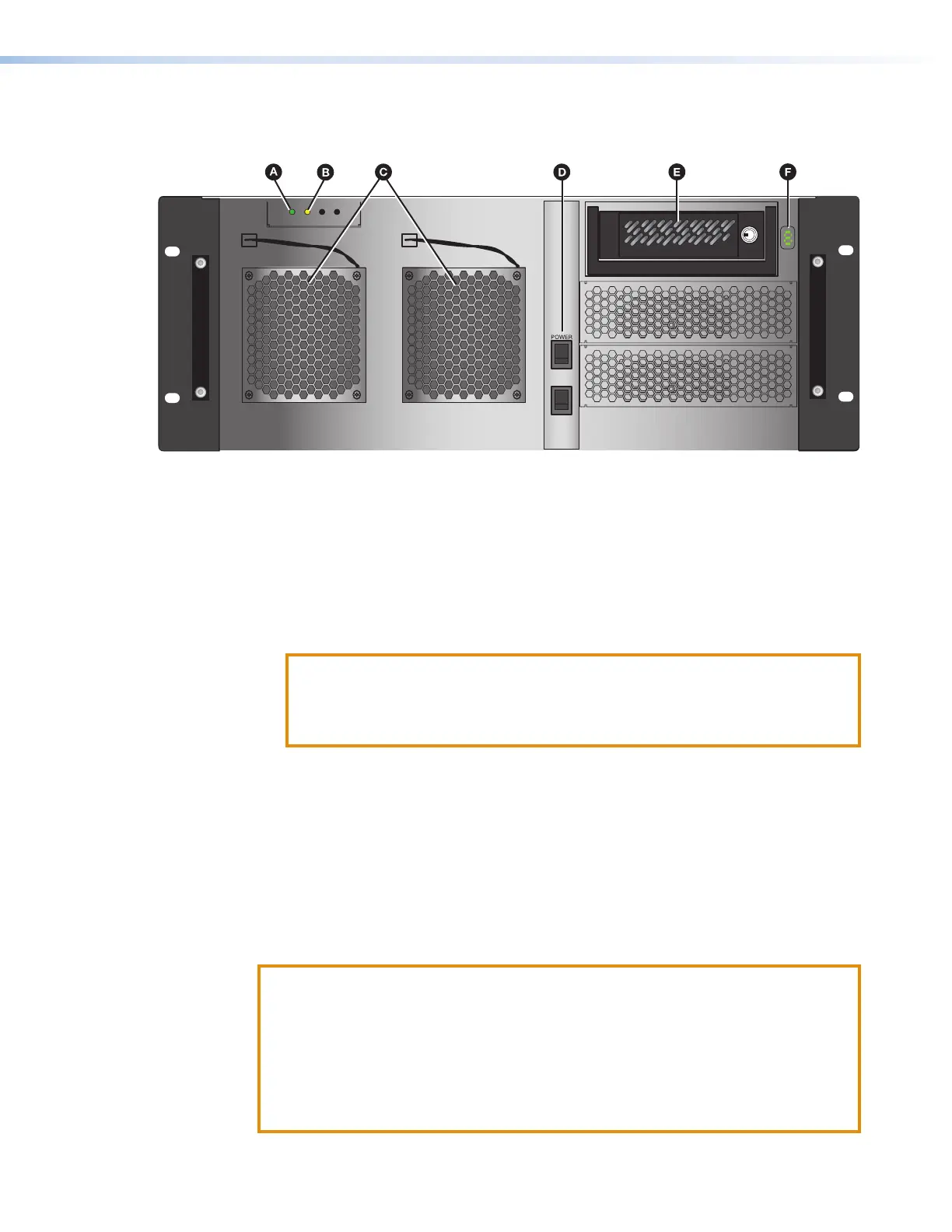
Front panel — Quantum Elite 408 and Quantum Connect
The following front panel features are located behind the access panel:
Figure 46. Quantum Elite 408 and Quantum Connect Front Panel
A
Power indicator LED — This green LED lights when the unit is receiving power.
B
Data LED — This amber LED blinks when data is being written to or read from the
hard disk drive.
C
Fans — These two cooling fans provide forced-air ventilation, drawing air in through
the access panel and exhausting via the rear panel vents. The fan modules are
hot-swappable — if a fan fails, it can be replaced while the unit is powered on and
operating (see Replacing a fan on the next page). These fans may need to be
cleaned periodically (see Cleaning Ventilation Grilles and Filters on the next page).
ATTENTION:
• If a fan fails, replace it as soon as possible to avoid overheating.
• Si un ventilateur tombe en panne, remplacez-le dans les plus brefs délais afin
d’éviter la surchauffe.
D
Power switch — This rocker switch powers the unit on and off.
E
Hard disk drive — This 80 GB IDE disk drive is located in a removable caddy that is
locked in position by a supplied key. The drive is partitioned as follows:
• Drive C: Contains the operating system.
• Drive D: Contains system configuration and image files.
You can manage the contents of the D drive using the Control Panel (see Using the
Control Panel on page 61).
F
LCD window — Displays a 0 that blinks while the system is powering up. When the
Quantum is completely powered up, the 0 in this window remains lit steadily.
ATTENTION:
• If your Quantum processor front panel contains a black rectangular Reset
button (located directly below the Power switch), do not press it. Doing so could
damage the operating system.
• Si la face avant de votre processeur Quantum dispose d’un bouton de
réinitialisation rectangulaire noir (situé juste en dessous de l’interrupteur
d’alimentation), n’appuyez pas dessus. Cela pourrait endommager le système
d’exploitation.



 To Next Page