15
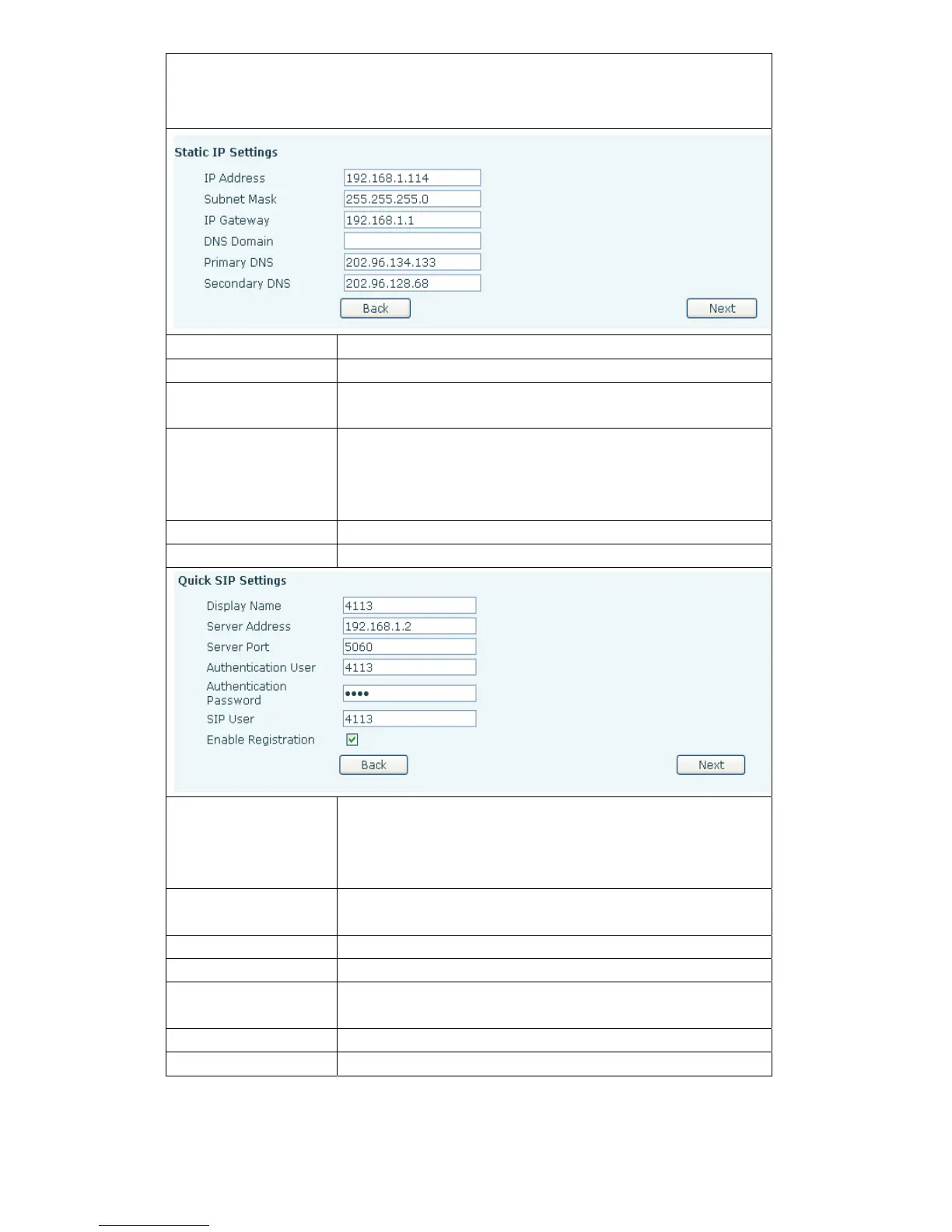
Select Static IP MODE,click【NEXT】can simply configurate the network address and
SIP parameters(default as 1 Line)and browse configuration items. Click
【BACK】return to the last page.
IP Address
Please enter your assigned IP addresses.
Subnet Mask
Please enter your assigned subnet mask.
IP Gateway
Please enter your assigned a default gateway
address.
DNS Domain
Set the DNS domain suffix. When the user input in the
DNS domain name address and cannot be resolved,
telephone will add this domain behind the domain
name address then go to resolve.
Primary DNS
Please enter your primary DNS server address.
Secondary DNS
Please enter your alternate DNS server address.
Display Name
Configure display name,able to do when calling in the
called party
( don’t name the caller ) can show this
configuration parameters , and allow input English
letters;
Server Address
Configure the SIP registration server address,Support
domain address
Server Port
Configure the SIP registration server signaling port
Authentication User
Configure the SIP registration account.
Authentication
Password
Configure the SIP registration account password.
SIP User Configure the number registered on IP server.
Enable Registration
Configurate to allow/p
rohibit the registration;



 To Next Page