FaroArm User Guide
January 2007
15
Chapter 1: Introduction to the FaroArm
Installing Probes
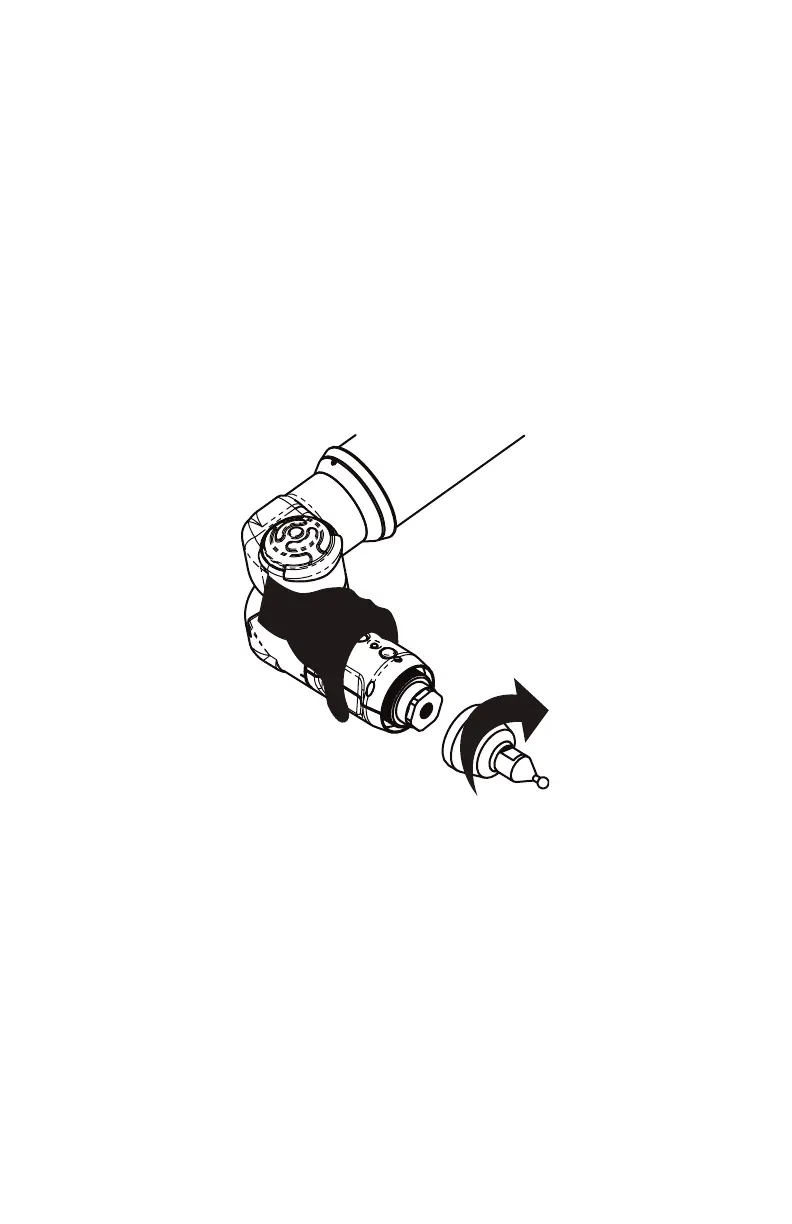
The probe attaches to the threaded handle at the end of the FaroArm.
Use the 12mm open-ended wrench, in the probe case, to install the
probe.
• Hold the button area near the end of the FaroArm with one
hand.
W
ARNING: Do not hold the FaroArm except in the button area
when installing a probe. Holding the FaroArm at the last joint may
bend the tube and damage the system.
• Rotate the probe clockwise and thread the probe into the
FaroArm.
• Use the 12mm wrench to hand-tighten the probe.
W
ARNING: Only hand-tighten the probe after you have installed it.
Do not over-tighten the probe.
Use your measuring software to setup and calibrate the probe. See
“Probes” on page 31.
Figure 1-10 Installing a Probe
08M46E00_FaroArmUSB.book Page 15 Monday, January 15, 2007 1:12 PM


 To Next Page