6. Commissioning
38 © Festo Didactic GmbH & Co. KG
6.9.3 Allen Bradley controller
Controller: Micrologix (ML) 1500
Programming software: RSLogix 500/RSLINXLite
1. Connect PC and PLC using the RS232 programming cable
2. Switch on power supply unit
3. Switch on the compressed air supply
4. Release the EMERGENCY-STOP pushbutton (if available)
Note
Condition for the following operating steps is to configurate the necessary online
parameter (nodes, devices) with RSLINXLite/RSLogix 500!
After using shutdown and exit RSLogix 500 and RSLINXLite to avoid conflicts with
the serial interface!
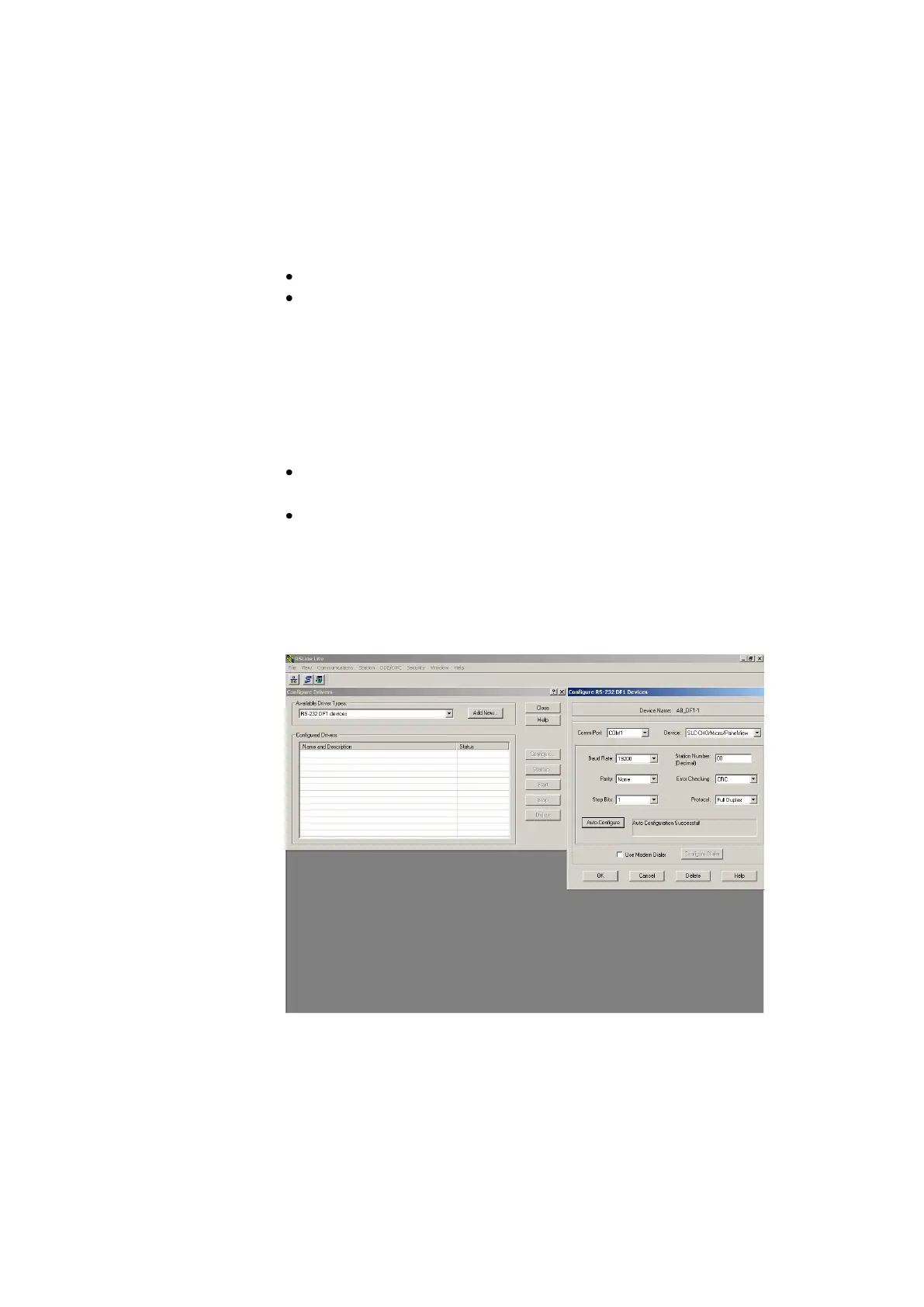
CPU ML 1500 Onlineparameter configuration
Wait until the PLC has carried out its test routines.
Start the RSLINXLite software.
Communications Configure Drivers… -
Add New… -1)
with OK Auto configure OK Close
Start the PLC programming software



 To Next Page