Emergency Command Center Manual — P/N LS10001-000FL-E:D 9/3/2014 27
Backbox Installation Installation
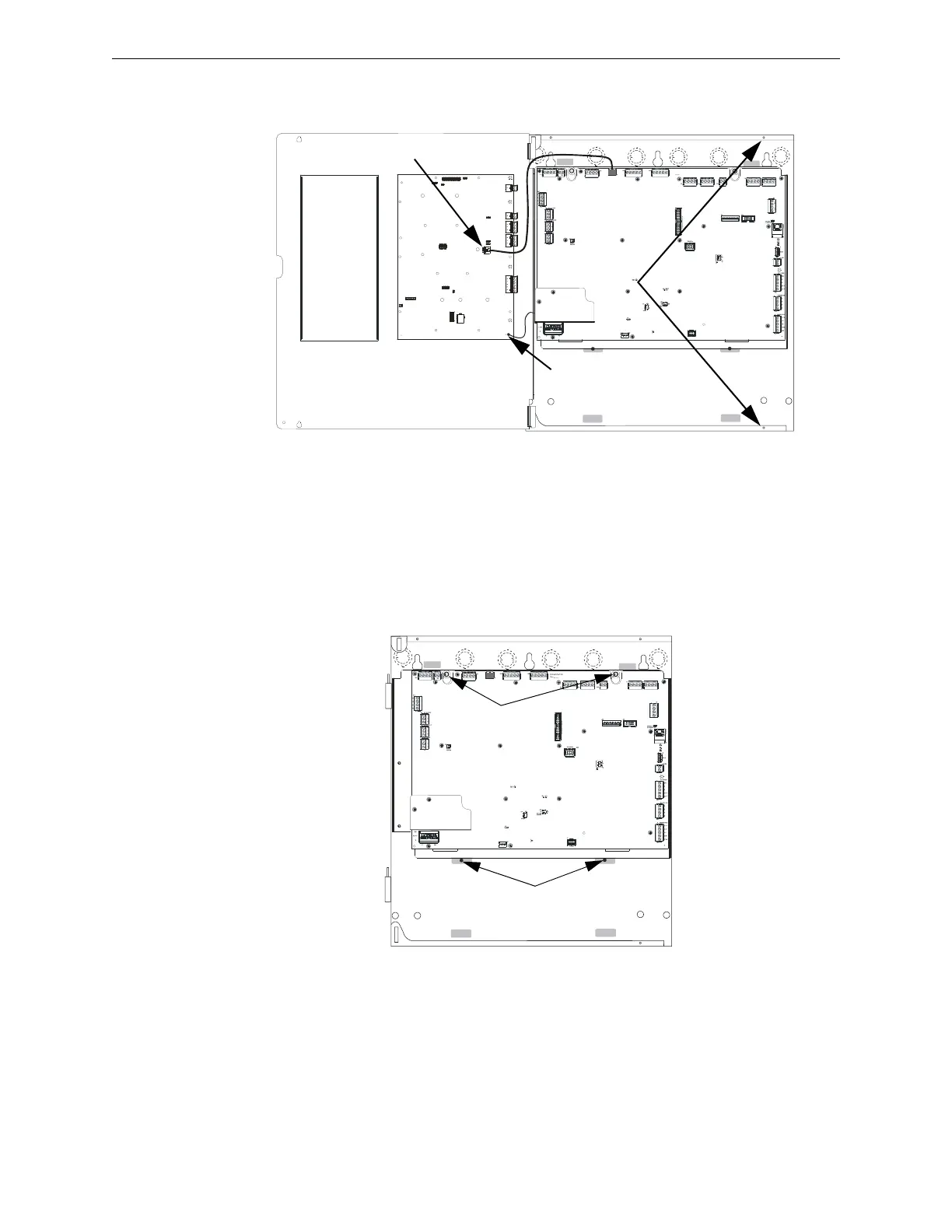
5. Lift the dress panel up and gently pull the lower hinge out of the backbox. Gently pull down to
remove the top hinge. Store the dress panel in a safe place.
Removing the Chassis Assembly
1. If present, remove the two (2) screws which fasten the lower chassis tabs to the backbox.
These are for shipping purposes only and do not need to be reinstalled.
2. Loosen the two nuts which secure the top of the chassis with an 11/32” socket.
3. Carefully lift up and remove the chassis assembly from the backbox and store in a safe, clean
place. Avoid static discharge which may damage static sensitive components on the board.
loosen screws
disconnect
earth ground
unplug cable
lift up dress panel,
pull out,
slide down to remove
Figure 2.1 Dress Panel Removal
ecc-dpopn.wmf
remove screws
loosen nuts
chassisinst.wmf
Figure 2.2 Chassis Removal


 To Next Page