60 Emergency Command Center Manual — P/N LS10001-000FL-E:D 9/3/2014
Programming Main Menu - User Programming
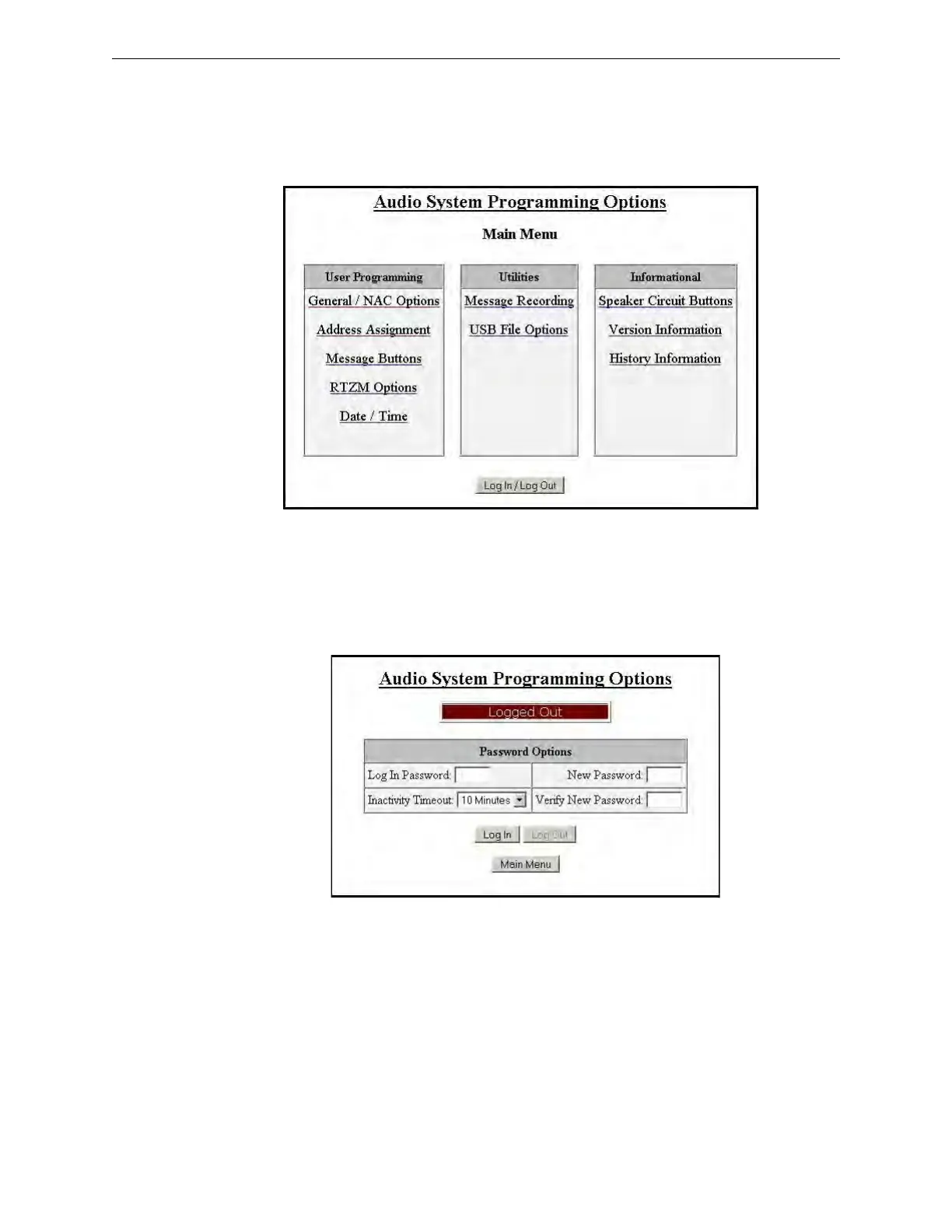
3.1 Main Menu - User Programming
This screen shows the main menu for the ECC user programming options. Changes to program-
ming require a valid password for system login. Note that a password is NOT required to change
the date/time, view the informational screens, or view the panel history.
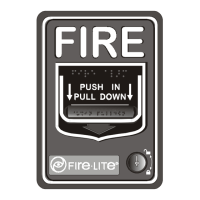
3.1.1 Password Options
Changes to ECC programming require a valid password login. Programming changes cannot be
made when there is an active event in the system.
Log In Password The default password for the ECC-50/100 is 0000.
New Password It is recommended that the password be changed to increase system security.
Valid passwords contain four digits from 0000-9999.
Verify New Password Re-enter the new password for confirmation.
Inactivity Timeout Select the amount of time, 5 minutes, 10 minutes, 20 minutes, 30 minutes, or
60 minutes, the system is allowed to remain idle before automatic user log out. The timeout feature
helps the system protect against unauthorized programming changes.
Figure 3.1 Main Menu
m
a
i
n
_
m
e
n
u
.
j
p
g
Figure 3.2 Password Options


 To Next Page