Emergency Command Center Manual — P/N LS10001-000FL-E:D 9/3/2014 79
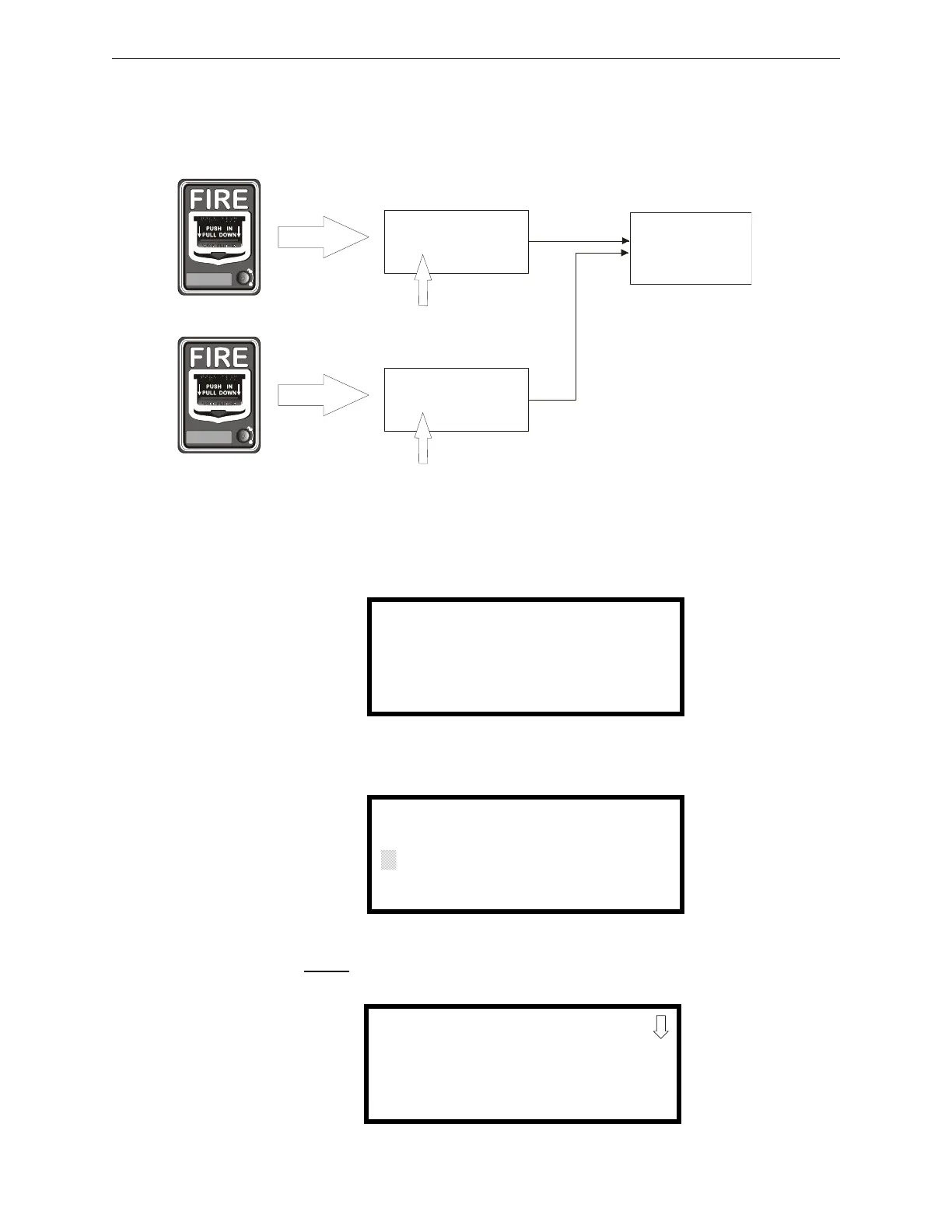
Programmed Activation by FACP Programming
cause Message 2 to be generated over speaker circuit 3. If the second addressable device (address
20 in the example below) is also activated, Message 1 will now be transmitted over speaker circuit
3 since Message 1 has a higher priority then Message 2.
FACP Programming Menus
To Program one of fourteen messages to a speaker zone, press the ENTER key at the FACP. The
following screen will be displayed:
Access Programming Mode by pressing the 2 key. The following screen will be displayed:
Entering the Master
level password (default 00000) will cause the following screen to appear:
Zone 5 and Zone 35
Zone 7 and Zone 35
Addressable Pull Station
(address 12)
Message 1
(highest priority of the three )
programmed to
activate
Speaker Circuit 3
Addressable Pull Station
(address 20)
programmed to
Message 2
(2nd highest priority of the three)
activate
e
c
c
e
x
3
.
w
m
f
1=READ STATUS MODE
2=PROGRAMMING MODE
3=MANUAL DIAL MODE
PROGRAMMING
ENTER PASSWORD
QQQQQ
PROGRAMMING
1=AUTOPROGRAM
2=POINT PROGRAM
3=ZONE SETUP


 To Next Page