62 Emergency Command Center Manual — P/N LS10001-000FL-E:D 9/3/2014
Programming Main Menu - User Programming
AC Loss Delay The reporting of a loss of AC power using the AC Loss relay output can be
delayed by programming the length of the desired delay. The factory default setting is 2 hours.
Options are 0, 2, 6, 12, or 23 hours.
Secondary Amplifier if an ECC-50W-25/70V is installed, select whether it will be used as a
backup amplifier or for secondary speaker circuits. If an ECC-50W-25/70V is not installed, select
none.
Primary Amp 70 VAC This field has no effect on programming and is used for informational
purposes only. The system can be converted from 25V to 70V by installing the ECC-XRM-70V. If
this transformer has been installed, be sure that SW5 on the main control board has been set to
“70V” operation. Use this field to record the amplifier’s settings.
Secondary Amp 70 VAC This field has no effect on programming and is used for informational
purposes only. When the ECC-XRM-70V has been installed and a secondary amplified is required,
model number ECC-50W-70V must be used. Use this field to record which model has been
installed in the system.
External Audio Input If there is a permanent connection to TB5 on the display board, select
whether the external audio input will function as Background Music or External Paging - Night
Ring. See Section 4.4.15 for more information.
IP Address The default IP address of 169.254.3.3 can be changed to another address with num-
bers from 0-255. Changing the IP address is suggested for a higher level of security on the sys-
tem’s programming. This number should be written down and stored in a safe location.
Identification Enter a label for this ECC system. Up to 80 character may be entered.
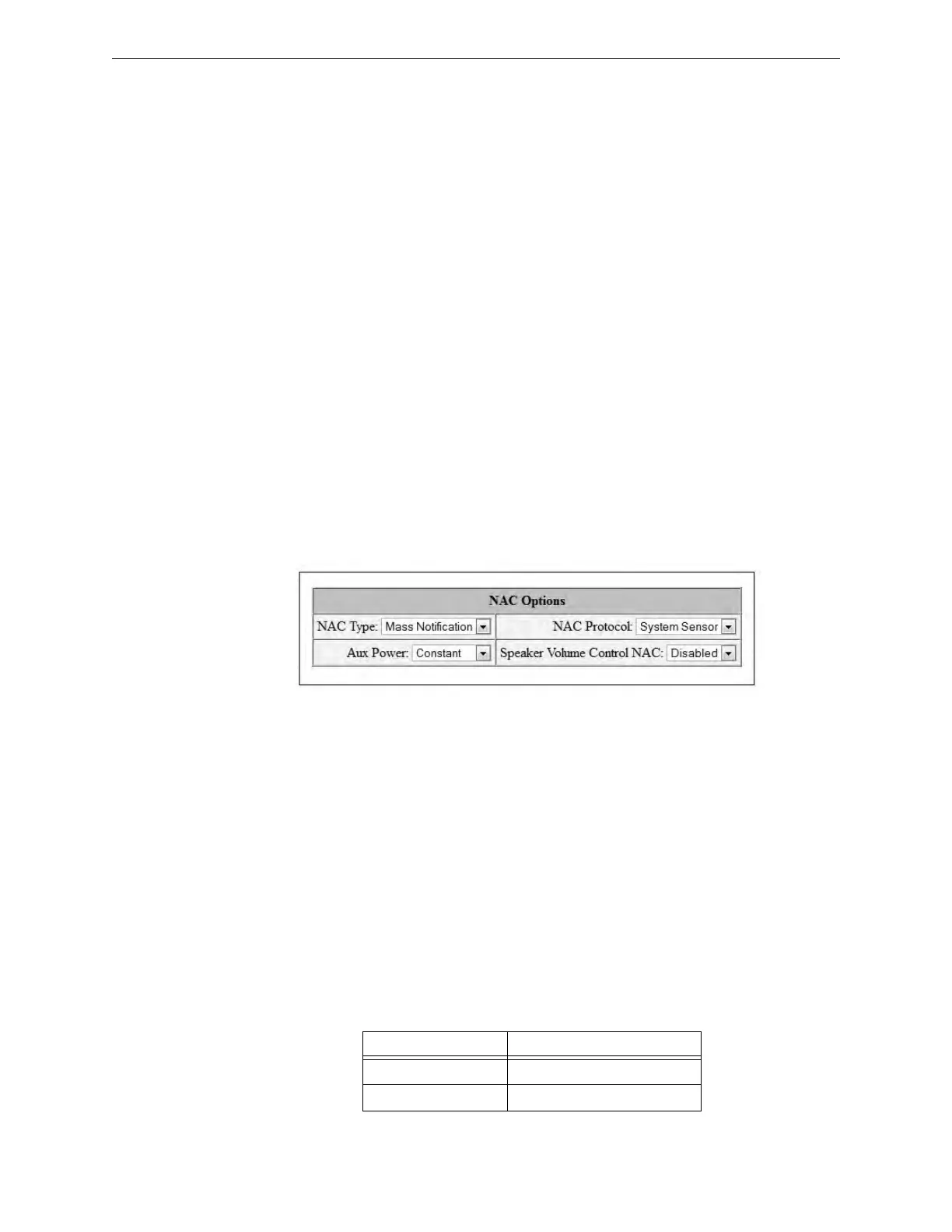
NAC Options
NAC Type The NAC circuit can be programmed to activate for specific applications. Select
Mass Notification to turn on the NAC circuit only for a mass notification event, Fire Evacuation to
turn on the NAC circuit only for a fire evacuation event, Both to turn on the NAC circuit for both
mass notification and fire evacuation events, or Follow Input to have the NAC follow the input
from an external source (connections to TB18). To use Both, the Unit Operation must be set to
Combination. Refer to “Unit Operation” on page 61.
NAC Protocol The programmer can select the notification appliance coding or strobe synchroni-
zation by selecting the corresponding drop-down box. Select System Sensor for System Sensor
synchronization, Wheelock, for Wheelock synchronization, Gentex for Gentex synchronization, or
Steady, for a continuous output with no coding.
To ensure proper strobe and circuit operation, there is also a limit to the number of strobes that can
be attached to each circuit. Following is a list of the strobes that have been tested with the ECC and
the maximum number that can be connected to each NAC. Make sure that the NAC maximum cur-
rent is not exceeded.
Strobe Manufacturer Maximum Number of Strobes
System Sensor 31
Wheelock 34
Table 3.1 Maximum Number of Strobes by Manufacturer
Figure 3.4 NAC Options
n
a
c
o
p
t
i
o
n
s
2
.
j
p
g


 To Next Page