Multi-DENCO Operation
FläktGroup DC-2013-0101-GB • Subject to modifications • R5-08/2020 115
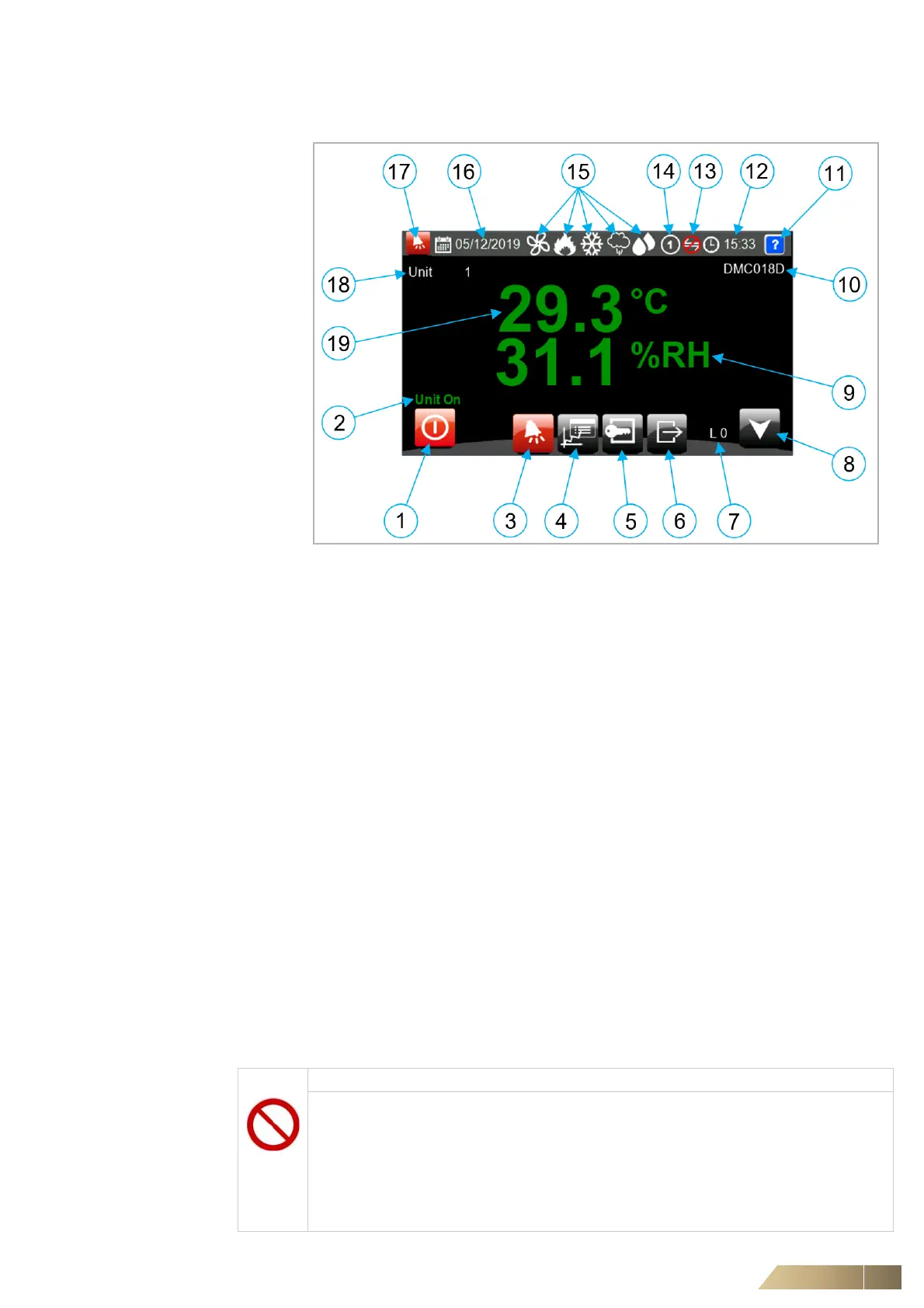
9.2.2 The home screen (C5-12)
9.2.3 Screen saver
If you do not use the touch screen for 15 minutes, a screen saver is displayed. To turn
off the screen saver simply touch the display. The screen will show a bright red alarm
symbol, if the unit has an active alarm during screen saver mode.
9.2.4 Physical operation and access
1: Unit ON/OFF (by keyboard) 11: Help/additional information
2: Unit Status 12: Date
3: Alarms Page 13: Network Status
4: Unit Graphs 14: Unit Number (for networking)
5: Login 15: Unit function Icons
6: Logout 16: Time
7: Logged to Level 17: Icon if any alarms are active
8: Status Information 18: Unit Number (for networking)
9: Current Humidity (depending on
control sensor)
19: Current Temperature (depending on
control sensor)
10:Model Reference
NOTICE
During operation:
• Do not open any doors.
• Do not remove any panels of an operating unit.
• Do not remove any floor tiles near to the unit.
• Do not conduct any work above or below the unit.
• Do not insert any tools through any of the grilles of the unit.


 To Next Page