10.4.8 File
10567703;a2
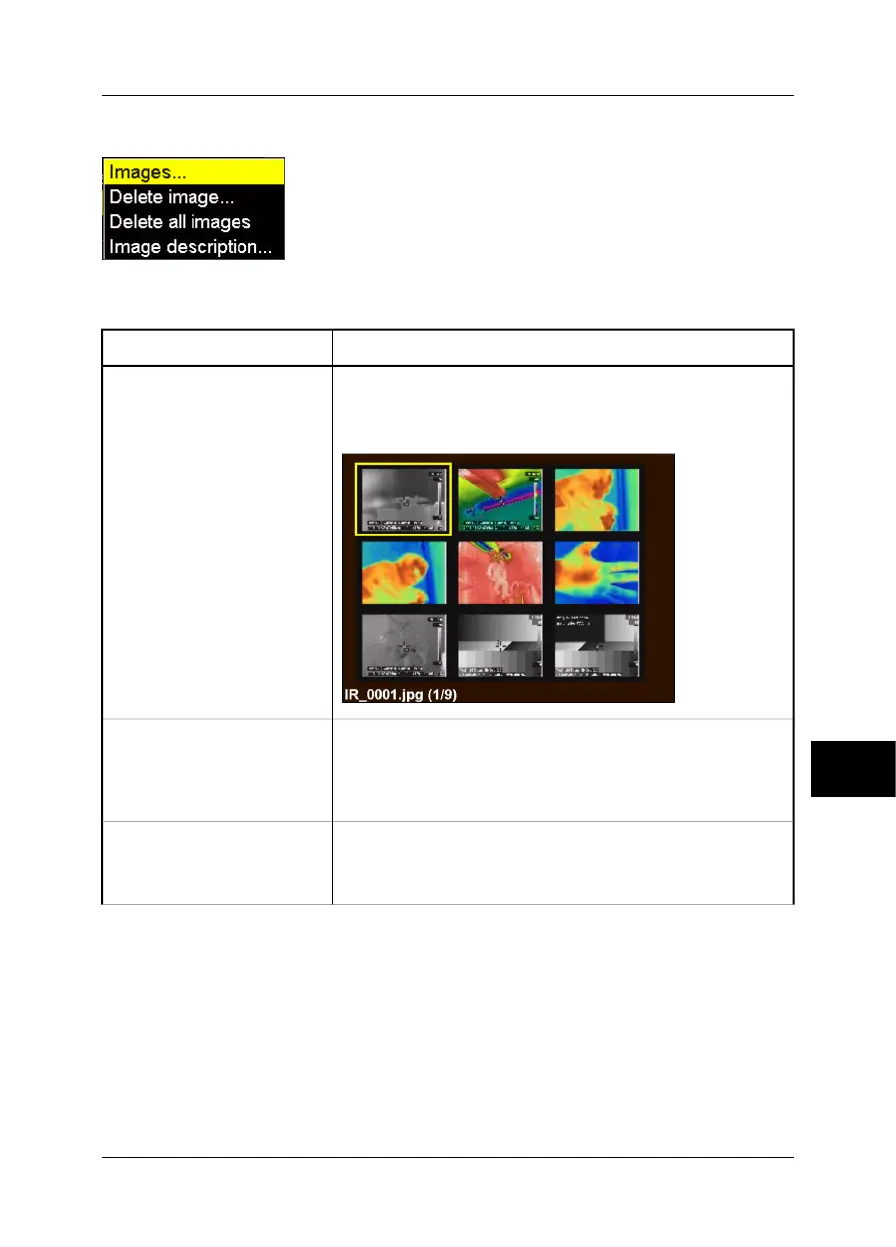
Figure 10.13 File menu
Figure 10.14 Explanations of the File menu
ExplanationCommand
Point to Images and press the joystick to display a thumbnail view
of the images in the internal camera memory. Open an image by
selecting the image using the joystick, then pressing MENU/YES.
10568903;a1
Images
Point to Delete image and press MENU/YES to delete a recalled
image.
This choice will display a confirmation box where you can either
confirm or cancel the deletion.
Delete image
Point to Delete all images and press MENU/YES to delete all images.
This choice will display a confirmation box where you can either
confirm or cancel the deletion.
Delete all images
10
Publ. No. 1558407 Rev. a155 – ENGLISH (EN) – February 6, 2006 73
10 – Camera program



 To Next Page