Cardiac Functions
Fetal / Maternal ECG (Option) 2
2-39
Table 2-31. Numeric Code for Calibration Setting
Calibration Setting Numeric Code
CAL PULSE 0 DEG 101
CAL PULSE 24 DEG 102
Fetal / Maternal ECG (Option)
The MPS450 simulates a combined fetal and maternal electrocardiogram (ECG)
occurring during labor, as well as a selection of pressure waveforms produced by uterine
contractions. The contraction period is adjustable and includes a manually generated
waveform.
The maternal ECG is always a normal sinus rhythm with a heart rate of 80 BPM; the fetal
heart rate is either fixed (to a selection from seven settings), or periodic, which is
interactive with uterine contractions. The simulated fetal heart rate represents a
measurement from a fetal scalp electrode, while the simulated maternal heart rate
represents a measurement from an electrode on the mother’s thigh.
The MPS450 simulates the fetal / maternal ECG on its regular ECG leads. The maternal
signal is a P-QRS-T wave fixed at 80 BPM, at half the selected ECG amplitude; the fetal
signal is a narrow R wave at full amplitude. Fetal and maternal signals are summed to
make a composite signal.
The simulated intrauterine-pressure (IUP) waveform represents a measurement taken by
an intra-amniotic catheter connected to a pressure transducer. The MPS450 simulates the
IUP on its BP4 blood-pressure channel, the same as if it were a blood-pressure
transducer, either at 5 or 40 uV/V/mmHg sensitivity (as has been set up for blood
pressure).
Simulating a Fixed Fetal Heart Rate (Fhr)
The MPS450 simulates seven preconfigured settings (BPM) for a fetal heart rate that is
fixed: 60, 90, 120, 140, 150, 210, or 240.
Action in the Menu-Control Mode
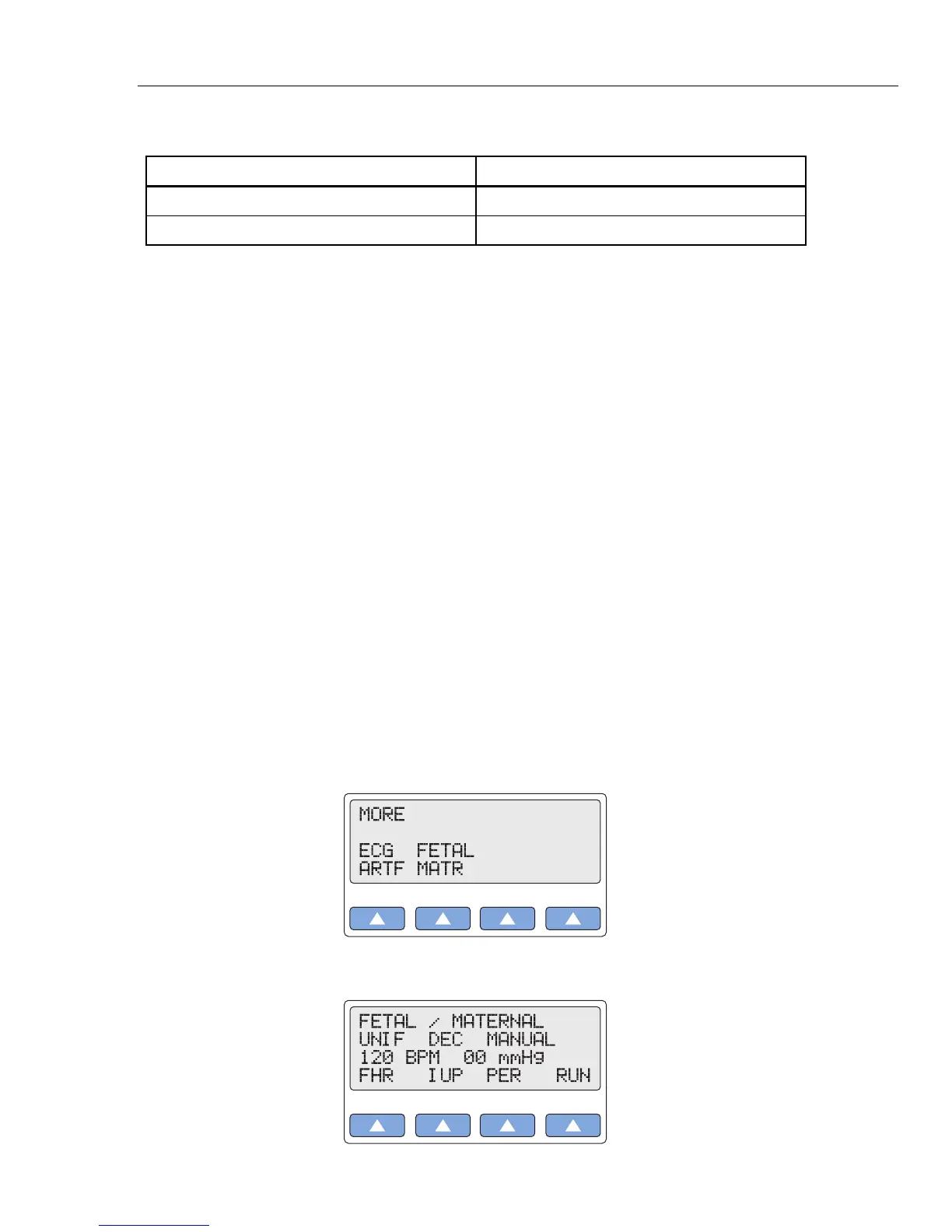
1. Press the top-menu key labeled MORE to display the following LCD screen:
gje039.eps
2. Select FETAL MATR to display the following LCD screen:
gje040.eps



 To Next Page