MX-4 USER GUIDE CHAPTER 13
126
To set up your Macintosh computer to communicate with the MX-4 (Static IP address):
Macintosh OS 10.2.8/OS 10.3.6
1 Plug in the straight cable (R5) to the MX-4 Ethernet port and your computer’s Ethernet port.
NOTE
A straight cable has the same wire configuration colors on each end.
A crossover cable has two different wire configuration colors on each end.
Make sure to use a crossover cable if you are working with a Macintosh computer.
2 Access System Preferences on the desktop using the Apple Logo in the right-hand corner of
the screen.
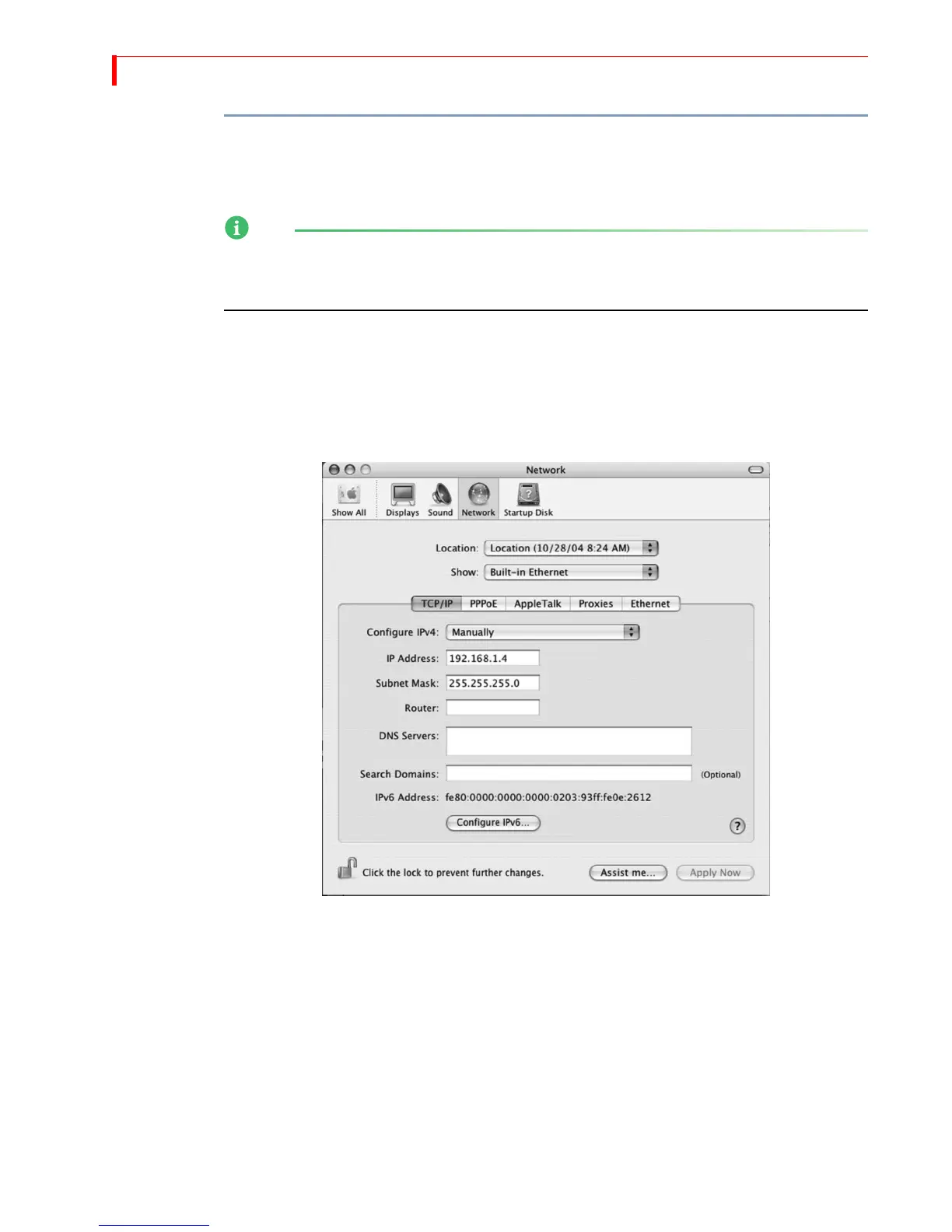
3 Click the Network icon in System Preferences to access the Network page.
4 In the Network page, change the Configure IPv4 field to Manually.
The network page should show an IP address of 0.0.0.0.
5 Apply a universal static IP address (192.168.1.4) to allow communication with the mixer
(192.168.1.3).
For example, if the mixer displays 192.168.1.3, the IP address entered on the Macintosh
should be 192.168.1.4.
6 Access your Internet browser. It should display the following:



 To Next Page