Monitoring Signals
106
VM200 User’s Guide
LED Display Meter (L/R or ST BUSS/SOLO)
The VM200 features two LED meters to the right of the LCD Display
that enable you to view stereo output levels. These nine-segment
LED meters display levels for the left and right channels (L/R) or the
Stereo Buss and soloing channels (St Buss/Solo).
The meters range from –48 dB to OL (overload). The overload indica-
tor lights when the signal clips. If an OL LED lights up while you are
metering levels, reduce the stereo output level to prevent signal dis-
tortion.
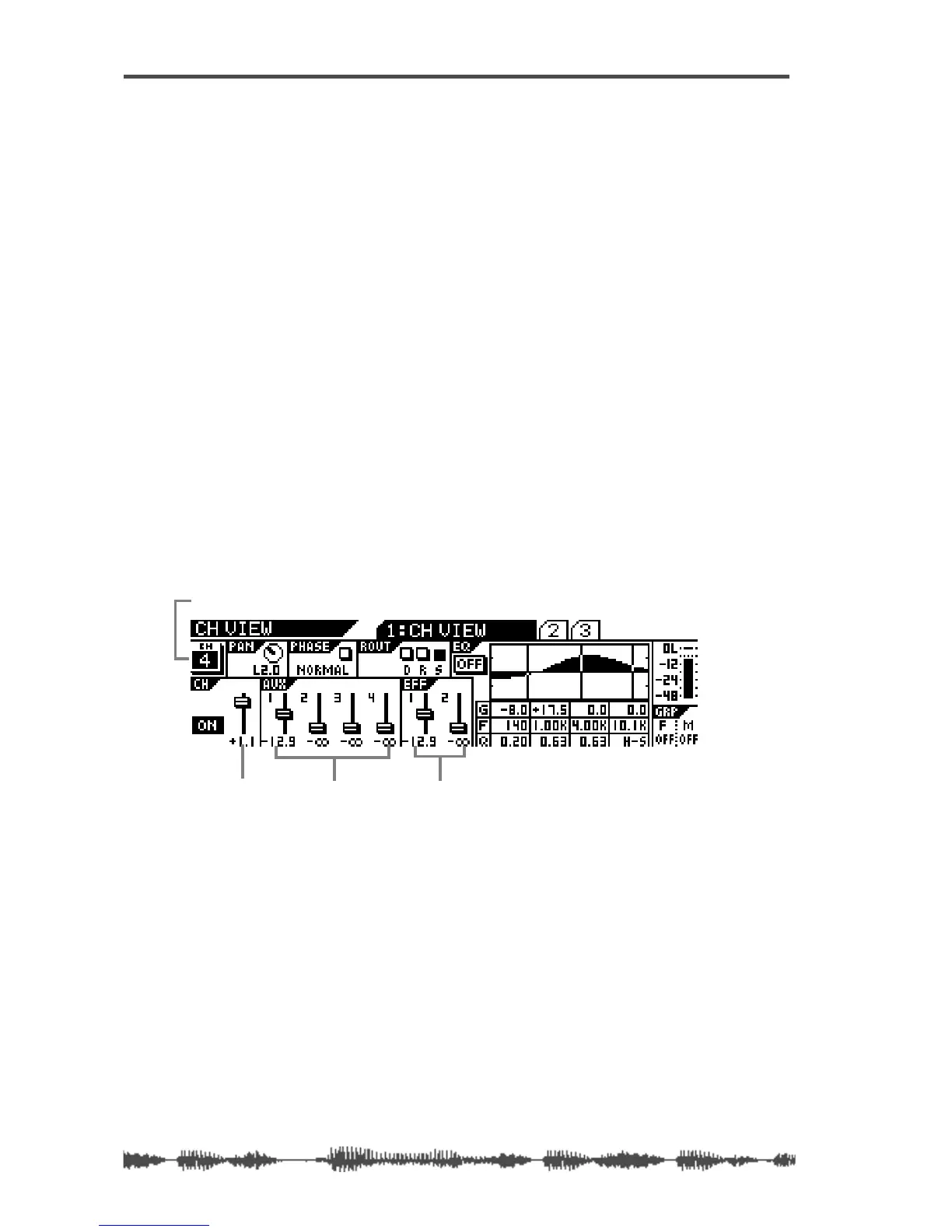
Viewing Individual Channel, Aux Send, and Effect Send Meters
1.
Press the [CH VIEW] key.
The VM200 displays the CH VIEW function page.
[CH VIEW] key and
all
[EQ EDIT] keys flash.
2.
Select a target channel layer by using a Page Select key.
3.
Press the target channel’s [EQ EDIT] key.
The VM200 displays the CH VIEW function page for the corre-
sponding channel.
As you move the faders, notice how the fader icons move to indi-
cate the fader positions.
channel fader level Aux Send level EFF Send level
CH VIEW function page for Channel 4



 To Next Page