Adjusting the EQ
VM200 User’s Guide
77
16 appear on the
EQ EDIT
function page, as shown below:
Adjusting the EQ
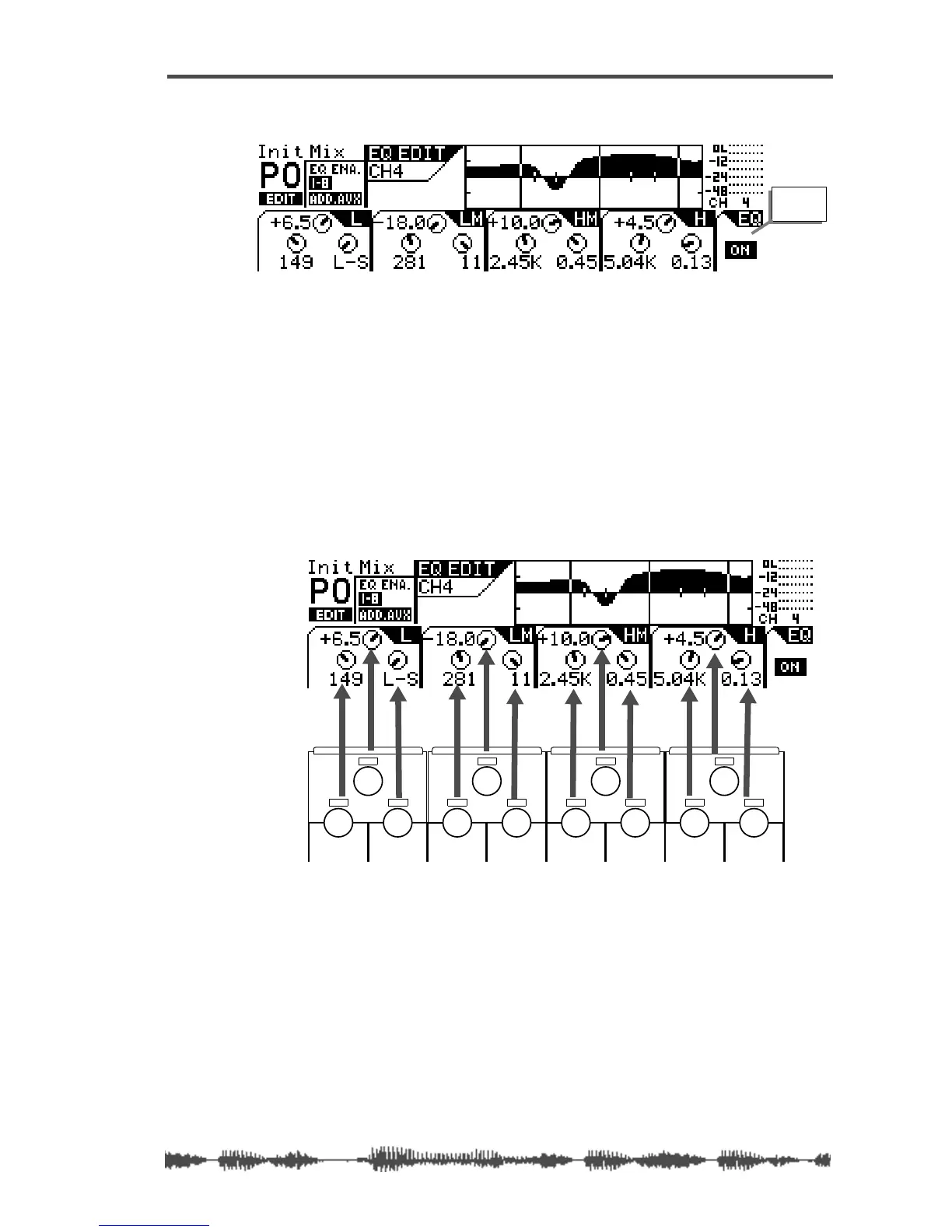
You can adjust the EQ for each of the four bands using three rotary
controls: Gain, Freq, and Q. These three EQ controls form a triangu-
lar shape on the top panel of the VM200.
The LCD display also features four sets of three circular knob icons.
Each set of three is arranged in a triangle that corresponds to the
hardware EQ rotary controls. (That is, Gain is on top, Freq is on the
lower-left, and Q is on the lower-right.)
Note that in EQ Edit mode, the Pan rotary controls adjust Freq and Q.
1.
Make sure that the
[CHANNEL/METER]
key is lit. Otherwise,
press it to turn it on.
2.
Press a Page Select key to specify a channel layer, such as
[1-8
ANALOG IN]
key.
The selected Page Select key lights up red.
3.
Press the
[EQ EDIT]
key for the channel whose EQ you wish to
edit.
EQ On
indicator
EQ/HI
EQ/HI-MIDEQ/LO-MIDEQ/LO
GAIN
FREQ
PAN
Q
PAN
FREQ
QFREQ
Q
FREQ Q
GAINGAINGAIN
PANPANPANPANPANPAN



 To Next Page