PRO PAK’R User Manual Version 1.0 Page -16-
FP International
3 operAting instructions
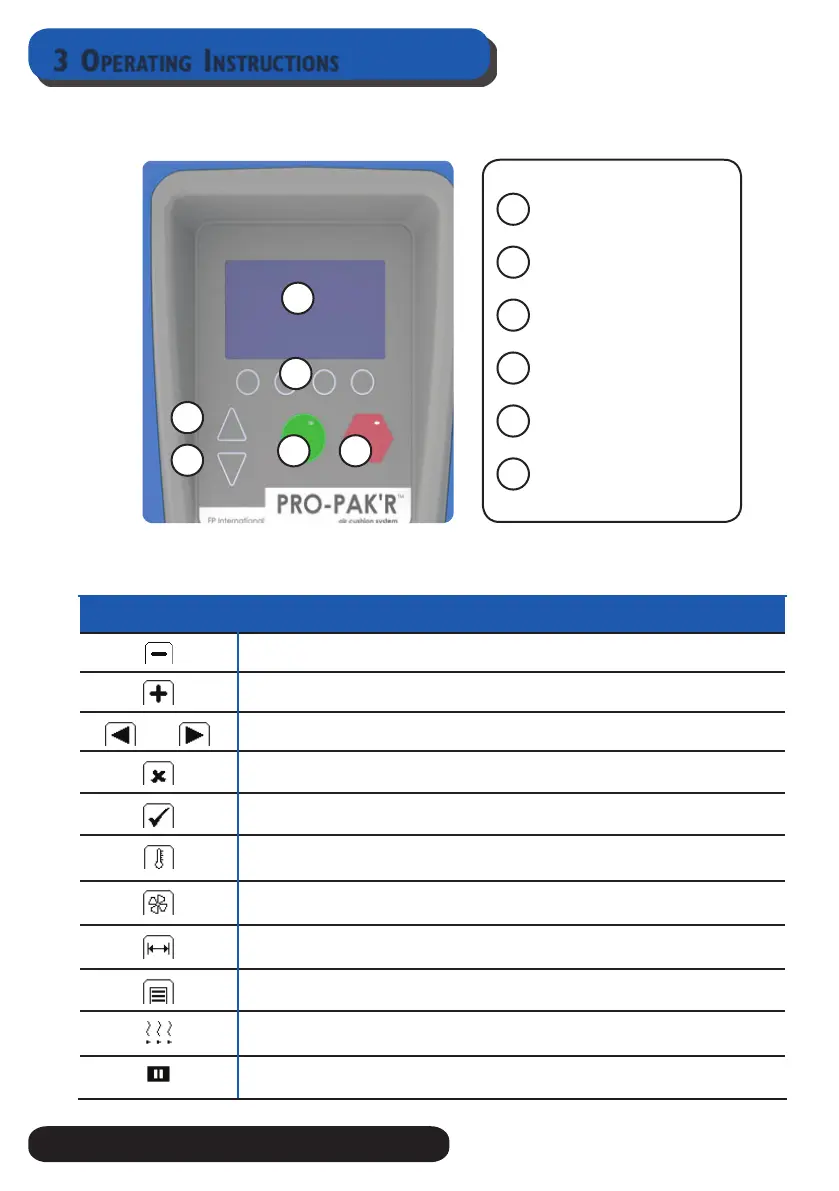
3.1.2 control pAnel keypAd instructions
3.1.3 control pAnel displAy symbols
stAtus icon whAt it meAns
Shows the icon for decrease
Shows the icon for increase
Shows the way of sliding true the menu
Shows the cancel icon
Shows the conrm icon
Shows the temperature control of the seal wheel that fuses the front and back lm sheets
together. Press the menu button below the icon to access seal temperature.
Shows the ll level rate of the cushions. Press the menu button below the icon to access
ll level.
Shows the length of strings of the air cushions. Press the menu button below the icon to
adjust the cushion length
Shows the menu. Press the menu button below the icon to access the menu.
Shows the machine is heating up or cooling down.
Shows the machine is in standby mode. If the PRO PAK’R is not used by “..” time it will go
in a “Standby” mode. To resume press “any” key.
3
4
1
2
5 6
Display Screen
4 Menu buttons
Forward feed button
Backward feed button
Start Button
Stop Button
1
5
4
3
2
6


 To Next Page